Service Titan
Magento–Acumatica Connector is a native extension that connects Magento stores to Acumatica through a governed store configuration. It validates API connectivity, imports Magento orders into Acumatica, drives fulfillment back to Magento on shipment and invoice release, brings refunded orders into the correct AR and SO flows, and synchronizes customers, items, prices, images, categories, and inventory quantities. Defaults, cross-references, and date windows are centralized so data posts cleanly and operations remain auditable across channels.
Service Titan
ServiceTitan–Acumatica Integration is a governed connector that brings ServiceTitan invoices, payments, inventory movements, vendors, pricebook items, and journal entries into Acumatica with centralized setup, credential testing, and policy-driven import options.
It supports controlled creation or mapping of customers, items, warehouses, and business units; aligns documents to Acumatica types with release options; and provides inquiry pages for end-to-end traceability across AR, inventory, and GL.
1
Centralized store setup and secure connectivity
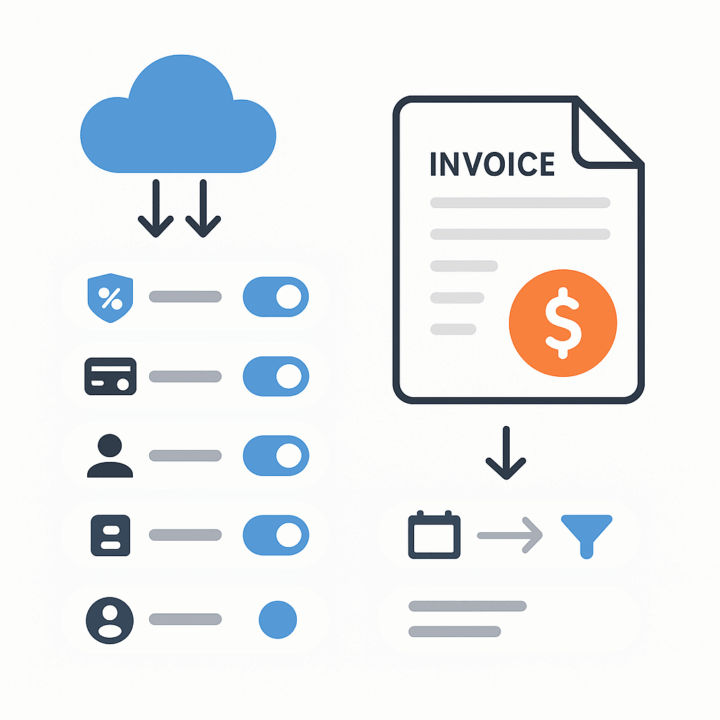
A dedicated store configuration concentrates all connection and behavior settings in one place. You define the store code and description, set a default store for processing screens, and verify the API using Test Credentials before operators run any import. General Settings guides the creation and entry of credentials generated in ServiceTitan, reducing mid-flow failures and establishing a clear governance surface for administrators.
Date windows and status filters govern what comes in (for example, Begin and Last dates for invoices or journal entries), so the connector ingests only intended records, supports incremental runs, and preserves a verifiable audit trail.

2
Policy-driven invoice import with payment, tax, terms, and customer controls
Invoice Import Options let you activate invoice handling and decide exactly which components to include: taxes, payments, customer data, and GL accounts. You can restrict imports by invoice status, choose the Acumatica invoice type, and control date filters.
Payment behavior is configurable: import as Payment or Prepayment, optionally release payments after import, or skip payment import entirely. Customer handling is flexible—either import and create customers with a default class or use a default customer. Bill-to and ship-to can be overridden directly from the ServiceTitan invoice. Term Options and Account Options map ServiceTitan values to Acumatica terms and GL accounts, keeping postings consistent and compliant.
3
Item and pricebook governance with controlled creation
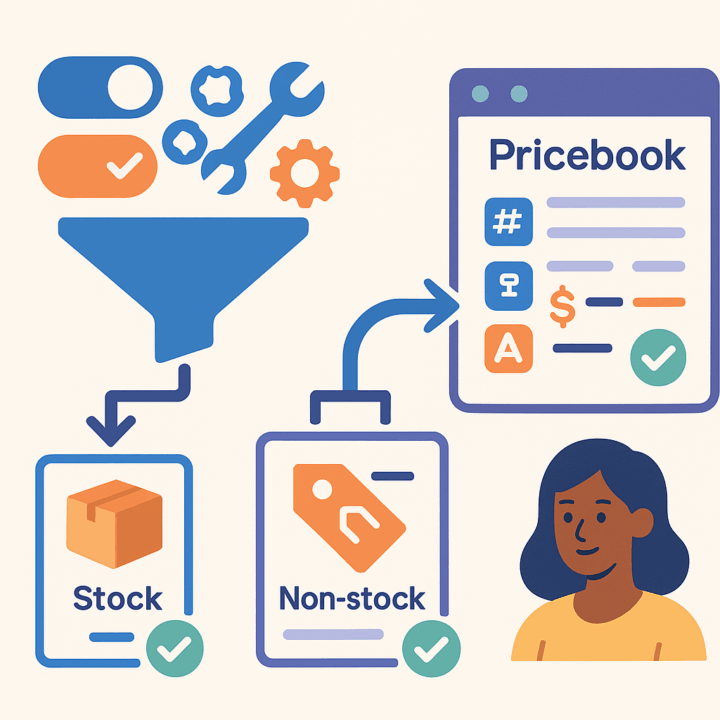
Inventory settings allow you to import items from ServiceTitan or map them manually. When enabled, the connector can generate stock items from Materials and Equipment and non-stock items from Service lines, using specified stock/non-stock item classes and a selected UOM. Operators can load Materials, Equipment, and Services from ServiceTitan for review before commit.
A dedicated Pricebook view brings ServiceTitan item code, name, UOM, price, and item type into an Acumatica workspace, aligning catalog data while preserving cross-system identifiers. This approach standardizes how SKUs enter Acumatica and prevents ad-hoc item creation that leads to downstream mismatches.
4
End-to-end inventory transactions with controlled releases
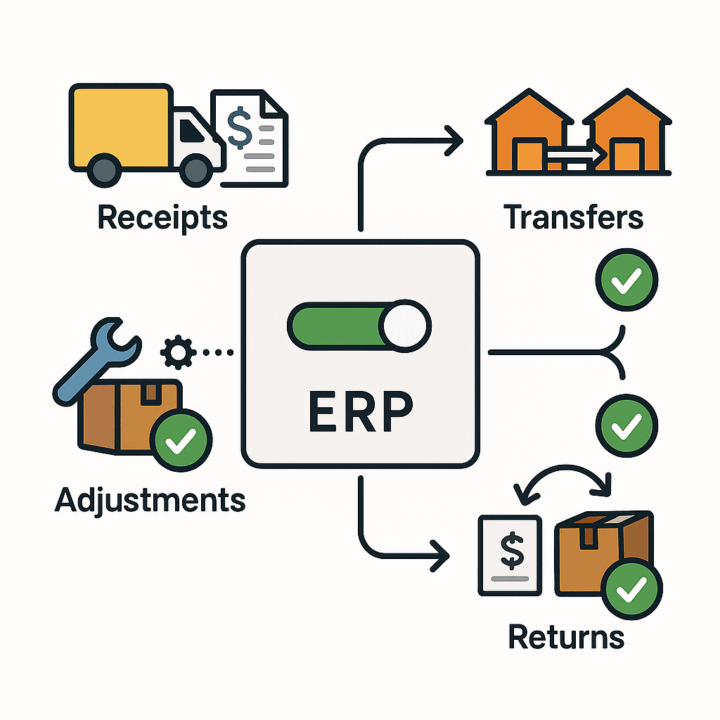
Inventory Transactions settings cover receipts, transfers, adjustments, and returns. For each document type you can enable import and choose to release automatically after import, minimizing manual touch while keeping ERP status authoritative. When the “Activate Bill” option is selected, bills can accompany receipts so AP documents are created alongside inventory receipts for accurate accruals.
Returns and receipts include vendor and PO references where applicable, while transfer imports standardize as one-step transfers in Acumatica. Field-by-field mappings ensure warehouse, location, quantities, and costs land correctly on each line.
5
Organizational alignment: branches, warehouses, trucks, PO/return types, and vendors
Business Units in ServiceTitan can be loaded and mapped to Acumatica branches, ensuring financial segmentation aligns with operational structures. Warehouse governance maps ServiceTitan Warehouses and Truck IDs to Acumatica warehouses, so stock movements and allocations route to valid sites.
You can load and map ServiceTitan PO types and return types to Acumatica purchasing types, as well as import and map vendors. These controls remove ambiguity at import time, reduce operator corrections, and keep reporting dimensions consistent across systems.


6
Accounting integration and operational traceability
When invoice import is not used, you can enable Journal Entry import with its own statuses and date windows. Journal entries carry ServiceTitan identifiers and land on Acumatica GL with mapped accounts, debits, credits, and branch (from store setup), providing a clean audit trail for non-AR financial activity.
For AR and inventory flows, the connector includes inquiry pages for invoices, payments, transfers, adjustments, returns, and receipts. Each inquiry preserves ServiceTitan IDs and the store code alongside Acumatica document numbers, so users can drill from a business event to the exact released documents without reconstructing history from external sources.
Tagline
SCHEDULE A DEMO
«Consider this ServiceTitan-Acumatica integration as the digital nervous system for your business. Just as a nervous system connects your brain (Acumatica, handling complex financial and inventory logic) to your sensory organs and limbs (ServiceTitan, managing field operations and customer interactions), this integration ensures that every customer touchpoint, every service performed, and every financial transaction is instantly communicated and processed across your entire organization. This seamless flow of information allows for rapid response, coordinated action, and holistic understanding of your business’s health and performance.»
Tagline
SCHEDULE A DEMO
«Consider this ServiceTitan-Acumatica integration as the digital nervous system for your business. Just as a nervous system connects your brain (Acumatica, handling complex financial and inventory logic) to your sensory organs and limbs (ServiceTitan, managing field operations and customer interactions), this integration ensures that every customer touchpoint, every service performed, and every financial transaction is instantly communicated and processed across your entire organization. This seamless flow of information allows for rapid response, coordinated action, and holistic understanding of your business’s health and performance.»
Gift Card Processing is a native extension for Acumatica that manages the full gift card lifecycle—from issuance and sale through redemption, balance tracking, history, and returns—directly within Sales Orders, Invoices, and AR payments. It supports both non-stock (code-based) and serialized stock cards, optional expiration control, and centralized setup and governance. The result is consistent processing, accurate balances, and an auditable record of every transaction without side spreadsheets or ad-hoc tools.
Consignment Processing in Acumatica provides companies with advanced tools to manage the location and sales of inventory at customer sites. The solution enables control of both quantities and valuation of inventory across multiple consignee locations. It simplifies the order process for consignment items, improves visibility by showing quantities of sold and unsold items, and automates key processes from shipping to invoicing and returns.By offering a dedicated system for consignment operations, businesses can increase operational efficiency and maintain accurate control of their consignment inventory. The functionality can be deployed by creating a new customization project, which can then be published for multiple tenants.

Salesforce–Acumatica Integration provides a governed store configuration that connects Salesforce and Acumatica with credential validation, cross-reference mapping, and policy-driven import and export flows. Orders are imported from Salesforce into Acumatica with configurable defaults; customers, items, price books, and discounts can be synchronized; and approved changes in Acumatica can be pushed back to Salesforce. Options for taxes, payments, and address overrides keep postings compliant, while inquiry and history pages give operators traceability from initial import through updates and releases.
WHAT OUR CLIENTS SAY
“Exceptional experience from start to finish — their professionalism truly stands out.”
Laura Bennett
Marketing Director
“Fast, reliable, and always one step ahead. Couldn’t ask for better support.”
David Romero
Head of Operations
“They deliver quality every single time. A trusted partner for our business growth.”
Sophie Klein
Managing Partner