10 Common ERP Implementation Mistakes And How To Avoid Them
In our last post we discussed ERP implementation and briefly went over some common mistakes people make before, during and after the implementation of an ERP system. This post is going to cover those implementation mistakes in more detail.
Implementing an ERP system is a major undertaking. It's expensive, time-consuming and complicated for an IT department to take on. Unfortunately, potential delays and expenses are all too common. One of the most common questions we hear from organizations considering implementing an ERP for the first time is "how much is this going to hurt?" The simple answer is: It'll hurt. However, the more you and your organization prepare for it, the less of a burden it'll be.
The implementation of ERP is disruptive — rightfully so. Considering ERP solutions are capable of improving nearly every aspect of your business, impacting every single one of your departments and helping your business be more profitable. Good things don't come easy, and if they did, they wouldn't be very effective. It's essential that businesses are honest with themselves and accept the fact that it'll be a challenge. Prepare yourself for disruption and understand if that's something you're willing to accept.
That being said, here are the top 10 most common ERP implementation mistakes organizations make before, during and after implementation, and how to avoid them, in no specific order.
ERP System Mistakes: The List
Mistake #1: Improper Planning
Planning is arguably the most important part of a successful ERP implementation. Deploying an ERP system is going to affect every department in your organization, so you'll need a solid plan to tackle an ERP project. Most organizations don't do enough up-front planning, and this typically leads to confusion down the line which can delay and derail the ERP project all together. There's a simple solution to this: plan, plan again, then after you're done planning, plan again.
It's vital to think through the implementation of the new ERP system and establish your priorities. Having a plan in place will give you a good roadmap to follow, and will help you get back on track when you hit bumps along the way. In addition, businesses should assemble an ERP implementation team from departments across the company. Not only will this help the implementation of the ERP project move smoothly, but you'll have someone to turn to in each department to help put the new system into place.
It's also suggested that an internal audit is conducted of all current processes before selecting the ERP system to know where you stand.
Mistake #2: Not Weighing The Pros & Cons of On-Premise vs. Cloud-Based ERP
Before deciding between an on-premise and a cloud-based ERP solution, businesses should evaluate several factors. For example, a cloud-based deployment requires proper internet connectivity, subscription-type payments and comes with numerous benefits such as catering to remote employees. On the other hand, on-premise ERP systems require a dedicated IT staff, up-to-date servers and in-house hardware with large up-front fees, which is suitable for those who want to host the software on their own servers.
Software-as-a-service is quickly becoming the most predominate platform for new ERP implementations. SaaS may seem like the perfect solution for organizations who've experienced difficult implementations or have struggled to support their earlier ERP investments. While SaaS does offer solid benefits, clients need to understand that there's potential for new organizational challenges.
For example, SaaS cannot be customized to suit your business needs and users are forced to adapt existing business processes to the software. These process discrepancies can often impact integration with legacy systems, which can expand organizational change management concerns. Additionally, organizations with unique functional or industry-specific requirements will need a structure and approach to address necessary functionality which isn't provided by the new ERP system. This usually means you'll need to find work-arounds, third-party software or alternative means.
Mistake #3: Trying To Implement All In One Go
When implementing an ERP system, the single most important thing an organization can do to reduce delays is to focus on one task at a time. We know it may seem counter-intuitive, but you'll go a lot slower if you don't have priorities set, and are trying to do everything all in one go. We suggest starting with the features and departments that are most important to your business. Echoing above, planning ahead of time helps you identify which features are the most valuable for your business, and helps you understand that certain functionalities are dependent on others already being in place.
Mistake #4: Not Having An Active Load Testing Environment
The best way to see if your system is up to speed, and performing how you'd expect it to, is to run testing. Unfortunately, you won't be able to see accurate results based on a few test users. To really see if your ERP system is working as effectively as it should, you need to simulate your entire user load in order to see real-world effects of changes. Taking time to do proper load testing will not only speed up the implementation, but it will also better set your business up for success.
Kevin Herrig, president and CEO of GSI, an ERP software specialist with a primary focus on Oracle's JD Edwards products: "You won't be able to see the true results of your changes based on a couple of test users," points out Herrig. "You must be able to simulate your user load in order to see the real-world effects of changes and avoid costly unplanned downtime."
Mistake #5: Not Evaluating Your Needs
As obvious as it may sound, choosing the correct ERP solution from the start is very important. Sit down with the implementation team and evaluate what your business is doing well and what areas it needs improvement in. Think about where your business runs into issues: maybe it's inventory management, or maybe it's CRM (Customer Relationship Management). Whatever the answer to that question is, finding an ERP solution with features that suits your businesses needs will address these shortcomings. Additionally, keep your industry in mind when evaluating ERP solution vendors as there's tons of good small software companies that support industry-specific needs.
Mistake #6: Not Taking Time And Resources Into Account
Organizations grossly underestimate the time and resources required to implement a new ERP system. You're probably asking yourself how you can calculate implementation time. A rough estimate to answer that question would be to divide the cost of the ERP software by 100. For example, if the ERP software costs $50,000, then that would equal to approximately 500 man-hours, or roughly three months to implement the ERP solution using a certified consultant. Additionally, you may need to double those figures if you plan on implementing the new ERP system yourself with minimal professional assistance.
Mistake #7: Not Retiring Legacy Systems
The new ERP system that you implemented is more than likely a replacement, even upgrade, from your legacy system. It's important to make sure staff stops using legacy systems to utilize the ERP to its fullest capacity. Keeping legacy systems intact will not only cost you money, as you'll continue to pay for licensing, maintenance, and upgrades, but it will also undermine the effectiveness of the newly implemented ERP system.
"If organizations do not actively work to decommission applications during the implementation, the end result is an ERP with all of the original legacy applications hanging off of it," argues John Picciotto, principal, Application Modernization & Optimization at Accenture . "The end result is another piece of software that you are paying maintenance and support on, paying for hardware and upgrades, and paying for interfaces back into the core ERP," when the point of getting an ERP system was to streamline workflow and reduce costs and waste.
Mistake #8: Not Having A Maintenance Strategy
Like all tools, ERP systems need proper maintenance to function at optimal levels. Scheduling preventative maintenance can ensure the ERP system is fully taken advantage of, and will limit the chances of problems, which could end up costing organizations a lot of time and lost productivity down the line.
"Customers not conducting preventative maintenance are not taking full advantage of their ERP investment and their maintenance dollars," states Marco Valencia, vice president, Upgrade Office, North America & Latin America, SAP America. "By not applying maintenance, their systems will quickly become obsolete (from a technical perspective) as will their business processes." Moreover, he says, it is important to "keep the kernel up-to-date, with the right legal changes applied to prevent potential problems," and with improvements in installation technology, customers now experience only limited disruption when implementing support packs.
Mistake #9: Improper Training & Change Management
As emphasized before, implementing an ERP solution, like all big changes, will be disruptive, and there will be bumps in the road. Having an unprepared staff and not given them sufficient training on the new ERP system is one of the most common reasons ERP projects ultimately fail. Additionally, it can make employees hate the new system because they don't fully understand the point of the system, or how to use it. It's important to make sure staff has a chance to become comfortable with the new system before it launches. Communicating with staff members, and providing adequate training, will drastically improve the implementation process.
“Change management is an absolute requirement when implementing a new ERP solution,” states Jeff Carr, founder and CEO of Ultra Consultants, an independent research and enterprise solutions consulting firm serving the manufacturing and distribution industries. “The ability to effectively manage change may very well be the most important skill that executives, managers and employees need to master. Business transformations through ERP will not take place without effectively managing change across three key organizational areas: people, process and technology.”
“All too often, organizations look only at the IT technology to unify, streamline and simplify business operations,” says Akhilesh Tiwari, global head of enterprise application services at Tata Consultancy Services. “While processes and systems require deep analysis, the people factor needs as much careful consideration and strategic planning as the rest. This is even more critical during a cloud ERP migration.”
“SaaS solutions bring the promise of configurable business processes and more intuitive user interfaces than prior ERP software offerings,” says Frey. “This often leads organizations to assume that organizational change management and training are less important for SaaS projects.” However, “SaaS solutions place greater burdens on clients to adapt current business processes to the software.
“To avoid rework and ensure that end users thoroughly understand the changes that will occur upon go-live, organizations should identify necessary process changes early in the implementation project,” Frey recommends. “Additionally, end-user training must consider not only the transactional aspects of a user’s role but also the changing interaction with other users and with systems not part of the new solution. By delivering appropriate, timely training, users are likely to accept the new system at a faster pace and with greater success.”
Mistake #10: Underestimating Accurate Data
Garbage in equals garbage out. It is essential to ensure the new ERP system is set up with accurate and clean data, which will minimize the possibility of errors, and ensure that proper procedures and parameters are in place. ERP systems are remarkable tools that can scale your business like you've never seen, but at the end of the day ERP systems can only function properly with data being fed to them. Setting the system up correctly from the get-go will create far less issues down the line. It's suggested to review all your data sources. By doing this, it may reveal informational gaps in existing data.
"It is imperative that proper programming and procedural parameters are put in place right from the start to minimize the likelihood of errors," says Martin Levesque, director of Professional Services, iDatix , a document management and workflow solutions provider.
Takeaways
Hopefully this will guide your business in the right direction when ERP implementation inevitably becomes part of the game-plan. Implementing ERP solutions are not easy, but there are people out there who are willing to help. Are you ready to start your ERP implementation journey without any mistakes? Feel free to contact us at 818-484-5004, email us at sales@biz-techservices.com or simply fill out the form below. Additionally, you can visit our home page for a list of services offered and ERP system solutions!
ERP Implementation: The Ultimate Guide to Success
Enterprise resource planning (ERP) solutions have the ability to unlock your organizations potential by streamlining daily processes, like financial management for example, and boosting client and customer engagement. However, several businesses are struggling to grasp the concept of not only how ERP solutions work and how the implementation of ERP is done, but they're also curious as to what benefits it would bring to their business.
The reality is that 55-75% of ERP projects ultimately fail.
ERP implementation comes with a price. Not only numerical figures, but time and energy as well. It's absolutely essential for your organization to research and understand the process thoroughly before jumping into an ERP solution blindfolded. Having said that, we've put together this extremely in-depth guide on steps you should take to avoid failure, as well as exercising the best practices for success. We'll also be discussing the benefits of such a solution with expert tips along the way.
What is ERP Implementation?
Before we get started, let's understand what the implementation of ERP actually is. It's the process of collecting data on current business practices, strategic planning, installing software, testing software, streamlining operational procedures, cleansing and migrating data, managing change, training users, going live and maintaining support. Implementation of ERP is just the first step, but it's not a one-time setup, rather a continuous process or life cycle. Organizations green-light ERP implementation for a plethora of reasons. For example, streamlining operations, reducing manual labor, improving customer satisfaction or unionizing business processes. Keep in mind, the implementation process, timeline and complexity is dependent on the number of modules being deployed, data conversion, customization required and project management resources available.
Benefits of ERP Solutions
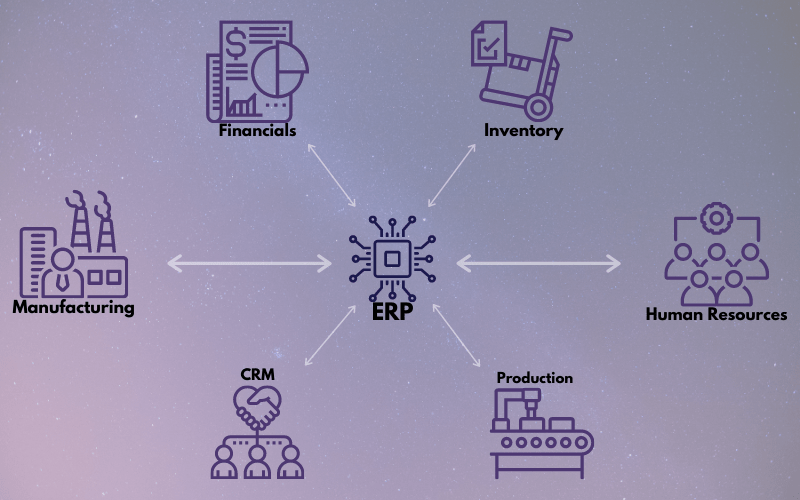
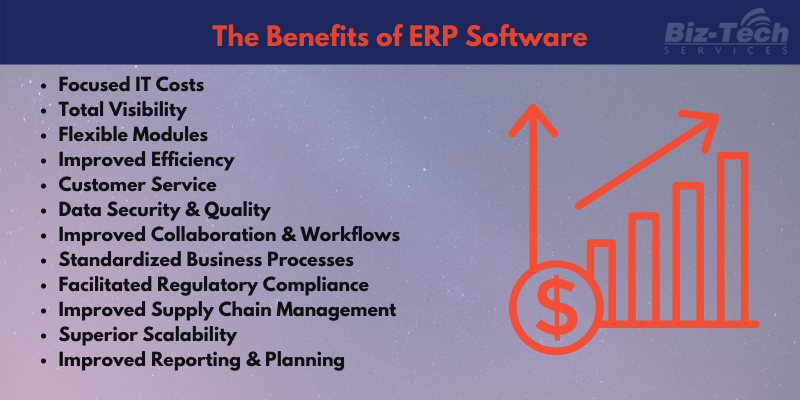
It's no secret. ERP solutions are expensive. There's a high cost to implement the system and then further costs to maintain it. Yet, organizations and businesses seem to use ERP every day and continue to purchase new systems, further improving their existing systems. For many, this does not come as a surprise. Considering the implementation of ERP systems can make your business run smoother by unifying and protecting data, automating processes and producing easy-to-understand reports, it's a no-brainer. With these and many more capabilities, the benefits of an ERP solution in business can make day-to-day operations and long-term planning much more efficient.
Steps to Successful ERP Implementation
I. Planning
II. Installation
III. Data Transfer
IV. Testing
V. Training
VI. Launch
VII. Post Launch
I. Planning
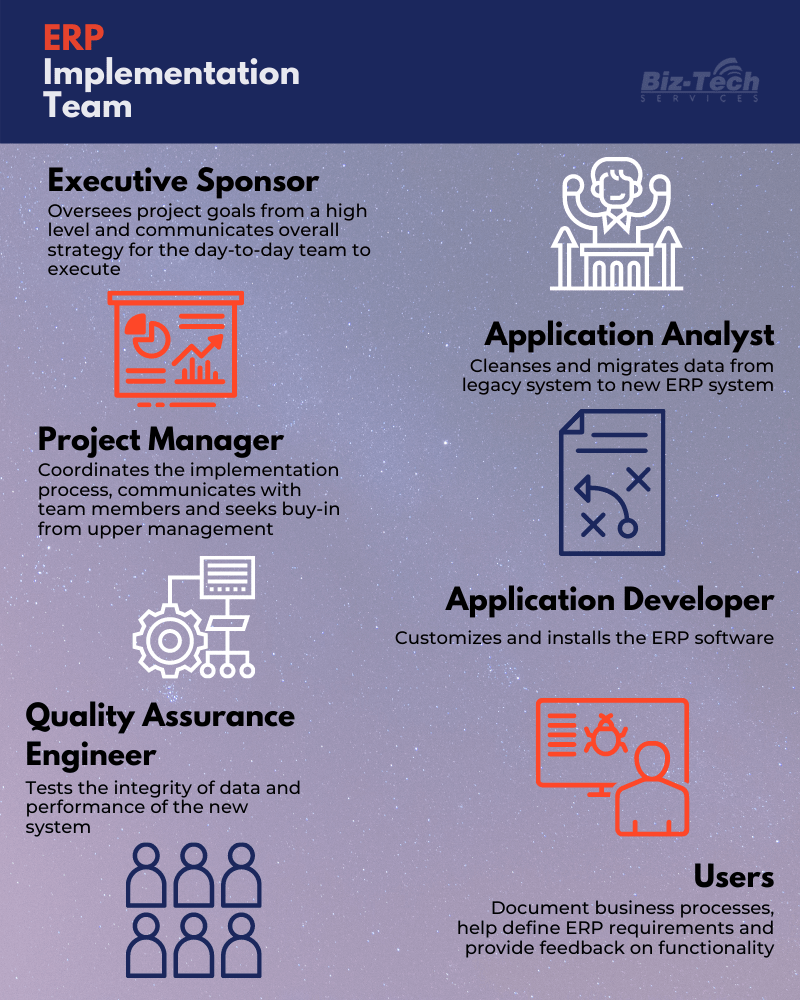
The first step is to understand why your organization needs the implementation of ERP. Define the vision, scope and need of an ERP solution. Furthermore, you will need to assemble an implementation team that can communicate effectively, efficiently and has the knowledge and willingness to guide the project from start to finish. Team members need be chosen based on expertise and knowledge in relation to the task at hand, as they will be the most affected and the most willing to see the ERP implementation software succeed. The team should include the following roles:
Team members should examine and document existing business processes and map out how they flow from one department to the next. It's vital to identify common issues or errors, duplicated and redundant efforts and missed opportunities with customers. Understanding your existing business processes will help you set goals and objectives for a smooth ERP implementation process. Additionally, figure out key performance indicators and quantify your desired results. Also, Define the exact requirements you want in your ERP solution and put together a reasonable timeline and budget.
II. Installation
Installing ERP software is your opportunity to evaluate current operations and re-engineer business processes into standard operating procedures. Define which processes to automate or to keep manual, then design a blueprint of how new practices will flow. The responsibility of installing the ERP software and building the infrastructure is on the application developer. Be cautious, don't lose track of progress and keep a flexible time line. At the end of the day, you are responsible for your ERP implementation, not the vendor or consultant.
III. Data Transfer
The next step in the implementation journey is the transferring of data, or data migration. Many organizations store supplier, customer and physical asset records in databases that contain errors and redundant information. This data needs to be reviewed and edited accordingly to maximize accuracy and uniformity before the data transfer or migration even starts. All outdated information should also be removed at this time. Once the data has been verified and updated, the application analyst transfers the data to the new system. This typically involves implementing new databases, transferring data and mapping database fields between ole and new systems.
IV. Testing
Now is when the quality assurance test engineer comes in to test the ERP system. It's important to make sure that all functionality, interfaces and reports work in real-life situations and transaction data. Users should also validate that business processes are communicating correctly and accurately between departments. It's essential the ERP system is thoroughly tested before launch.
V. Training
This is the step that is going to consume significant time, energy and effort. Employees are expected to carry out normal day-to-day responsibilities throughout the process. How long this training takes fully depends not only on the size and complexity of the chosen ERP solutions, but also on the mentality your employees have about adjusted work flow. Prioritization of in-depth training provides opportunities for users to give feedback and for the implementation to act accordingly.
Communication between staff, team members and the vendor can decrease the likelihood of lost productivity after launch. Keep in mind that 56% of ERP implementations result in some form of operational disruption after launch, which is frequently attributed to insufficient training. However, there are vendors that also provide training to users and offer on-boarding support to make implementation efficient. Be sure to ask your vendor what type of support it offers as it may include classes, online learning modules or written manuals.
VI. Launch
Depending on the scale of the ERP project and available resources, organizations can choose three different approaches when going live and launching the ERP software.
All-Out: All users transition from the legacy system to the new one in a single day. This is the fastest and cheapest option, but be aware of technical difficulties as they can cause major operational problems.
Phased: Users transition by department or function. The implementation team members can improve the transition period with each department, but the process will take longer and integrating ERP modules individually can be difficult.
Parallel: Users run both systems simultaneously. Since there's a legacy system to fall back on, this is the least riskiest approach. However, users tend to spend more time duplicating work on top of cost inefficiency as running two systems at once is expensive.
Be flexible and ready for unexpected challenges on launch day. It's a good idea to have additional or temporary IT staff on hand, as well as employees who can work overtime. Avoid system downtime by developing a communication strategy. Once the ERP software has launched, test and audit the system again to verify reliability, accuracy and speed. Prioritize the balance sheet, as well as the inventory and accounts receivable ledgers. IT should support users as they verify, document and modify businesses processes in the live ERP system.
VII. Post Launch
There's a common misconception that once the implementation of ERP is live, that's it and you're done. Unfortunately, it's not that simple. Implementation of ERP requires ongoing maintenance of the ERP software and support for all users who work with it. Budgeting time and resources to identify errors and fix them will be vital throughout the ERP solutions life cycle. Additionally, after going live, you should start evaluating the success of the ERP project. Take key performance metrics of objectives and goals of the project into consideration. Such as: costs compared to budget, ROI (return of investment), decrease in human error and increase in supply chain or manufacturing productivity.
Common ERP Implementation Mistakes
| Falling Back to Legacy Systems | Lack of Support | Vendor Aggression |
|---|---|---|
| Don't make a bad process faster with automation. Consider how to use the ERP solution to streamline your business, reduce duplicate work and manual labor, and improve employee communication and customer satisfaction. | The implementation team members should seek support from upper management. Make sure to get senior sponsorships as early as possible and manage expectations throughout the entire process. In fact, 65% of executives believe ERP systems have at least a moderate chance of hurting their business due to the potential for implementation problems. | Don't let vendors decide what you need and oversell you on unnecessary features. Define your ERP requirements early in the planning process based on your organizations goals and objectives. If possible, consider an industry-specific solution. |
| Short-Term | On-Premise ERP vs. Cloud-Based ERP | ERP Misconceptions |
|---|---|---|
| Don't make major business moves with short-term goals in mind. Plan for the long-term. Consider events like future upgrades or increasing the scale of the ERP software. Keep in mind that 23% of businesses are unable to grow as quickly as they'd like because they lack the tools required in their existing ERP system. | If your company doesn't have the financial backing to properly implement an on-premise solution, then consider utilizing a cloud-based ERP system. The initial costs are lower, and fees are charged by number of users or resources consumed. | Don't be misguided. Understand the realities of ERP implementation. Be realistic about timelines and budgets. Also make sure to give your project team and IT staff the resources they need to be successful. In fact, 61.1% of ERP implementations take longer than expected while 74% often exceed budget. |
ERP Implementation Consulting
ERP implementation consultants should have a proven implementation approach and methodology. Experience in your industry isn't necessarily a requirement for the consultant, but it may make the process efficient and possibly less daunting.
Consultants can help negotiate conflicts between ERP vendors and your business. That being said, vendors are usually motivated to up-sell more software bu pushing rich functionality. However, your business should mainly focus on adding only what it needs in order to simplify the process or generate more revenue.
The benefits of using a consultant are endless. Some major benefits are that consultants understand the ERP software, know how to apply and set the software up, keeps you focused on your ERP project, addresses the fear in organizational change and user training.
Depending on your resources and complexity of the ERP project, a consultant may or may not be right for you.
Conclusion
In the end, the implementation of ERP software can be a long and tedious, sometimes even difficult, process. However, with the right methodology, planning and strategy, you'll be able to dramatically improve your business in the long run.
To understand more about implementation and ERP solutions for your business, please feel free to contact us! You can reach us at 818-484-5004 or email us at sales@biz-techservices.com. Additionally, you can visit our home page for a list of services offered and ERP solutions!