
DSCO Connector
DSCO Connector is a native Acumatica extension that governs the full DSCO (CommerceHub) order-to-cash loop from a single store configuration. It connects via access token and base URL, validates connectivity, imports DSCO orders into Acumatica as Sales Orders or SO Invoices, sends acknowledgements, exports shipment confirmations and invoices, synchronizes inventory quantities by warehouse and quantity basis, and manages cancellations at both order and line levels. Cross-references align items and warehouses so documents post cleanly and downstream DSCO statuses and tracking numbers update reliably.
DSCO Connector
DSCO Connector is a native Acumatica extension that governs the full DSCO (CommerceHub) order-to-cash loop from a single store configuration. It connects via access token and base URL, validates connectivity, imports DSCO orders into Acumatica as Sales Orders or SO Invoices, sends acknowledgements, exports shipment confirmations and invoices, synchronizes inventory quantities by warehouse and quantity basis, and manages cancellations at both order and line levels.
Cross-references align items and warehouses so documents post cleanly and downstream DSCO statuses and tracking numbers update reliably.
1
Governed store setup and secure connectivity
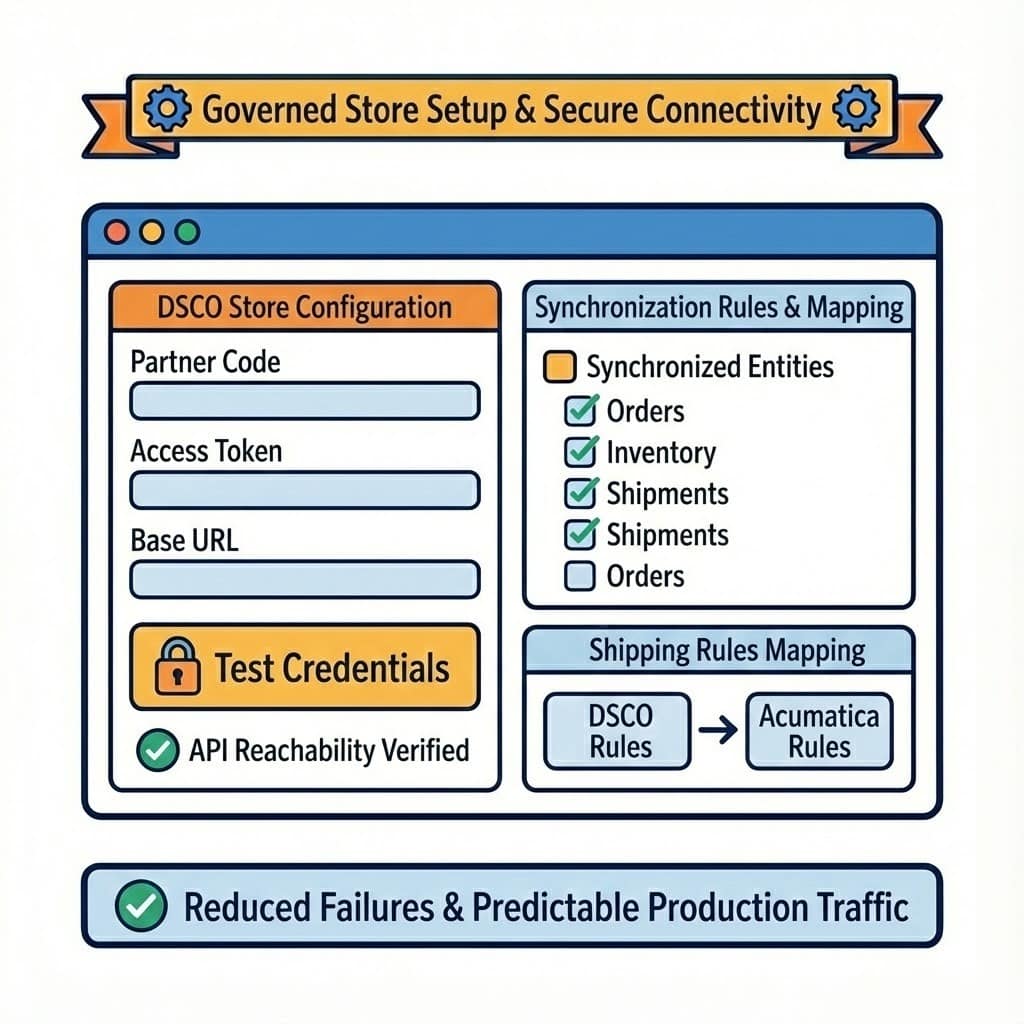
The DSCO store configuration centralizes all connection and behavior controls: partner code, access token, base URL, and a Test Credentials action to verify API reachability before operators start processing. This single place also defines which entities are synchronized and how shipping rules are mapped between DSCO and Acumatica. By validating credentials and defaults up front, you reduce mid-process failures and keep production traffic predictable.
2
Controlled order import and acknowledgement workflow
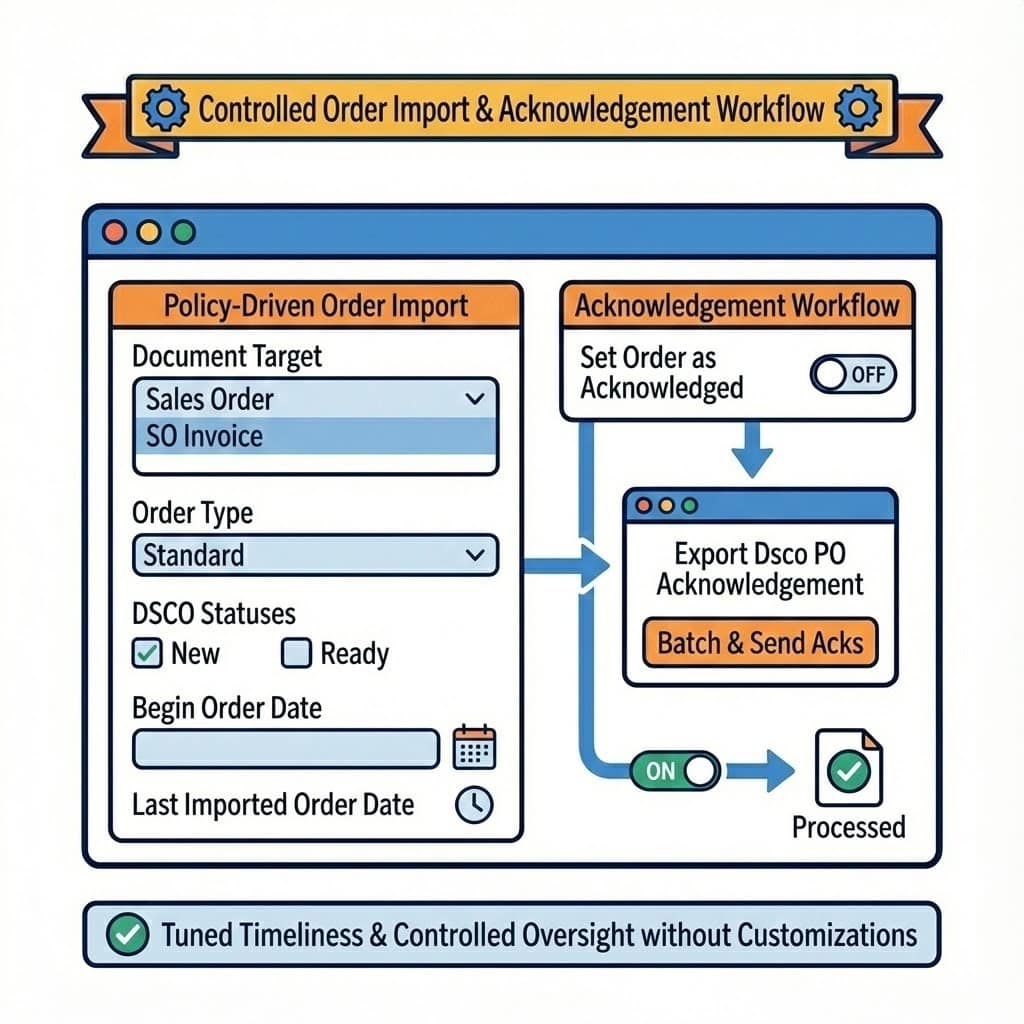
Order ingestion is policy-driven. You choose the document target (Sales Order or SO Invoice), the default order type, which DSCO statuses are eligible, and the starting date window (Begin Order Date), with Last Imported Order Date tracked for traceability. If “Set Order as Acknowledged” is enabled, imports do not require a separate acknowledgement step; if not, a dedicated Export Dsco PO Acknowledgement screen batches and sends acks later. This separation lets you tune timeliness versus operator oversight without customizations.
3
Fulfillment and invoicing exports aligned with releases
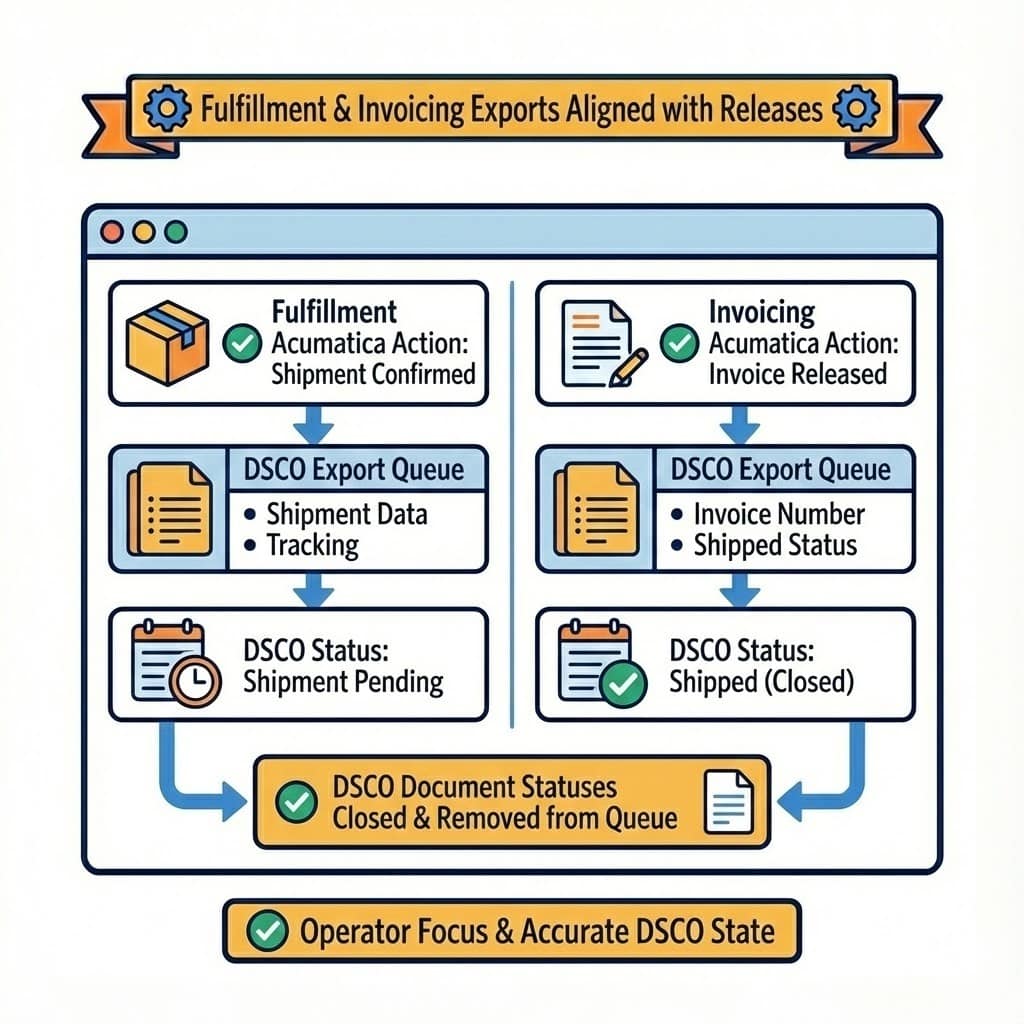
Exports can be tied to standard Acumatica actions: when shipments are confirmed (or invoices prepared), the connector can push shipment data, set tracking numbers, and mark DSCO as shipment pending. Likewise, on invoice release, it can update DSCO to shipped and stamp the invoice number. When each stage is completed, DSCO document statuses transition to closed and disappear from the corresponding export queue, keeping operator focus on what still needs action and ensuring DSCO reflects Acumatica’s released state.
4
Master data mapping and cross-reference governance
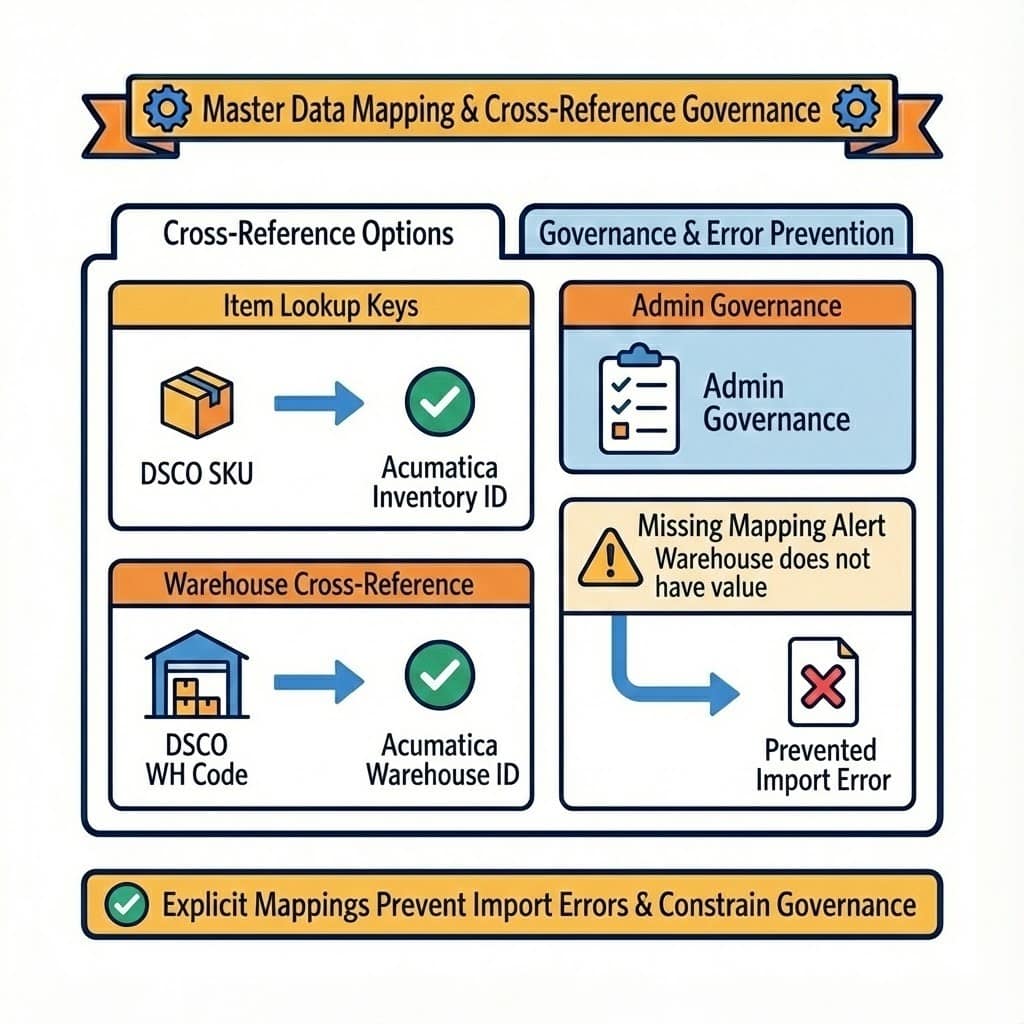
Cross-reference options control how DSCO values resolve to Acumatica values. Item lookup keys (for example, SKU) determine how incoming lines match Inventory IDs; warehouse cross-references ensure orders route to valid Acumatica warehouses. The UI explicitly warns when mappings are missing, preventing “Warehouse does not have value” or item-not-found errors at import time. Because only checked entities appear in the cross-reference dropdowns, admins can constrain mappings to the fields they intend to govern.
5
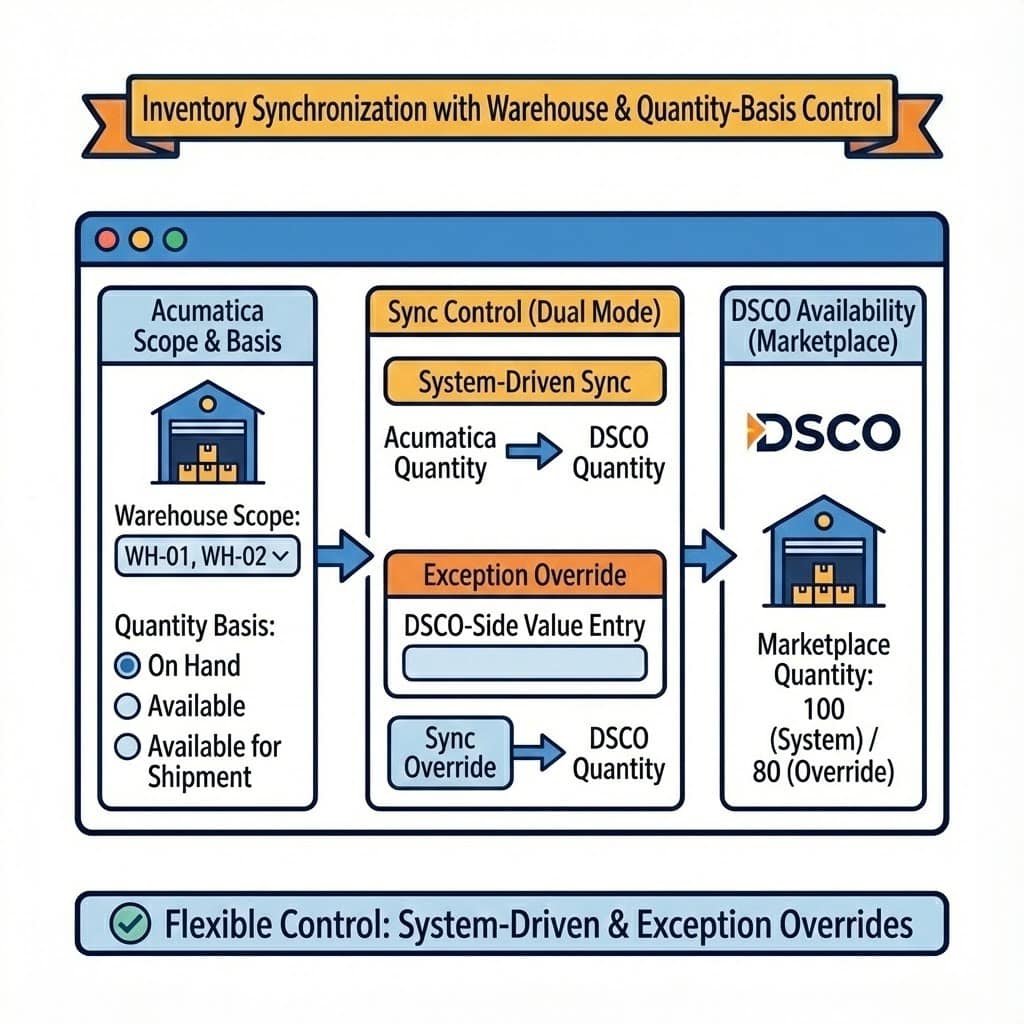
Inventory synchronization with warehouse and quantity-basis control
Inventory availability sync is scoped to selected warehouses and a chosen basis: On hand, Available, or Available for Shipment. You can push Acumatica quantities directly or override DSCO quantities by entering DSCO-side values and syncing them. This dual mode supports both fully system-driven availability and exception cases where commercial constraints require temporarily overriding marketplace quantities—without breaking the standard sync pattern for the rest of the catalog.
6
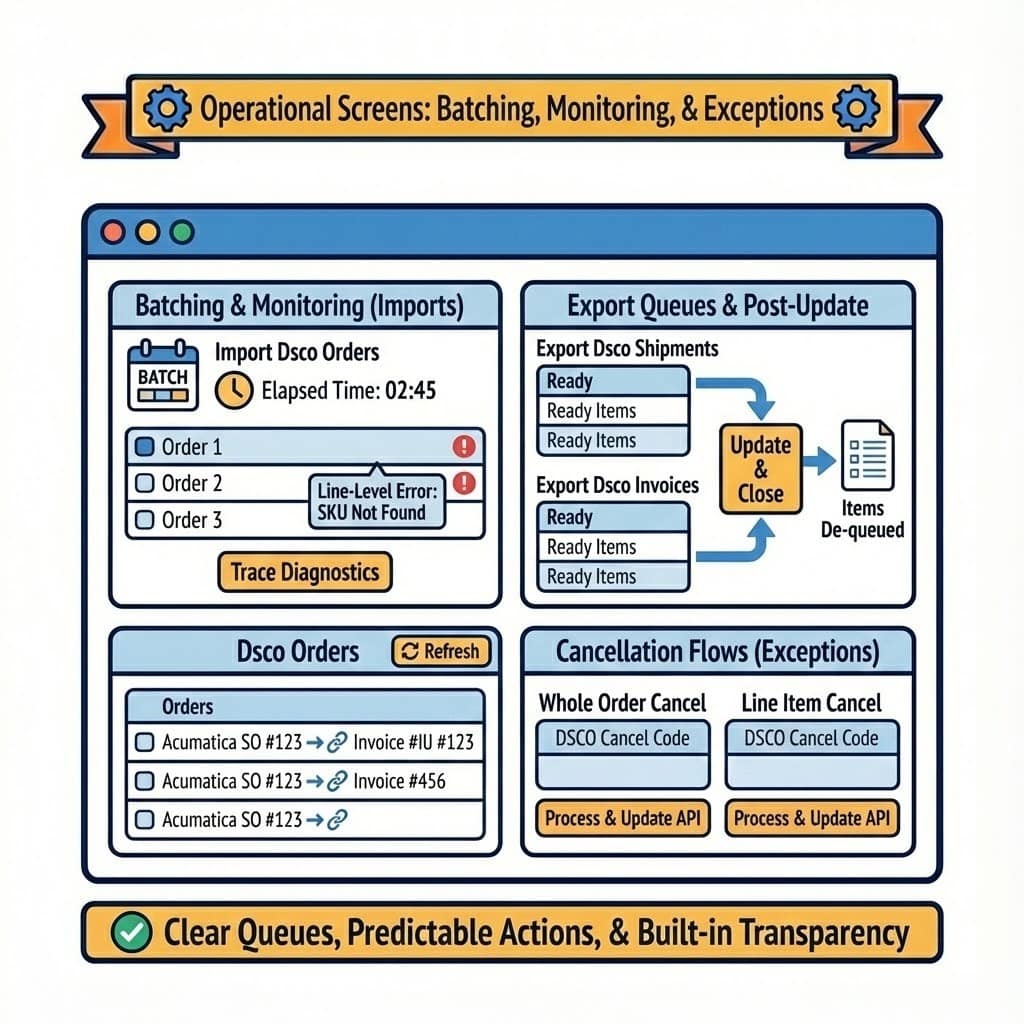
Operational screens for batching, monitoring, and exceptions
Operators work from dedicated screens: Import Dsco Orders retrieves and imports in batch, shows elapsed time, and surfaces line-level errors with hover details and a trace for diagnostics; Dsco Orders lets users refresh DSCO order status and see linked Acumatica SO and invoice numbers. Export Dsco Shipments and Export Dsco Invoices queue only what’s ready, then close and de-queue items post-update. Cancellation flows are covered by two dedicated exports: one for whole orders and one for individual line items, each enforcing a DSCO cancel code and updating DSCO via API once processed. This structure gives teams clear queues, predictable next actions, and built-in transparency for audits.
Tagline
SCHEDULE A DEMO
«Think of the Acumatica DSCO Connector as a universal translator and freight forwarder for your business’s e-commerce operations. It doesn’t just pass messages (data) between your Acumatica ERP and the DSCO platform; it intelligently translates them, ensures they arrive in the correct format, handles the shipping manifests (order processing), keeps track of all your goods (inventory), and even manages returns and cancellations, all while constantly reporting back to your central command center (Acumatica). Without it, you’d be manually translating and coordinating every single package and message, leading to delays and errors.»
Tagline
SCHEDULE A DEMO
«Think of the Acumatica DSCO Connector as a universal translator and freight forwarder for your business’s e-commerce operations. It doesn’t just pass messages (data) between your Acumatica ERP and the DSCO platform; it intelligently translates them, ensures they arrive in the correct format, handles the shipping manifests (order processing), keeps track of all your goods (inventory), and even manages returns and cancellations, all while constantly reporting back to your central command center (Acumatica). Without it, you’d be manually translating and coordinating every single package and message, leading to delays and errors.»

Shopify Connector is an integration link for two platforms‒Shopify’s e-commerce system and Acumatica
Cloud ERP. The connector supplies all the tools a business needs to improve its order processing strategy,
to simplify inventory management, pricing, payment, and streamline its logistics processes. Bilateral
synchronization makes it possible to manage orders in Acumatica and mark them fulfilled in the Shopify system automatically. Using this connector allows better time management and facilitates the connection between the platforms. Above all, the connector also streamlines the process of handling the payment information.

EZCom Connector is a native Acumatica extension that connects Acumatica to the EZCom EDI platform through a governed store configuration and a Biz-Tech–managed intermediate server. Connectivity and defaults are defined once on General Settings; from there the connector imports purchase orders (including changes and routing responses), supports shipment-level imports with tracking, and exports acknowledgements, routing requests, warehouse orders, outbound shipments, and outbound invoices. Trading-partner profiles centralize cross-references for items, carriers, warehouses, customers, and inventory availability so documents post cleanly and external statuses update reliably.
ShipHero–Acumatica Integration is a native extension that synchronizes fulfillment and ERP data through a governed store configuration. It supports two directional modes (ShipHero to Acumatica and Acumatica to ShipHero), validates connectivity, imports orders and shipments, exports orders and purchase orders, brings receipts back, and synchronizes items, vendors, warehouses, and inventory quantities. Centralized options for taxes, packaging, customers, items, and cross-references keep postings consistent and auditable across the order, shipment, and receiving lifecycle.
WHAT OUR CLIENTS SAY
“Exceptional experience from start to finish — their professionalism truly stands out.”
Laura Bennett
Marketing Director
“Fast, reliable, and always one step ahead. Couldn’t ask for better support.”
David Romero
Head of Operations
“They deliver quality every single time. A trusted partner for our business growth.”
Sophie Klein
Managing Partner