
ShipHero Connector
ShipHero Connector is a native extension that synchronizes fulfillment and ERP data through a governed store configuration. It supports two directional modes (ShipHero to Acumatica and Acumatica to ShipHero), validates connectivity, imports orders and shipments, exports orders and purchase orders, brings receipts back, and synchronizes items, vendors, warehouses, and inventory quantities. Centralized options for taxes, packaging, customers, items, and cross-references keep postings consistent and auditable across the order, shipment, and receiving lifecycle.
ShipHero Connector
ShipHero Connector is a native extension that synchronizes fulfillment and ERP data through a governed store configuration. It supports two directional modes (ShipHero to Acumatica and Acumatica to ShipHero), validates connectivity, imports orders and shipments, exports orders and purchase orders, brings receipts back, and synchronizes items, vendors, warehouses, and inventory quantities.
Centralized options for taxes, packaging, customers, items, and cross-references keep postings consistent and auditable across the order, shipment, and receiving lifecycle.
1
Bidirectional integration modes with governed setup
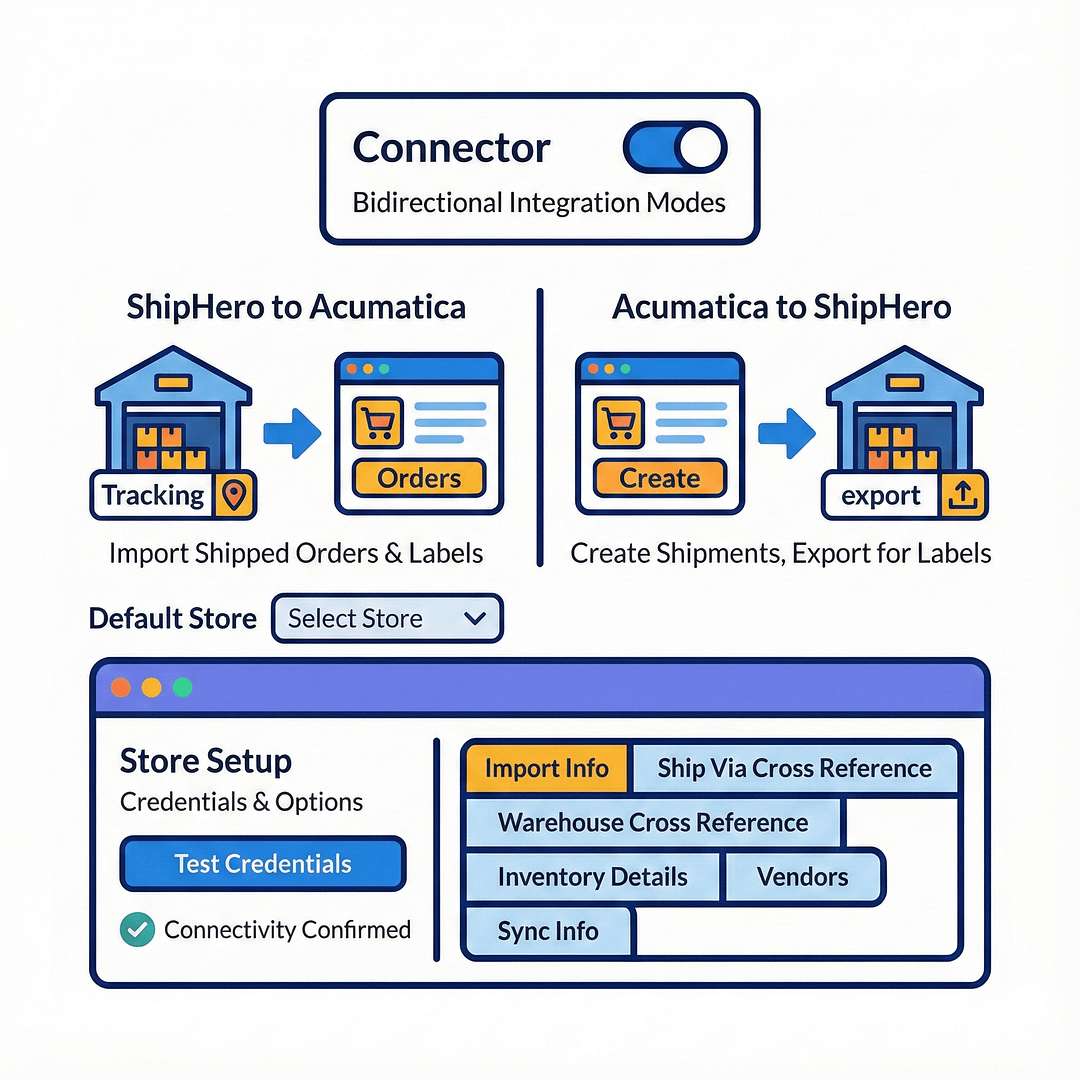
The connector can operate in two modes selected per store: ShipHero to Acumatica (import shipped orders and shipments that already have labels and tracking) or Acumatica to ShipHero (create and release shipments in Acumatica, then export them to ShipHero). A default store can be designated so batch actions target the right endpoint without extra clicks.
Credentials and options are defined once on store setup. Test Credentials confirms connectivity before operators run imports or exports, reducing mid-process failures. Depending on the chosen mode, the UI exposes the relevant tabs (for example, Import Info, Ship Via Cross Reference, Warehouse Cross Reference, Inventory Details, Vendors, Sync Info), keeping configuration scoped and clear.
2
Structured order import and export with clear processing screens
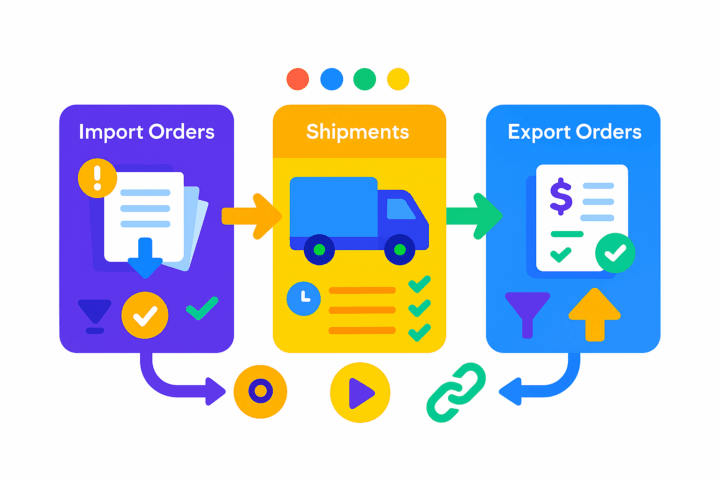
Operators use dedicated screens for each step. Import Ship Hero Orders retrieves orders or shipments from the selected store and imports them as Sales Orders or Invoices based on a defined “Import To” and order type. Export Ship Hero Order lists only open SO-template orders eligible for export and lets you process individually or in batch.
“Get Ship Hero Shipments” shows orders and shipments returned by ShipHero; filters such as “Show Only Orders with No Shipments” focus attention on what still needs action. Each screen exposes the store code selector, elapsed-time feedback, and direct links to related records, making high-volume operations predictable and easy to audit.
3
Shipment, label, tracking, and delivery alignment
ShipHero→Acumatica mode, shipments with labels and tracking generated in ShipHero are imported and linked to the corresponding Acumatica orders. The Ship Hero Order and Ship Hero Shipment inquiry pages surface header data, addresses, Ship Via, packages, and the processed flag so users can verify that fulfillment details and tracking numbers are in sync.
In Acumatica→ShipHero mode, shipments created in Acumatica are exported, and subsequent ShipHero shipment updates can be fetched back, maintaining a single chain of custody for each order across systems without manual re-entry.


4
Purchase orders out, receipts back in
The connector exports open purchase orders from Acumatica to ShipHero, either manually or on a schedule, enabling third-party logistics or external warehouses to pick, pack, and receive against governed instructions. A companion Import Ship Hero Receipts screen brings posted receipts back from ShipHero into Acumatica so on-hand/available balances and vendor accruals reflect warehouse activity.
A Ship Hero Purchase Order inquiry allows bringing back updates made to the synced PO in ShipHero, closing the loop and keeping ERP records aligned with warehouse-side changes.
5
Master data mapping, item/vendor sync, and inventory control
Cross-references map Ship Via and Warehouse codes between platforms so imported and exported documents land with valid carriers and warehouse IDs. Item creation can be automated on import with defaults for item type, class, UOM, and warehouse; when disabled, a default item or “replace missing products” behavior prevents blocking the flow.
Inventory Details and Vendors tabs let operators load and sync items and vendors in either direction. Quantity export can be driven by a selected basis (for example, On Hand, Available, Available for Shipping), and optional price export (MSRP and Default Price) keeps ShipHero current with ERP catalog values. This governance avoids mismatches and maintains offer accuracy.

6
Customer, tax, packaging, and box mapping options for compliance
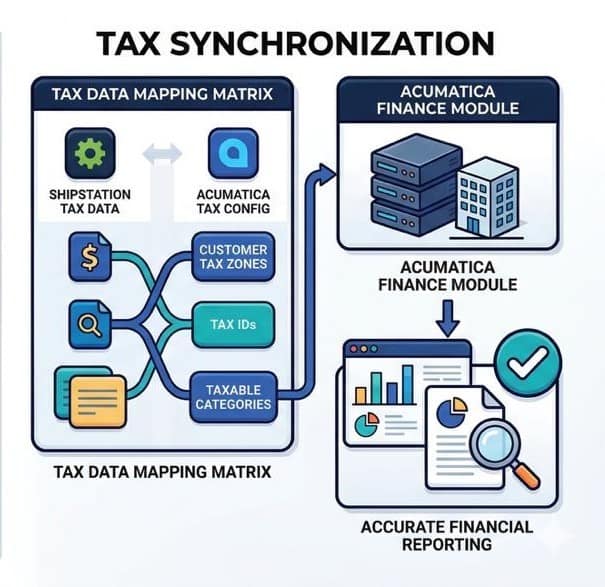
Customer handling is flexible: you can import customer records from ShipHero with a default customer class, or use a default customer and override bill-to and ship-to addresses from the order. Tax options allow importing taxes and setting customer tax zone, tax ID, and taxable categories to ensure compliant postings.
Packaging can be automated; if it is not, a Default Box ID can be specified. In Acumatica→ShipHero mode, Box Mapping ties Acumatica box IDs to ShipHero box names, ensuring package-level data matches on both sides. These controls standardize compliance-sensitive data and reduce downstream corrections.
Tagline
SCHEDULE A DEMO
«Consider the ShipHero-Acumatica integration as the digital backbone of your e-commerce business. Just as a backbone provides structure, supports movement, and protects the central nervous system, this integration provides the essential structure for your data, automates the movement of information, and protects the integrity of your core business processes by ensuring seamless, accurate, and real-time communication between your warehouse, sales, and financial operations.»
Tagline
SCHEDULE A DEMO
«Consider the ShipHero-Acumatica integration as the digital backbone of your e-commerce business. Just as a backbone provides structure, supports movement, and protects the central nervous system, this integration provides the essential structure for your data, automates the movement of information, and protects the integrity of your core business processes by ensuring seamless, accurate, and real-time communication between your warehouse, sales, and financial operations.»
Amazon–Acumatica Integration connects Amazon (FBM and FBA) with Acumatica through a governed store configuration and an intermediate server. It imports orders, creates and sends PO acknowledgements and shipment fulfillments, synchronizes inventory quantities, and processes refunds, all from Acumatica screens. Cross-references and store-level defaults align items, payments, carriers, taxes, warehouses, and customers so data lands correctly on day one and remains consistent through the order-to-cash cycle.
Consignment Processing in Acumatica provides companies with advanced tools to manage the location and sales of inventory at customer sites. The solution enables control of both quantities and valuation of inventory across multiple consignee locations. It simplifies the order process for consignment items, improves visibility by showing quantities of sold and unsold items, and automates key processes from shipping to invoicing and returns.By offering a dedicated system for consignment operations, businesses can increase operational efficiency and maintain accurate control of their consignment inventory. The functionality can be deployed by creating a new customization project, which can then be published for multiple tenants.
DSCO Connector is a native Acumatica extension that governs the full DSCO (CommerceHub) order-to-cash loop from a single store configuration. It connects via access token and base URL, validates connectivity, imports DSCO orders into Acumatica as Sales Orders or SO Invoices, sends acknowledgements, exports shipment confirmations and invoices, synchronizes inventory quantities by warehouse and quantity basis, and manages cancellations at both order and line levels. Cross-references align items and warehouses so documents post cleanly and downstream DSCO statuses and tracking numbers update reliably.
WHAT OUR CLIENTS SAY
“Exceptional experience from start to finish — their professionalism truly stands out.”
Laura Bennett
Marketing Director
“Fast, reliable, and always one step ahead. Couldn’t ask for better support.”
David Romero
Head of Operations
“They deliver quality every single time. A trusted partner for our business growth.”
Sophie Klein
Managing Partner