
Zapier Connector
Zapier Connector is a native Acumatica extension that connects Acumatica ERP with external platforms through Zapier webhooks and dedicated Zaps. It centralizes webhook URLs, import settings, order mapping, customer handling, item creation, payment behavior, warehouse synchronization, and logging inside the Zapier Store configuration. The connector imports external orders into Acumatica as Sales Orders, SO Invoices, or AR Invoices, supports customer and item creation during import, maps incoming Zapier fields to Acumatica documents, exports inventory items, quantities, sales prices, customers, addresses, and contacts, and provides raw incoming data visibility for auditing, troubleshooting, and validation.
Zapier Connector
Zapier Connector is a native Acumatica extension that connects Acumatica ERP with external platforms through Zapier webhooks and dedicated Zaps. It centralizes webhook URLs, import settings, order mapping, customer handling, item creation, payment behavior, warehouse synchronization, and logging inside the Zapier Store configuration. The connector imports external orders into Acumatica as Sales Orders, SO Invoices, or AR Invoices, supports customer and item creation during import, maps incoming Zapier fields to Acumatica documents, exports inventory items, quantities, sales prices, customers, addresses, and contacts, and provides raw incoming data visibility for auditing, troubleshooting, and validation.
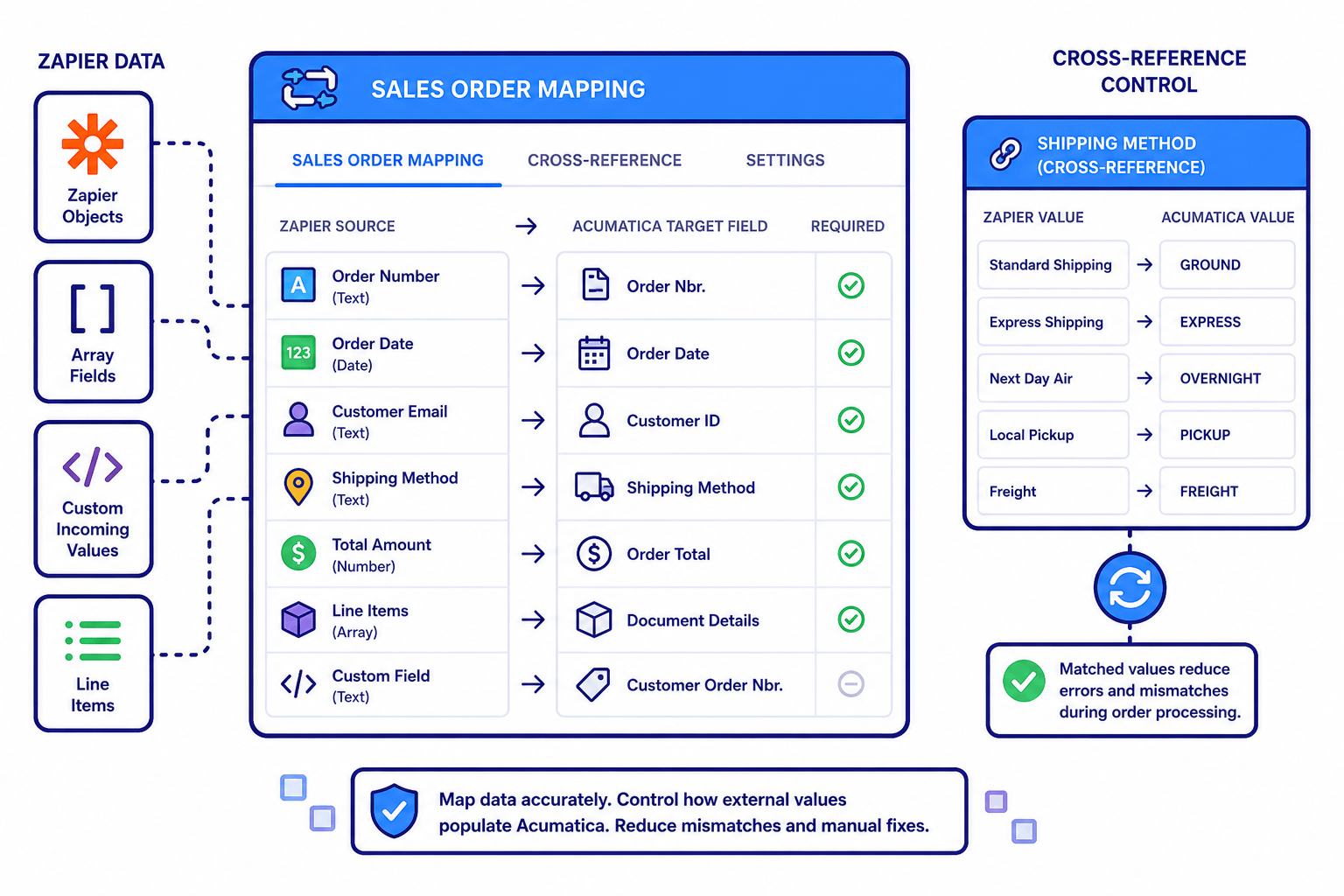
Cross-references align selected entities such as shipping methods, items, warehouses, customers, and mapped Zapier fields so incoming orders can be converted into clean Acumatica documents, while unmapped raw data remains visible for validation, troubleshooting, and controlled processing.
1
Centralized Zapier Store configuration and webhook routing
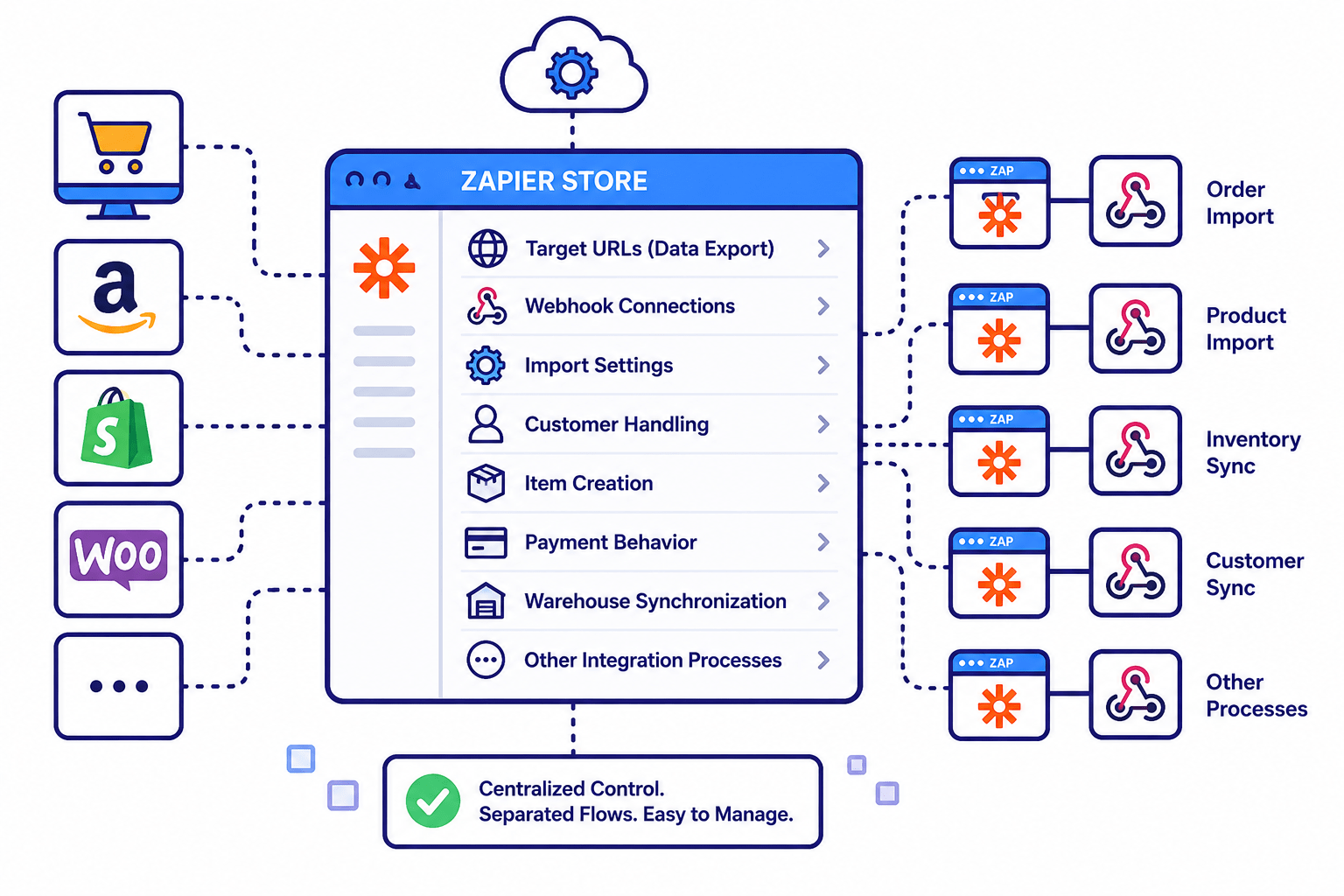
The Zapier Store screen acts as the main control center for the connector. It manages target URLs for data export, webhook connections, import settings, customer handling, item creation, payment behavior, warehouse synchronization, and other core integration processes. Each integration flow uses its own dedicated Zap and webhook endpoint, which keeps order import, product import, inventory sync, and other processes separated and easier to administer.
2
Flexible order import into Acumatica documents
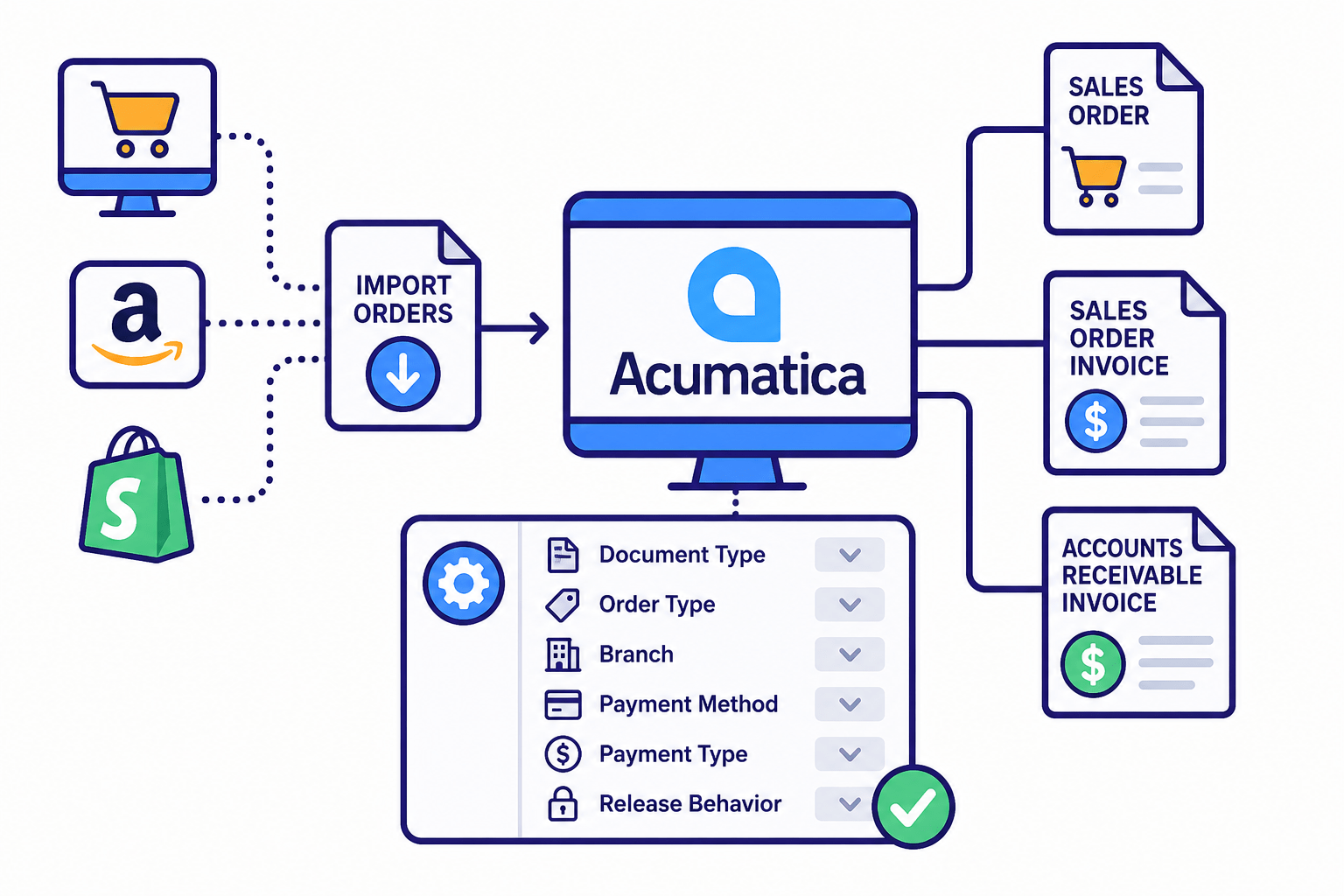
The connector supports importing orders from connected external platforms into Acumatica as Sales Orders, Sales Order Invoices, or Accounts Receivable Invoices. Import settings define the target document type, default order type, branch, payment method, payment type, and release behavior. This gives companies control over how external sales are converted into Acumatica transactions instead of forcing all orders into a single rigid workflow.
3
Configurable customer, item, tax, payment, and POS handling
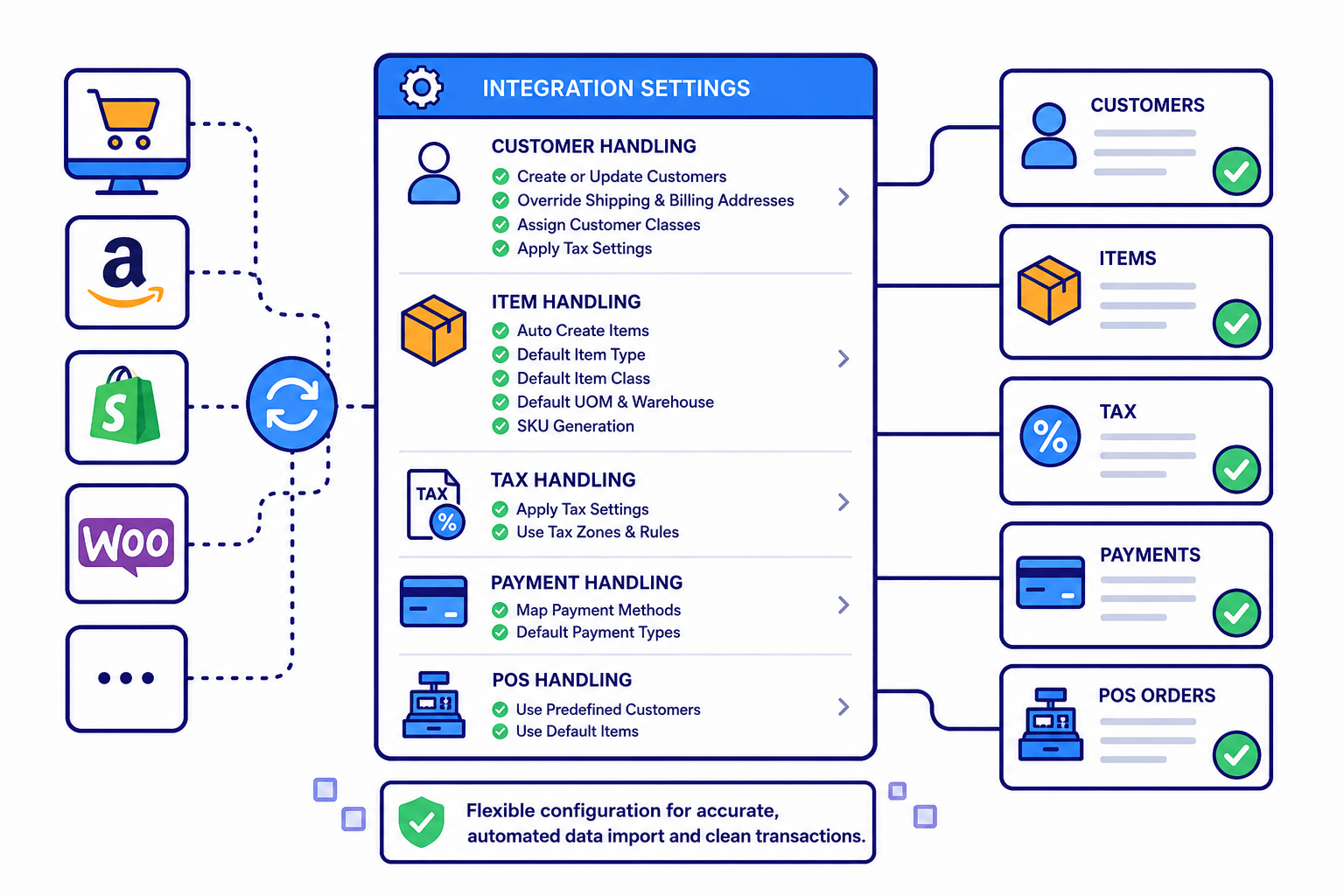
The integration can create or update customer information, override shipping and billing addresses, assign customer classes, and apply tax settings during the import process. It also supports automatic item creation when products do not already exist in Acumatica, with defaults for item type, item class, UOM, warehouse, and SKU generation. POS options allow imported retail orders to use predefined customers and default items, reducing manual cleanup after synchronization.
4
Field mapping and cross-reference control
The Sales Order Mapping tab maps incoming Zapier data to the correct Acumatica fields. Zapier objects, array fields, line items, and custom incoming values can be assigned to Acumatica target fields so that external data lands in the correct ERP structure. Cross-reference options also allow selected entities, such as shipping methods, to be matched between Zapier values and Acumatica values, reducing mismatches during order processing.
5
Inventory, quantity, and price synchronization
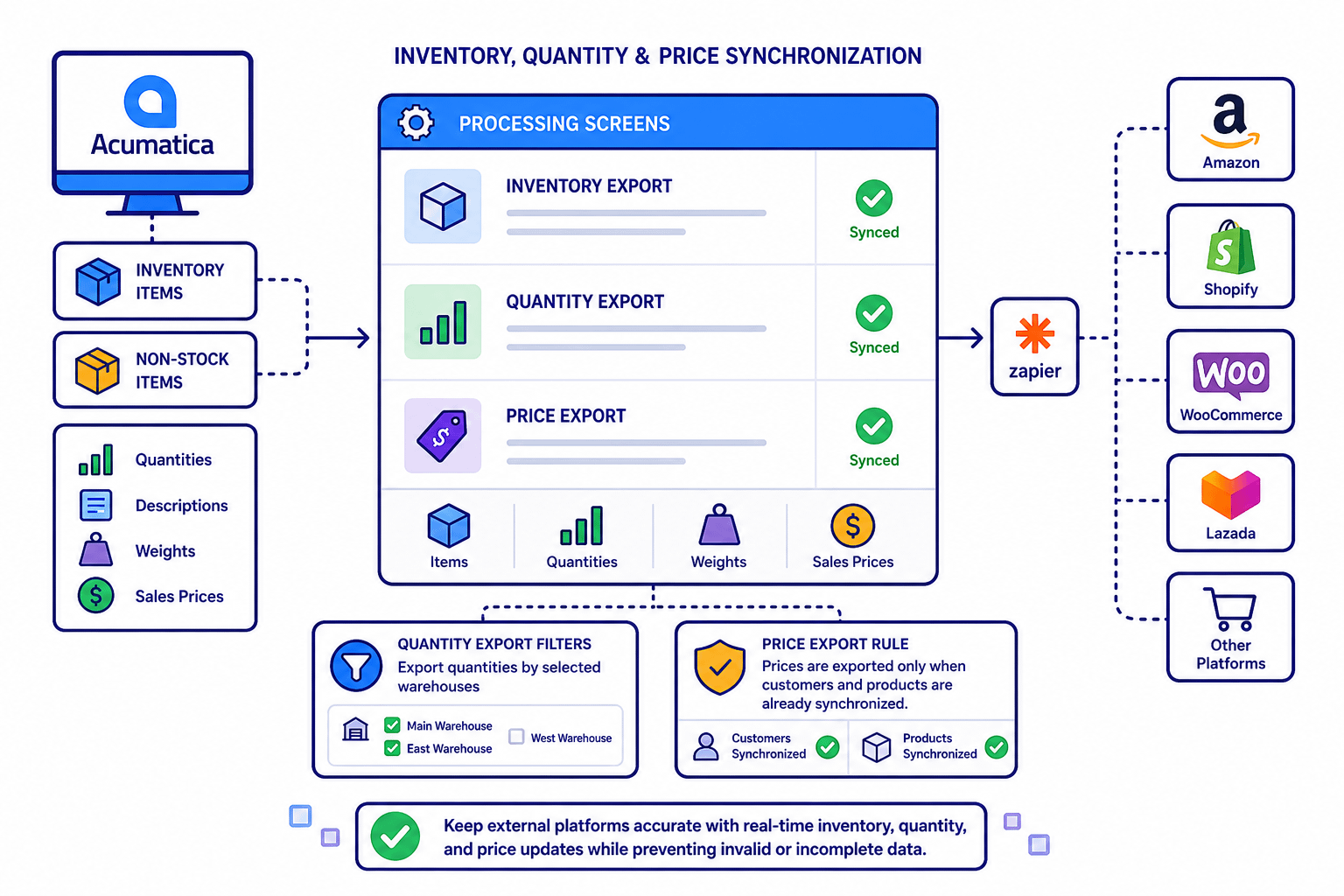
The connector supports exporting Acumatica stock and non-stock items to connected platforms through Zapier. Inventory items, quantities, descriptions, weights, and sales prices can be synchronized through dedicated processing screens. Quantity exports can be filtered by selected warehouses, and item prices are exported only when the related customers and products are already synchronized, helping prevent invalid or incomplete pricing data from reaching external systems.
6
Customer, address, contact, and raw data visibility
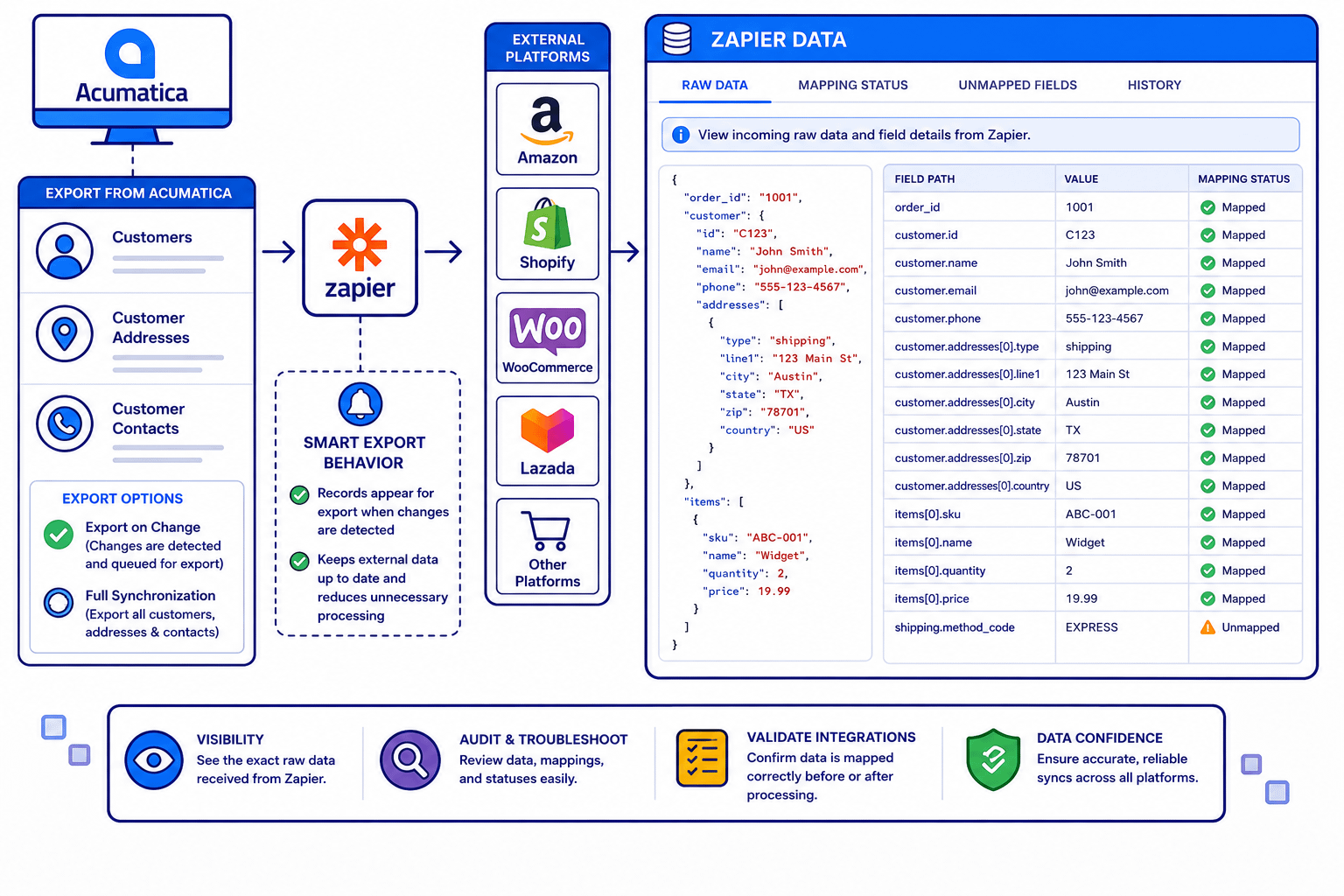
Customer records, customer addresses, and customer contacts can be exported from Acumatica to external platforms through Zapier. Records appear for export when changes are detected, while broader options allow full customer synchronization when needed. The Zapier Data screen provides visibility into incoming raw data, including field paths, values, mapping status, and unmapped fields, making it useful for auditing, troubleshooting, and validating integration behavior before or after processing.
Tagline
SCHEDULE A DEMO
Think of the Acumatica Zapier Connector as a traffic control tower for your business data. Orders, customers, items, prices, inventory quantities, addresses, and contact details may come from different external platforms, but the connector gives each data stream a clear route into or out of Acumatica. It does not simply move information from one place to another; it helps decide where that information belongs, how it should be mapped, which Acumatica document it should become, and whether related customers, items, warehouses, payments, and fields are ready for clean processing. Instead of manually sorting every incoming order, checking every field, and pushing updates back to external systems one by one, the connector organizes those flows through Zapier webhooks, dedicated processing screens, cross-references, and raw data visibility, so Acumatica remains the central system of record.
Tagline
SCHEDULE A DEMO
Think of the Acumatica Zapier Connector as a traffic control tower for your business data. Orders, customers, items, prices, inventory quantities, addresses, and contact details may come from different external platforms, but the connector gives each data stream a clear route into or out of Acumatica. It does not simply move information from one place to another; it helps decide where that information belongs, how it should be mapped, which Acumatica document it should become, and whether related customers, items, warehouses, payments, and fields are ready for clean processing. Instead of manually sorting every incoming order, checking every field, and pushing updates back to external systems one by one, the connector organizes those flows through Zapier webhooks, dedicated processing screens, cross-references, and raw data visibility, so Acumatica remains the central system of record.

Shopify Connector is an integration link for two platforms‒Shopify’s e-commerce system and Acumatica
Cloud ERP. The connector supplies all the tools a business needs to improve its order processing strategy,
to simplify inventory management, pricing, payment, and streamline its logistics processes. Bilateral
synchronization makes it possible to manage orders in Acumatica and mark them fulfilled in the Shopify system automatically. Using this connector allows better time management and facilitates the connection between the platforms. Above all, the connector also streamlines the process of handling the payment information.

EZCom Connector is a native Acumatica extension that connects Acumatica to the EZCom EDI platform through a governed store configuration and a Biz-Tech–managed intermediate server. Connectivity and defaults are defined once on General Settings; from there the connector imports purchase orders (including changes and routing responses), supports shipment-level imports with tracking, and exports acknowledgements, routing requests, warehouse orders, outbound shipments, and outbound invoices. Trading-partner profiles centralize cross-references for items, carriers, warehouses, customers, and inventory availability so documents post cleanly and external statuses update reliably.

ShipHero–Acumatica Integration is a native extension that synchronizes fulfillment and ERP data through a governed store configuration. It supports two directional modes (ShipHero to Acumatica and Acumatica to ShipHero), validates connectivity, imports orders and shipments, exports orders and purchase orders, brings receipts back, and synchronizes items, vendors, warehouses, and inventory quantities. Centralized options for taxes, packaging, customers, items, and cross-references keep postings consistent and auditable across the order, shipment, and receiving lifecycle.
WHAT OUR CLIENTS SAY
“Exceptional experience from start to finish — their professionalism truly stands out.”
Laura Bennett
Marketing Director
“Fast, reliable, and always one step ahead. Couldn’t ask for better support.”
David Romero
Head of Operations
“They deliver quality every single time. A trusted partner for our business growth.”
Sophie Klein
Managing Partner