PayPal Acumatica Integration Configuration Checklist
The moment a sale is made is often the most exciting part of a business day, but the manual work required to actually collect the money can quickly dampen that enthusiasm. If your team is jumping between your accounting software and a separate payment portal to send invoices, check payment statuses, or record receipts, you are losing valuable time. This disjointed process often leads to delays in shipping, errors in financial reporting, and a slower cash flow. We at Biz-Tech Services believe that your ERP system should be the heartbeat of your operations, handling everything from the initial order to the final payment without requiring you to switch windows.
The Biz-Tech Services, Inc. PayPal Acumatica Integration ia a specialized customization that enables your business to send professional payment requests directly to customers. This bridge utilizes the PayPal invoicing Application Programming Interface to generate live payment links that your customers can pay via their PayPal account or as a guest using a credit card. Because the system is integrated, it automatically updates your financial records the moment the funds are confirmed. To ensure your business is ready for this level of automation, we have prepared a configuration checklist to guide your pre-launch preparation.
Technical and System Prerequisites
Your journey begins with ensuring your internal environment is ready to support the connection. First, your business must have the necessary Acumatica modules active, specifically the Accounts Receivable, or AR, and Sales Orders, or SO, modules. Second, you must have a PayPal Business account, as personal accounts do not support the specific invoicing API required for this Biz-Tech Services Paypal Acumatica integration.
Third, you will need to generate your digital credentials through the PayPal developer portal. This involves creating a new application to obtain a unique Client ID and a Client Secret. These act as your secure digital signature, allowing Acumatica to speak to PayPal on your behalf. Finally, ensure your network security allows for this communication. Your Acumatica server must be able to reach the PayPal API endpoints over a secure connection on port 443. We recommend verifying these technical foundations before moving into the software configuration on Biz-Tech Services Acumatica PayPal connector.
Configuring the Core Connection
Once the foundations are set, the next step is establishing the connection within Acumatica. We begin by installing the customization package through the customization projects form. After the package is published to your database, you must create a dedicated payment method.
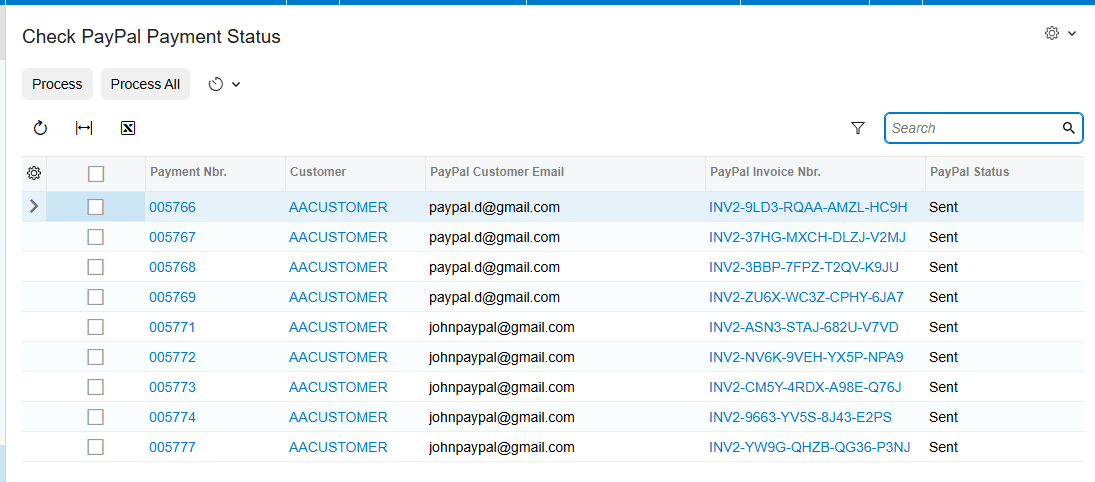
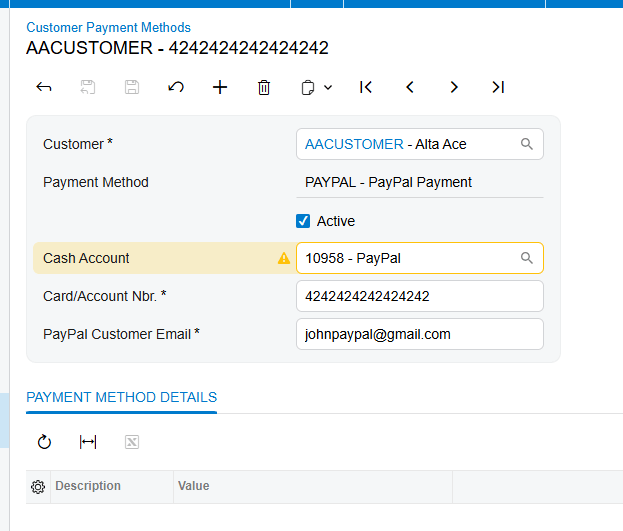
In the Payment Methods screen, you will define a new ID, such as PAYPAL, and set the means of payment. This action reveals a specialized settings tab where you will enter the Client ID and Client Secret you gathered earlier. You must also enter the correct base web addresses for both the live and testing environments. Before saving, we always use the test credentials feature to ensure the two systems are communicating correctly. A successful test confirms that your ERP can securely request invoices and receive status updates.
Mapping Customer Data and Workflows
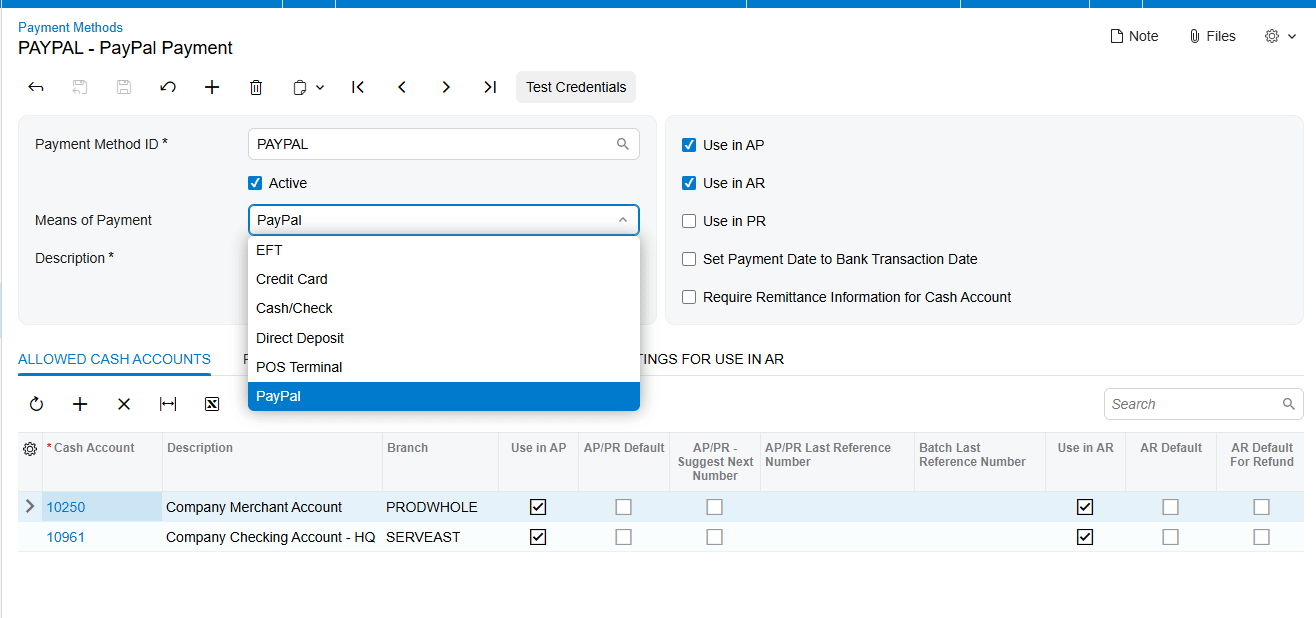
A critical part of your pre-launch checklist is preparing your customer records for automation. Each customer who intends to pay via this method must have a customer payment method configured with their specific PayPal email address, as you can see on Customer Payment Methods screen. This email is where PayPal will deliver the digital invoice. While the system allows you to override this email on a case-by-case basis, having it correctly mapped in the customer profile ensures your daily billing runs without manual entry.
Your business should also decide which operational workflow best fits your sales cycle. The Biz-Tech Services Paypal Acumatica integrator offers three primary entry points. First, you can send a payment request directly from a sales order, which is ideal for businesses that require payment before shipment. Second, you can send a request from an existing invoice if your billing occurs after the service or delivery. Third, you can generate a standalone payment request from the payments and applications screen to collect deposits or prepayments not yet tied to a specific document.
Testing and Go-Live Readiness
The final phase of your configuration of iz-Tech Services Acumatica PayPal connector, involves validating the payment lifecycle. We recommend using a PayPal sandbox account during the testing phase. This allows you to simulate the entire process of sending an invoice, making a test payment, and watching the status change in Acumatica without moving real money.
During this stage, your business should familiarize itself with how the system handles different scenarios. For example, if a customer makes a partial payment, the system will update a specific paid amount field but keep the record on hold until the full balance is collected. You should also test the refund and cancellation workflows. Issuing a full refund within Acumatica will automatically trigger the PayPal refund API and void the payment record in your ERP, keeping your books in perfect sync.
Launch and Management
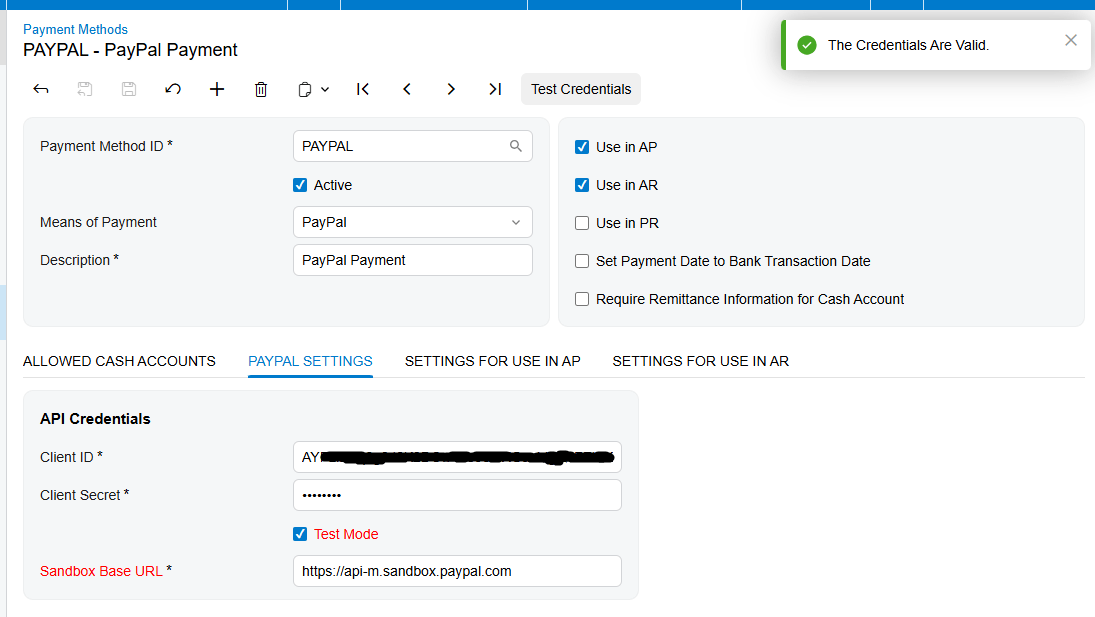
To maintain efficiency after launch, your operations managers should use the centralized processing screen. This tool allows you to check the status of multiple outstanding payments at once. Because Acumatica does not poll for updates in the background, unless you specify automation schedule, this bulk processing screen is your primary tool for daily reconciliation, ensuring that every Sent status is updated to Paid as soon as the customer completes their transaction.
This Biz-Tech Services Acumatica PayPal integration is designed for business owners who want to eliminate the data gap between their payment portal and their accounting office. By following this structured configuration checklist, we ensure that your payment processing is as streamlined and professional as the products you sell.
If you are ready to simplify your billing and want to see how these automated payment workflows can benefit your business, we invite you to visit biz-techservices.com to learn more or to schedule a demo of our Biz-Tech Services Acumatica PayPal Acumatica Integrator.