

Acumatica AI Assistant in 2026 R2: Use Cases, AI Units, GI Security, and Governance

Acumatica AI Assistant in 2026 R2: Use Cases, AI Units, GI Security, and Governance
A practical guide to governed reporting, AI Units, Generic Inquiry security, and rollout controls.
Why AI Assistant governance is an operating issue
AI Assistant makes ERP reporting more conversational: a user can ask a business question in ordinary language and receive a text answer, table, chart, or pivot table. That convenience can remove a real bottleneck for finance, operations, and project teams that otherwise wait for a report or build a one-off inquiry. It also changes the operating model. The quality, relevance, and visibility of answers are shaped by the Generic Inquiries that administrators choose to expose, the descriptions that make those inquiries understandable, and the roles assigned to users. Governance is therefore not an after-the-fact security review. It is the design work that determines what the assistant can reliably answer and who can use it.
For a 2026 R2 organization, the practical question is not whether natural-language access to ERP data is valuable. It is whether the business can introduce it with a defined data boundary, an accountable owner, a measured usage model, and a review path for decisions that matter. This guide explains how to set that foundation. It focuses on reporting and analysis, where an assistant can accelerate discovery while people remain responsible for interpretation, approval, and action.
What Acumatica AI Assistant is and is not
Acumatica AI Assistant is a natural-language interface embedded in Acumatica. In the documented 2026 R2 experience, it can answer questions using Generic Inquiries configured by an administrator, preserve context within a conversation, and display information as text, lists, tables, charts, or pivot tables. A useful governance principle follows directly from that design: the assistant is not a general, unrestricted search engine over the ERP database. Its useful data scope is the intentionally exposed inquiry set.
It is also important not to overstate what it does. The official FAQ describes AI Assistant as limited to querying data through configured and exposed Generic Inquiries; it does not update records or perform actions. That boundary makes the first rollout easier to contain, but it does not eliminate the need for oversight. A response may still be misunderstood, based on an inappropriately broad inquiry, or used as the basis for a decision without the correct business context. Treat AI Assistant as a governed analysis interface, not as an autonomous decision maker.
What changed for AI Assistant in 2026 R2
Acumatica states that AI Assistant became generally available with the 2026 R2 release for customers on 2026 R1 and later, subject to obtaining it through the customer subscription process. The 2026 R2 materials also describe context-aware assistance, a self-aware capability that can state its limits, a Help Agent informed by Beacon content, and the ability to turn a question into a dashboard widget. These changes make the assistant more visible to business users, which is exactly why role design and operational ownership should be settled before broad enablement.
General availability should not be read as a signal to enable everything at once. Availability, licensing, entitlement, and actual behavior should be checked in the target tenant before publication or rollout. A controlled pilot lets the organization validate the version, enabled features, user experience, inquiry results, and AI Unit consumption on its own data. That evidence is more useful than assumptions drawn from another customer, another edition, or an earlier release.
Start with business questions rather than with a feature list
The best first questions are narrow, repeatable, and already familiar to the business. A controller might want to review open receivables by aging band and customer class. A purchasing manager might want to identify overdue purchase orders with a material impact on customer commitments. A project leader might want to compare actual cost with budget for active projects. Each question has a clear owner, a recognizable source of truth, and a result that a person can validate against an existing report or inquiry.
Avoid beginning with questions that combine confidential data, undefined metrics, or many competing exceptions. “Which customers are risky?” sounds useful, but it depends on a governed definition of risk, appropriate data access, and human judgment about how the result will be used. Start by documenting the question, expected output, intended audience, data owner, and a simple acceptance test. If a result cannot be reconciled to a trusted baseline, the inquiry or its descriptions need work before more users depend on it.
Make Generic Inquiry exposure a deliberate data boundary
Generic Inquiries are the central governance control for AI Assistant. Acumatica documentation explains that an administrator can select Expose to AI Assistant on a published inquiry, add descriptions for the inquiry, fields, and parameters, and process the descriptions through AI Assistant Data Processing. The assistant then works from that approved set. An exposed inquiry is not merely a reporting artifact; it becomes a curated interface between users’ natural-language questions and business data.
Use a small, reviewable inventory. For every candidate inquiry, record the business purpose, owner, audience, sensitive fields, key filters, expected refresh behavior, and review date. Remove experimental inquiries from the initial set. Prefer purpose-built inquiries over broad “everything” inquiries, and test them with representative users. When an inquiry changes materially, re-evaluate its exposure and reprocess its AI description. This limits accidental scope expansion and gives the organization a clear answer when someone asks what the assistant is allowed to use.
Design roles and access before enabling users
The official FAQ says AI Assistant inherits access rights defined on each Generic Inquiry, so users see only data they are authorized to view. It also notes that administrators initially have access and additional users need the AI Assistant User role. Inherited security is valuable, but it is not a substitute for reviewing whether the underlying inquiry itself expresses the intended business boundary. A user who legitimately has broad inquiry access may still not be the right audience for a broadly exposed conversational analysis experience.
Map access in three layers: application roles, inquiry access, and the AI Assistant User assignment. Ask who should ask questions, which inquiries they should be able to use, and who can change the inquiry definitions. Separate ordinary business users from people who administer exposed inquiries. Test with non-administrator pilot accounts, including edge cases such as regional managers, temporary staff, and users with mixed finance and operations responsibilities. Document removals as carefully as grants, because a role change may be the fastest way to reduce exposure when an issue is found.
Write descriptions that improve answers without revealing more data
AI descriptions help the assistant associate business language with the right inquiry, field, and parameter. They should explain what a measure means, the period it covers, the intended use, and any important caveat. For example, an “open invoice balance” field description can clarify whether it excludes disputed documents, whether the amount is in base currency, and which date drives aging. Clear descriptions reduce ambiguous questions and make it easier for users to recognize whether an answer fits the decision at hand.
Descriptions should not become a secondary data store. Do not put credentials, private customer notes, hidden operating procedures, or sensitive assumptions into a description simply because it is convenient. Use a review checklist that includes accuracy, business terminology, security sensitivity, and ownership. If a query depends on a parameter, write a clear instruction for that parameter so users understand the boundary rather than receiving a plausible-looking result built on an accidental default.
Establish an AI Units budget and monitoring routine
AI Units are Acumatica’s measure of AI Assistant consumption. Acumatica describes them as reflecting a blend of model input, output, and cache tokens, and identifies the AI Unit Consumption screen and License Monitoring Console as places to monitor usage. If the monthly allocation is exhausted, the assistant is unavailable until the allocation resets or additional units are obtained. That makes consumption monitoring both a financial and a continuity control.
Set a monthly owner and an escalation threshold before launch. During a pilot, measure consumption by use case rather than only in aggregate: recurring executive questions, exploratory analysis, training activity, and repeated retries can have very different patterns. Review sudden changes in use as an operational signal. A spike may reflect strong adoption, confusing descriptions, an overly broad prompt pattern, or a process that should be served by a saved dashboard instead. Publish a simple user guideline: ask concise, specific questions; review the proposed result; and use established dashboards for routine monitoring where that is a better fit.
Create a human review policy for decisions and exceptions
A conversational answer can be a useful starting point, but it should not silently replace a controlled business decision. Define categories that always require source verification or a second reviewer: payment holds, credit decisions, payroll-related analysis, pricing exceptions, vendor selection, project write-offs, and anything involving regulated or confidential data. The policy can be brief, but it should tell users when an AI Assistant response is informational, when it must be reconciled, and where the authoritative record remains.
For every pilot use case, decide what evidence a user should retain. In some cases a link to the inquiry result and a saved report is sufficient. In others, a supervisor approval or an exported reconciliation may be appropriate. The goal is not to create bureaucracy around simple questions. It is to ensure that a polished chart or summary does not conceal an unverified interpretation, a stale filter, or a missing exception.
Treat data sensitivity as a design input
Data classification should influence which inquiries are exposed, how they are filtered, and which roles receive access. Financial figures, customer information, employee data, health information, project margins, and personally identifiable data do not all have the same handling requirements. Start with the classifications already used by the organization, then evaluate the fields included in each proposed inquiry. If an inquiry mixes useful operational data with highly sensitive fields, consider a separate, least-privilege inquiry for the AI use case.
Acumatica states that AI Assistant temporarily stores a user prompt and a record that a tool call succeeded, rather than the underlying data itself, to support follow-up questions; it also states that customer data is not used to train foundational models. Those statements are helpful, but a rollout team should still review the current contractual terms, regional requirements, retention expectations, and internal policies with the appropriate security and legal stakeholders. Do not turn a product statement into a blanket compliance conclusion.
Use a pilot that can prove or disprove the rollout assumptions
A pilot should be small enough to observe and broad enough to surface real differences in language, roles, and workflows. Select a cross-functional group such as a finance analyst, operations manager, project manager, IT administrator, and the business owner of each inquiry. Give them a short set of tested questions, then allow additional questions that they record for review. Capture whether the assistant selected the appropriate inquiry, whether the result reconciled to an existing source, whether the wording was clear, and whether the user knew what to do next.
Define entry and exit criteria. Entry criteria might include published and reviewed inquiries, completed role tests, named owners, a consumption threshold, and user training. Exit criteria might include an agreed accuracy rate for the approved question set, no unresolved access issues, a documented support path, and a decision about the next inquiry group. A pilot is successful when it produces trustworthy evidence, not merely when participants say the experience is impressive.
Measure quality, safety, adoption, and business value together
Do not reduce governance to a security checklist. Track four categories: quality, safety, adoption, and value. Quality can include reconciliation success for approved questions and the percentage of answers that required inquiry changes. Safety can include access-test results, sensitive-data incidents, and completed reviews of exposed inquiries. Adoption can include active users, repeat use by role, and the types of questions users ask. Value can include time saved in recurring reporting, fewer manual report requests, or faster exception identification where the business can credibly measure it.
Use the measures to decide what to improve. Low adoption might mean training is weak, but it can also mean the first inquiries are not valuable. High use with low trust is a warning sign, not a victory. A modest set of reliable, owned questions usually creates more lasting value than a large set of ambiguous inquiries that users cannot explain or reconcile.
Plan for changes to data, roles, models, and releases
Governance is ongoing because the system changes. New customizations can add fields and tables. An inquiry can be revised. A person’s role can change. Acumatica can release an update that affects availability or behavior. Establish a lightweight change process: identify the changed asset, assess whether it is exposed to AI Assistant, re-test the relevant question set, reprocess descriptions where required, and update the inventory. Schedule periodic access reviews and a quarterly review of active inquiries, usage, and unresolved user feedback.
Release planning deserves special attention. Before an upgrade, validate the AI Assistant feature state, role assignments, exposed inquiries, data-processing status, key outputs, integrations around reporting, and the current contractual or entitlement details. Keep the test evidence with the upgrade record. This turns AI Assistant from an untracked convenience into a managed part of the ERP reporting estate.
How Biz Tech AI Analyst fits into the conversation
Biz-Tech AI Analyst is separate from Acumatica AI Assistant. According to Biz-Tech product documentation, it is an Acumatica customization package that lets business users describe a reporting need in plain language. It can propose a new report or Generic Inquiry, explain its intended columns, tables, filters, and grouping, and build it only after the user approves the proposal. It can also propose changes to existing reports and inquiries, while preserving versions for reports and offering an undo path. It is designed to help business users create or refine reporting artifacts without writing SQL or BQL.
The distinction matters for governance. Acumatica AI Assistant is a governed question-and-answer experience over administrator-exposed Generic Inquiries. Biz-Tech AI Analyst is intended to help users create or change report and inquiry definitions within their assigned Acumatica rights and approval flow. Its documentation states that it does not insert, change, or delete business data; it creates or changes report and inquiry definitions. Organizations considering both should define separate owners, access policies, approval expectations, and token or licensing controls rather than treating them as interchangeable tools.
A practical 30 day governance roadmap
Days 1 through 5: name an executive sponsor, operational owner, technical administrator, inquiry owners, and security reviewer. Confirm the target version and entitlement. Inventory candidate inquiries and classify their data. Days 6 through 10: choose five to ten high-value questions, review inquiry exposure and descriptions, and build a role matrix. Days 11 through 15: process descriptions, assign pilot roles, test non-administrator access, and define consumption thresholds and support routing.
Days 16 through 22: run the controlled pilot, reconcile answers, capture feedback, and correct inquiry design rather than asking users to work around bad results. Days 23 through 30: review usage, evidence, access results, and unresolved risks. Decide whether to expand to another audience, add a small set of inquiries, improve training, or pause until a control is strengthened. Repeat the cycle whenever material data, roles, or release conditions change.
Common rollout mistakes to avoid
The first mistake is exposing broad inquiries because they are already available to an administrator. The second is assuming inherited access means no review of inquiry scope is necessary. The third is measuring only demonstrations and not reconciliation quality. Other frequent problems include failing to explain parameters, neglecting AI Unit thresholds, allowing a pilot to become a silent production rollout, and using AI output as a substitute for a controlled approval or financial review.
A more reliable approach is intentionally modest: a limited question set, a small user group, named owners, tested roles, and evidence that results match trusted sources. That discipline makes expansion easier because every new inquiry and audience has a clear route through the same governance process.
Conclusion and next step
Acumatica AI Assistant can make governed ERP information easier to reach, but it does not create governance by itself. The organization creates it by curating Generic Inquiries, assigning roles deliberately, monitoring AI Units, testing answers, and keeping people accountable for decisions. The strongest rollout is one where users can explain what the assistant can use, why they can see the answer, and how they would verify it.
Begin with a short AI reporting and security workshop: select the initial business questions, review the underlying inquiries and access model, define pilot success measures, and document the owner for each control. Biz-Tech Services can help organizations assess reporting design, Generic Inquiry exposure, security roles, custom development, and the practical path from pilot evidence to an operational rollout.
Frequently Asked Questions
Is Acumatica AI Assistant generally available in 2026 R2?
Acumatica states that, as of the 2026 R2 release, the managed-availability program concluded and AI Assistant is generally available to customers on 2026 R1 and later. Confirm entitlement and configuration for the target tenant before rollout.
What data can AI Assistant use?
It works through Generic Inquiries that an administrator has configured and exposed to AI Assistant. The organization should maintain an inventory of those inquiries and review their purpose, scope, and ownership.
Does AI Assistant respect Acumatica security?
Acumatica says it inherits access rights defined on each Generic Inquiry. Organizations should still test actual role combinations with non-administrator pilot accounts and review the inquiry scope itself.
Can AI Assistant change ERP records?
The official FAQ describes it as limited to querying configured Generic Inquiries; it cannot perform actions or update records.
What are AI Units?
AI Units measure AI Assistant consumption. Monitor them in the AI Unit Consumption screen and License Monitoring Console, set thresholds, and plan for the possibility that the monthly allocation may be exhausted.
Why do Generic Inquiry descriptions matter?
Descriptions help the assistant interpret business language and parameters. They should define measures and constraints clearly without storing sensitive information that does not belong in a description.
How is Biz Tech AI Analyst different?
Biz-Tech AI Analyst is a separate customization that proposes and, after user approval, creates or changes reports and Generic Inquiries within a user’s rights. It does not change business data.
What is the safest first rollout?
Start with a small pilot of high-value, reconcilable questions; validate roles, exposed inquiries, usage, and user understanding before expanding.
Sources
- Acumatica AI Assistant FAQ
- Exposing Generic Inquiries to AI Assistant
- Working with AI Assistant general information
- Acumatica artificial intelligence overview
- Acumatica on AI ERP evaluation and governed access
- Biz Tech AI Analyst product documentation — Internal Biz-Tech product documentation, September 2026
How to Link CRV Fees to Beverage SKUs in Acumatica
To link California Redemption Value, or CRV, fees to beverage SKUs in Acumatica, open the beverage Stock Item record and select the appropriate CRV non-stock item in the CRV Item field. When the customer location is enabled for CRV, Acumatica adds that associated fee item as a separate sales order line with the same quantity and warehouse as the beverage item.
The Biz-Tech Services CRV product for Acumatica therefore uses a direct stock-item-to-non-stock-item relationship. The available product documentation describes this relationship, the customer-location switch, the CRV amount, and the parent and child fields that identify linked lines. It does not describe a separate alias, cross-reference, item-class, unmapped-record, or validation framework.
What CRV Item Linkage in Acumatica Does
A CRV item identifies the environmental fee associated with a beverage under California's recycling program. The beverage remains a stock item. Its CRV fee is configured as a non-stock item and selected on the beverage's Stock Item record. This pairing tells the customization which fee line belongs with the beverage line during sales processing.
Before creating the link, the appropriate CRV fee item must already exist as a non-stock item. The documentation does not give instructions for creating that non-stock item or list required fields on it. It only states that the item chosen in the CRV Item field should be configured as non-stock.
Link CRV Fees to Beverage SKUs in Acumatica Step by Step
Use the following documented sequence for each beverage stock item that needs an associated CRV fee. These are plain item-level assignments; the source does not describe a bulk mapping process.

1 Open the Stock Item screen in Acumatica
2 Select the beverage stock item that should carry the CRV fee
3 Open the Price/Cost tab
4 In the CRV Item field, select the appropriate CRV item configured as a non-stock item
5 Review the CRV Amount field used to define the amount for the associated CRV item based on the selected unit of measure, or UOM
6 On the Customer Default Location, confirm that Include in CRV is checked for customers whose sales orders should display the CRV line
How Beverage Stock Items and CRV Non Stock Items Are Paired in Acumatica
The documented mapping has two parts. The main or parent item is the beverage stock item selected on the Stock Item screen. The associated or child item is the CRV non-stock item selected in the CRV Item field. The source does not describe a separate mapping table, external product identifier, or SKU cross-reference between these records.
Because the assignment is made on the individual Stock Item record, each beverage item must point to the CRV item that applies to it. The documentation does not say whether several beverage stock items may reuse one CRV non-stock item, whether one beverage can carry more than one CRV item, or how the system handles an empty CRV Item field.
How CRV Amount and UOM Affect the Linked Fee in Acumatica
The CRV Amount field defines a separate price for the associated CRV item. The documentation also states that this amount is based on the selected unit of measure. It does not provide a formula, conversion example, rounding rule, or priority rule for situations in which a beverage uses more than one UOM.
The source gives two different location cues for this field. It first mentions CRV Amount immediately after the Price/Cost tab instructions, but later says that CRV Amount was added to the General tab of the Stock Item screen. The manual does not reconcile those references, so users should confirm the field's location in their installed customization.
How the Customer Location Controls the Added Line in Acumatica
The Stock Item link identifies the fee item, but the Customer Default Location controls whether it appears on a sales order. When Include in CRV is checked for the selected customer's location, adding the beverage parent item causes the system to add the associated CRV child item as a new line. When the checkbox is not checked, the CRV item is not displayed on the sales order.
For the automatically added line, the system uses the same quantity and warehouse as the parent beverage item. The documentation does not describe a different warehouse rule, a manual override process, or a message that appears when the customer location and item setup do not produce an expected line.
How Parent and Child Fields Preserve the Relationship in Acumatica
Parent Item and Child Item fields appear on the Sales Orders, Shipments, and Invoices screens. These fields identify the main beverage item and its associated CRV item as the documents move through the sales process. They provide the documented line-level evidence that the fee belongs to a specific beverage line.
The source does not specify the exact tab, column position, screen ID, edit permissions, or values shown in the Parent Item and Child Item fields. It also does not explain how the relationship behaves if a user deletes, changes, or splits one of the linked lines.
Mapping Features Not Defined in the Acumatica CRV Documentation
The supplied CRV guide documents direct item linkage only. It does not define aliases or alternate SKU values, inventory cross-references, item-class defaults, a queue for unmapped records, or named validation rules. It also provides no error messages, exception inquiry, import process, or automatic fallback when a beverage has no linked CRV item.
Those topics should be treated as implementation questions rather than assumed features. If a project requires class-level defaults, alias matching, cross-system SKU translation, or unmapped-item reporting, confirm that scope against the installed customization before designing the process around it.
Where to Check Your CRV Item Mapping in Acumatica
The documented fields provide a short verification path after the item link is configured.
1 On the beverage Stock Item record, confirm the CRV Item selection
2 Confirm that the selected CRV item is configured as a non-stock item
3 Review CRV Amount and the selected UOM on the Stock Item record
4 On the Customer Default Location, verify the Include in CRV checkbox status
5 On Sales Orders, add the beverage item and check for the associated CRV line with the same quantity and warehouse
6 On Sales Orders, Shipments, and Invoices, review the Parent Item and Child Item fields for the linked records
CRV Fee and Beverage SKU Mapping in Acumatica Frequently Asked Questions
Where do I link a beverage item to its CRV fee item?
Open the beverage's Stock Item record, go to the Price/Cost tab, and select the associated non-stock fee item in the CRV Item field.
Does the CRV fee use a stock item or a non-stock item?
The beverage is the stock item, while the associated CRV fee should be configured as a non-stock item.
What makes the CRV item appear on a sales order?
The customer location must have Include in CRV checked. When the parent beverage item is added, the system then adds the associated CRV item as a separate line.
Does the CRV line copy the beverage quantity and warehouse?
Yes. The documentation states that the associated child item receives the same quantity and warehouse as the parent item.
How can I identify the linked lines after the sales order?
Review the Parent Item and Child Item fields on the Sales Orders, Shipments, and Invoices screens. The manual does not provide screen IDs or exact column locations for those fields.
Can I map CRV by item class or SKU alias?
The documentation does not describe item-class mapping, aliases, or inventory cross-references. Its documented setup is an individual CRV Item assignment on the beverage Stock Item record.
What happens when a beverage SKU has no CRV mapping?
The source does not define an unmapped-record workflow, fallback item, validation message, or exception report. Confirm the expected behavior in the installed customization before relying on an automatic response.
Work With Biz Tech Services on CRV Item Setup in Acumatica
A reliable CRV setup starts with the documented stock-item-to-non-stock-item link, the CRV amount and UOM, and the customer location setting that controls whether the fee line appears. Sales Orders, Shipments, and Invoices then expose the parent and child relationship for review.
If your team needs help confirming CRV item links and sales document behavior in Acumatica, visit https://biz-techservices.com to contact Biz-Tech Services or schedule a personalized demonstration.

Modern UI Migration Readiness
Modern UI Migration Readiness
Prepared for Biz-Tech Services | Last verified 13 October 2026
Acumatica Modern UI migration readiness is the discipline of proving that your people, processes, customizations, and dependencies can operate safely in the modern interface before a production upgrade makes it the default. This guide explains what to inventory, test, train, remediate, and measure so the migration supports the work that matters most.
Table of Contents
- Why Modern UI readiness is now a business priority
- What changes with Acumatica 2026 R2
- Build a Modern UI inventory before changing settings
- Assess customizations and custom screens
- Audit integrations, ISV products, and embedded experiences
- Decide the future of dashboards, pivot tables, and inquiries
- Map end-to-end workflows by role
- Set up a safe, representative test environment
- Create a role-based testing strategy
- Plan user adoption around recurring work
- Protect security, personalization, and controls
- Measure performance and accessibility in real conditions
- Sequence remediation and make tradeoffs explicit
- Run a rehearsal and production cutover
- Define readiness metrics and the next practical step
- A practical four phase migration plan
- How finance operations should validate the new experience
- How operations teams should validate warehouses and production
- Common readiness mistakes and how to avoid them
- Modern UI migration readiness checklist
- Frequently Asked Questions
- Sources Used
Why Modern UI readiness is now a business priority
Modern UI migration readiness is no longer a cosmetic ERP initiative. It determines whether people can complete the work that creates invoices, receives goods, closes jobs, posts time, releases payments, and answers customers. Acumatica 2026 R2 makes Modern UI the default experience and removes the normal ability to switch an otherwise available form back to Classic UI. Acumatica also states that Classic-only forms are planned to become unavailable in 2027 R1. The practical implication is simple: an organization that still depends on Classic-only assets must treat them as a visible operating risk, not as a future enhancement backlog.
The leadership question is not whether users prefer a familiar layout. It is whether every business-critical path has a supported, tested Modern UI route. The migration affects finance, operations, IT, reporting, internal controls, external integrations, and adoption. A good program gives each of those groups a role: business owners define the essential outcomes, IT validates technical compatibility, developers remediate UI-specific work, and executive sponsors decide which risks are acceptable.
This guide is a readiness framework, not a claim that every Acumatica tenant has the same gaps. Feature coverage, custom packages, ISV products, deployment model, version, and business process all matter. Use it to create an evidence-based inventory and a go/no-go decision before a release window is fixed.
What changes with Acumatica 2026 R2
In 2026 R2, Modern UI is the standard user experience. When a form has a Modern UI version, Acumatica opens it in Modern UI. The ordinary UI-selection options are no longer presented in the installer, system menu, Site Map, or Site Preferences. Administrators can temporarily enable legacy behavior through a web.config setting, but that is a troubleshooting measure, not a migration strategy.
The release still allows access to some Classic-only functionality, but it warns that the capability is being retired. Acumatica specifically identifies unmigrated dashboards and pivot tables, wizard forms, the Customization Editor Layout Editor, custom forms that have not been converted, and other Classic-only forms. Teams should record each of these items, identify its business owner, and decide whether to migrate, replace, retire, or defer it with documented risk acceptance.
Do not confuse an interface transition with a data conversion. Acumatica describes the switch as an interface change: records, transaction history, and configurations remain in the same application. However, an unsupported UI customization can make data difficult to view, enter, or act on. Readiness therefore focuses on business behavior and usability, not on moving master data between systems.
Build a Modern UI inventory before changing settings
Start with discovery, not conversion. Build one inventory covering standard forms, custom and customized forms, dashboards, pivot tables, generic inquiries, reports, mobile projects, embedded links, personalization, browser scripts, code-behind files, third-party extensions, and documented workarounds. Include the screen ID, purpose, business process, frequency, criticality, owner, current UI behavior, dependencies, and proposed disposition.
Use a tiering model that reflects operational consequence. Tier one includes steps that affect cash, shipment, production, safety, statutory reporting, customer commitments, or an active project billing cycle. Tier two covers important management, analysis, and supervisory work. Tier three includes occasional or replaceable conveniences. Tiering prevents a long list of minor layout issues from obscuring a single payment, warehouse, or compliance blocker.
Inventory evidence must be observable. A screenshot, a saved test case, a package name, an ISV confirmation, a user interview, or a record of usage provides better evidence than a spreadsheet cell that says ready. Ask super users where they leave Acumatica, reopen old bookmarks, use a browser favorite, or ask another user to complete a task. Those informal detours often reveal the Classic UI dependencies that configuration lists miss.
Assess customizations and custom screens
Most backend business logic does not automatically become a Modern UI problem. The higher-risk items are the portions of a customization that assume Classic UI page markup, control IDs, JavaScript behavior, fixed dimensions, code-behind files, or browser-side manipulation. Acumatica notes that forms with inline JavaScript or ASPX.CS code may require additional migration work; Modern UI recalculates controls according to its design guidelines and screen size rather than preserving Classic UI size calculations.
Run compatibility validation on a copy of each package in a sandbox that matches the intended target version. Treat a successful validation as the beginning of testing, not sign-off. For every package, record the validator result, conversion work performed, published version, affected screens, source repository reference, regression cases, test owner, and remaining limitations. Do not rely on an old package file or a verbal statement that it worked on another tenant.
The Customization Project Editor includes a Convert to Modern UI command for selected screens. It can generate source files for custom screens or extension files for customized screens. Use tooling to accelerate analysis, then review the generated result against the actual workflow. Conversion cannot decide whether a legacy dialog, layout, or client-side behavior remains the right interaction for a modern responsive application.
Audit integrations, ISV products, and embedded experiences
A Modern UI project can fail through a dependency that is not visually obvious. ISV solutions can open a custom form, inject a toolbar action, rely on legacy behavior, or publish a customization package at upgrade time. External systems may target a screen, launch an embedded page, parse an exported view, or depend on an operator following an old navigation route. Give every vendor and internal product owner a concrete compatibility questionnaire and a due date.
Request the exact supported version, prerequisite patches, installation order, Modern UI limitations, known issues, test guidance, support contact, and cutover coverage. Ask whether the vendor has tested your target Acumatica build rather than asking whether the product supports Modern UI in general. Record the answer and test the most consequential transaction in the sandbox. A statement of compatibility without a repeatable test is incomplete evidence.
Review bookmarks, deep links, browser extensions, iframe content, scanning and printing workflows, and automated browser steps. Replace brittle screen-driven automation with supported integration patterns where possible. When a dependency cannot be modernized before the release, document the business impact, temporary procedure, monitoring, owner, and date for removal. This makes technical debt a managed decision rather than an invisible production dependency.
Decide the future of dashboards, pivot tables, and inquiries
Dashboards and pivot tables often contain operational knowledge that is not captured in a formal customization project. In 2026 R2, existing Classic dashboards and pivot tables can still be accessed while teams migrate what they need, but new Classic dashboards and pivot tables cannot be created when Classic UI is disabled. The useful question is not whether every artifact should be copied; it is which decision or daily action each one supports.
Classify each asset as keep and migrate, redesign, replace with a generic inquiry or report, consolidate, or retire. Then test it with the audience who uses it. Check security, filters, saved views, export, drill-down behavior, shared versus personal settings, and performance at realistic volume. A modernized dashboard that loads but provides the wrong role with the wrong slice of information has not met its purpose.
Use this work to reduce duplication. When five teams maintain similar inquiries with slightly different calculations, establish a governed owner and a clear definition. Modern UI migration is an opportunity to improve information architecture, but it should not become an unbounded analytics redesign. Keep required operational assets in the critical path and schedule broader reporting rationalization as a separate, owned initiative.
Map end-to-end workflows by role
Screen-level testing is necessary but insufficient. A user experiences an order, purchase, work order, project, or close as a chain of steps across screens, approvals, attachments, reports, devices, and integrations. For each tier-one workflow, map the trigger, inputs, roles, decision points, exception paths, outputs, control evidence, and downstream system effects. This establishes what “ready” means in business terms.
Finance should trace payables, receivables, cash, tax, period close, approvals, and financial reporting. Distribution should trace promise dates, allocation, warehouse execution, shipment, invoice, return, and inventory adjustment. Manufacturers should trace planning, release, material, labor, completion, quality, and cost. Project and construction teams should trace commitments, changes, time, billing, retainage, and compliance. Use your actual configuration rather than a vendor demonstration path.
Include exceptions deliberately: an approval rejection, a partial shipment, an expired lot, a failed payment, a missing attachment, a late timecard, a reopened project, or a duplicate integration message. Exception handling exposes navigation, permissions, messages, and recovery work that happy-path demos leave untouched. It also gives the business a way to decide whether a changed interaction is acceptable before it happens under pressure.
Set up a safe, representative test environment
A productive migration sandbox resembles production in version, configuration, packages, security, tenant structure, report definitions, data volume, and devices without creating real-world transactions. Refresh responsibly, protect sensitive data, and isolate email, payment, carrier, tax, commerce, and file-transfer endpoints. Test credentials and certificates with nonproduction endpoints wherever the provider offers them.
Establish a baseline before changing anything. Capture key financial totals, inventory quantities and valuation, open orders and commitments, scheduled jobs, integration queues, user counts, response times, and critical report output. Record filters and time stamps. The same evidence becomes the comparison pack after an upgrade or customization publication. A total without the date, branch, company, ledger, or report parameters is difficult to audit.
Promote packages in a controlled sequence and preserve source control references. Use a clean test run after each major remediation wave. If an error is discovered, log the exact build, package version, role, browser, inputs, expected result, actual result, evidence, and owner. Reproducing a defect is far less expensive than rediscovering it at cutover.
Create a role-based testing strategy
Write test cases in the language of work. “Open the screen” is a smoke test; “receive a serialized item, resolve a quantity exception, print the label, release the receipt, and confirm inventory and AP consequences” is a meaningful business test. Each test should name the role, preconditions, data, steps, expected result, evidence, and pass/fail owner.
Separate technical checks from business acceptance. Technical checks cover publication, login, permissions, performance, errors, supported browsers, and dependent services. Business acceptance confirms that a role can complete its recurring work and that results are accurate. Both are needed. A developer should not be the only person to certify a controller’s close workflow, and an end user should not be asked to diagnose a package publication error.
Set entry and exit criteria. A tier-one test must pass in the target version; severity-one defects must be resolved or formally rejected; reconciliations must meet agreed tolerances; vendors must confirm essential components; and training must be complete for affected roles. Use defect severity based on business impact, not on how quickly an issue seems fixable. This prevents false readiness caused by optimistic labels.
Plan user adoption around recurring work
People do not need a catalogue of every design change. They need to know how to complete their own work, recognize a changed behavior, and get help without inventing an uncontrolled workaround. Build short role-based learning paths around daily tasks: navigation, search, inquiries, entering and releasing documents, working with attachments, approvals, personal settings, and exception recovery.
Use current screenshots from the approved target environment. A job aid copied from Classic UI is itself a migration defect. Give super users hands-on practice before their teams and assign them a clear escalation route. Their feedback should distinguish a genuine defect from a preference, a training gap, a configuration decision, and a process problem. Each category needs a different response.
Stage communication by business rhythm. Finance may need dedicated practice ahead of close, warehouse users ahead of a peak shipping window, and project teams ahead of billing. Publish the planned switch, what users will see, the support channel, any temporary limitations, and the decision owner. Adoption becomes manageable when people see a direct connection between the training and the work waiting on their desk.
Protect security, personalization, and controls
Modern UI readiness must preserve least privilege. Re-test role access, branch restrictions, approval maps, workflow states, sensitive fields, attachments, report access, inquiry visibility, and exported information. Do not assume a screen that renders correctly respects the same operational boundary. Use separate roles to prove both allowed and denied behavior.
Personalization deserves deliberate governance. Users may tailor screens, fields, tabs, and layouts, but critical controls must remain discoverable and consistent. Define what is centrally managed, what is role-specific, what can be personalized, and how a user requests a correction. Preserve the evidence needed for audit and make sure job aids point to the approved workflow rather than a particular individual’s personalized view.
Review browser policies, multifactor authentication, session timeouts, shared-device behavior, and attachment handling. Work with compliance and security leads when data is exposed through embedded services, analytics, automation, or customer-facing experiences. A migration that simplifies navigation while weakening a segregation-of-duties control is not ready for production.
Measure performance and accessibility in real conditions
Modern UI is responsive by design, so test the real mix of workstations, display sizes, browsers, warehouse devices, and network conditions. Observe load time, search behavior, scrolling, filters, grids, popups, file upload, printing, and keyboard use during normal volume. Fixed-size Classic UI assumptions frequently surface when a screen is used on a smaller display or with a different zoom level.
Measure a small set of representative tasks instead of relying only on an overall page-load impression. For example, time how long it takes to find an order, enter a receipt, open an inquiry, approve a bill, attach a document, and release a transaction. Compare the user experience with baseline expectations, and investigate whether a gap is caused by data, configuration, customization, network, browser policy, or a third party.
Accessibility and usability are operational quality concerns. Check readable labels, focus order, error messages, keyboard navigation, contrast, responsive reflow, and the clarity of actions. Invite users who work at different experience levels to perform realistic tasks. The best migration is one in which a new user can understand the next correct action without depending on a legacy layout.
Sequence remediation and make tradeoffs explicit
Use the inventory and test evidence to create a risk-ranked backlog. Fix tier-one blockers first, then high-frequency pain points, then strategic enhancements. For every item, state the decision: migrate, redesign, replace, retire, defer, or accept risk. Include an owner, target date, test case, dependency, estimate, and a measurable completion condition.
Avoid a big-bang scope that combines interface conversion, an ERP version upgrade, new AI functionality, report redesign, data cleanup, process reengineering, and a new commerce connector unless there is a compelling business reason. A stable base release makes later improvement safer. Where a combined release is unavoidable, give each component its own disable path, owner, and acceptance evidence.
Escalate uncertainty early. Missing vendor confirmation, a legacy script without source, a failing high-volume inquiry, or an untested device integration is not a minor observation. It is a decision point. Executive sponsors should resolve scope, funding, timing, or risk acceptance while alternatives remain available rather than after a production window has begun.
Run a rehearsal and production cutover
A timed rehearsal turns a plan into evidence. Use the intended upgrade route, target packages, configuration steps, integration holds, communications, smoke tests, reconciliations, and support model. Record actual duration, deviations, dependencies, and decisions. Improve the runbook until each task has an owner, start condition, expected duration, evidence, and fallback.
The production runbook should include user communication, backup and restore verification, interface pause or queue management, the upgrade, package publication, authentication checks, smoke tests, business-process validation, reconciliation, release of integrations, and monitoring. Define exactly who can declare a hold, who can authorize rollback, and what triggers that decision. A successful installer message is not a go-live decision.
During stabilization, monitor business outcomes as well as technical telemetry. Review errors, job failures, queue backlog, failed sign-ins, support tickets, print and email activity, payment and banking flows, performance, and critical document counts. Hold short cross-functional triage sessions. Make every emergency fix traceable, tested where possible, and visible to the people responsible for the affected workflow.
Define readiness metrics and the next practical step
A useful dashboard reports evidence, not optimism. Track the percentage of tier-one workflows passed, number of unresolved blockers, customization and ISV confirmation status, training completion, reconciliation differences, rehearsal duration, support coverage, and known exceptions. Pair each metric with an owner and a threshold. “Green” should mean that a documented condition has been met, not that a meeting felt positive.
After release, measure adoption and value separately from readiness. Look at task completion, support demand by role, workaround use, close duration, inquiry response time, transaction exceptions, and the business measures the migration was intended to protect. Review at 30, 60, and 90 days. This prevents the organization from declaring success at cutover while recurring users struggle with a slow or inconsistent process.
The next practical step is a facilitated readiness assessment that produces a screen and workflow inventory, risk-ranked backlog, test plan, training plan, and cutover decision criteria. Biz-Tech Services can help teams assess Modern UI coverage, customizations, integrations, ISV dependencies, business processes, and adoption risks—then turn the findings into an executable migration plan.
A practical four phase migration plan
Phase one is discovery and alignment. Confirm the target Acumatica version and the reason for the migration; nominate process owners; inventory screens, packages, dashboard assets, ISVs, integrations, and user groups; and tier the workflows. The output is a shared fact base, not a promise that all issues are easy. Leadership should approve the critical workflow list and the decision rules before conversion work begins.
Phase two is remediation and sandbox validation. Convert or redesign screen-specific work, obtain partner and vendor confirmations, replace unsupported behavior, and run technical regression tests. Keep a daily list of new defects and decisions. Where a remediation affects a workflow, give the business owner an early opportunity to see it; waiting until the final user-acceptance session makes even a small design decision feel like a surprise.
Phase three is role-based acceptance and rehearsal. Train super users, execute the tier-one test pack, reconcile data and documents, run the cutover script end to end, and verify the support model. Phase four is production and stabilization: communicate clearly, execute the approved runbook, monitor the agreed indicators, triage issues visibly, and turn deferred improvements into an owned release plan. The phases may overlap, but each needs explicit exit evidence.
How finance operations should validate the new experience
Finance should establish a baseline that makes discrepancies observable. Capture trial balances by company, branch, ledger, and period; AP and AR aging; cash positions; tax reports; inventory valuation where relevant; unreleased batches; and selected financial statements. Preserve the report parameters and as-of time. This provides a stable comparison after sandbox migrations and again after production cutover.
Test complete control chains. For procure-to-pay, enter and approve a bill, process payment, handle a void or adjustment, and reconcile the result. For order-to-cash, include credit review, shipment, invoice, payment, adjustment, refund, and aging. Exercise approval paths, multiple branches, currencies, tax settings, and restricted roles that reflect production. Confirm not only that a document saves, but also that it posts and appears correctly in the reports that people rely on.
The controller or a named delegate should sign a concise acceptance pack. It should show control totals, exceptions, selected transaction evidence, payment and bank-interface outcomes, and a list of any accepted differences with an owner and due date. This is a better go-live control than a generic confirmation that finance users could sign in.
How operations teams should validate warehouses and production
Distribution and warehouse teams should follow inventory from demand to fulfillment and return. Test availability, allocations, purchasing, receiving, replenishment, picks, packing, shipment, invoicing, returns, transfers, cycle counts, and valuation with real item classes, warehouses, units, kits, serial or lot controls, and partial shipments. Validate labels, printers, scanners, carrier connections, and actual workstations rather than only a developer laptop.
Manufacturing teams should connect planning, scheduling, execution, material movement, labor, completion, quality, and costing. Use representative calendars, work centers, alternate resources, bills of material, routings, scrap rules, subcontract steps, and backflush behavior. A work order that looks correct on one screen may fail in the shift-level sequence that operators use, so involve the people who record labor, issue material, and resolve exceptions.
For both teams, write a manual fallback for the few processes where an external device or service could fail during cutover. Define who records the temporary transaction, how it is reconciled, and when the fallback ends. A contingency that cannot be reconciled is simply deferred risk.
Common readiness mistakes and how to avoid them
One common mistake is treating a compatibility check as full acceptance. Validators and converters are valuable, but they cannot prove that a role can complete an exception-heavy process or that a custom report still supports a decision. Avoid the mistake by linking each technical artifact to one or more business tests and naming a business owner who can accept the result.
Another mistake is trying to preserve every legacy interaction exactly as it was. Some behavior was designed around fixed Classic UI layouts and no longer makes sense in a responsive interface. Instead, identify the underlying business need, then choose a design that meets it in Modern UI. This reduces rework and produces a process that is easier to maintain than a screen full of special cases.
A third mistake is scheduling training after the production change. Users discover real process gaps when they practice their own work, and those discoveries need time for remediation. Begin targeted super-user practice early, use final target-version screens in materials, and reserve time between user acceptance and production for corrections.
Modern UI migration readiness checklist
Before approving a production move, confirm that the target version and build are recorded; Classic-only assets are identified; tier-one workflows have named owners; customizations and ISV packages have target-build evidence; integrations have been tested for normal and exception behavior; dashboards, pivots, inquiries, reports, and mobile experiences have a documented disposition; and security roles have been revalidated.
Confirm that representative sandbox data and safe endpoints are available; pre- and post-change reconciliations are defined; role-based test cases have passed; defects are categorized and either resolved or accepted; user aids and training are current; production support coverage is scheduled; a cutover rehearsal has been timed; rollback criteria and authority are known; and communications say what changes and where users get help.
Finally, make the decision explicit. The executive sponsor, IT lead, and affected business owners should review the evidence and record go, no-go, or conditional go. A conditional decision must name the condition, owner, verification method, and deadline. This last step keeps readiness from becoming an ambiguous feeling and makes the migration accountable.
Frequently Asked Questions
Is Modern UI mandatory in Acumatica 2026 R2?
Modern UI is the default experience in 2026 R2 and ordinary switching options are removed. Classic-only assets can still be accessed temporarily with warnings, but Acumatica says they will no longer be available beginning with 2027 R1.
Will switching to Modern UI change our Acumatica data?
The UI transition does not convert or remove business records. The risk is operational: a customization, screen, report, or workflow may need work before users can interact with data correctly in the new experience.
Do all customizations need to be rewritten?
No. Backend logic can often remain intact. Review and test UI-specific customizations, especially JavaScript, ASPX.CS code-behind, fixed layout behavior, custom screens, and client-side manipulation.
How should we test Modern UI?
Test complete role-based workflows in a representative sandbox. Include normal and exception paths, permissions, integrations, reports, devices, reconciliations, and business-owner acceptance.
What should we do with Classic dashboards and pivot tables?
Inventory them, identify the decision they support, and choose to migrate, redesign, replace, consolidate, or retire each one. Existing Classic assets remain temporarily available in 2026 R2, but new Classic dashboards and pivot tables cannot be created when Classic UI is disabled.
Can we rely on EnableLegacyUI as our long-term solution?
No. Treat it as a short-term diagnostic or transition option. A sustainable plan removes reliance on Classic-only functionality before it becomes unavailable.
Who should own the migration?
IT owns environment and technical compatibility; business owners own workflow acceptance; developers own remediation; change leads own adoption; and an executive sponsor owns priorities, risk acceptance, and the final go/no-go decision.
What should block a production cutover?
A failed tier-one workflow, unsupported dependency, unresolved security issue, material reconciliation difference, unproven recovery procedure, missing vendor support, or incomplete business acceptance should block release.
How long does Modern UI migration take?
The answer depends on the number and complexity of customizations, third-party products, workflows, users, environments, and unresolved legacy dependencies. A discovery inventory and timed rehearsal provide a more reliable estimate than a generic timeline.
What is the most important first step?
Build a risk-ranked inventory of business-critical screens, customizations, dashboards, integrations, ISV products, and workflows. Then verify every tier-one item in a target-version sandbox.
Sources Used
- Acumatica 2026 R2 Classic UI retirement guidance
- Acumatica announcement: Classic UI deprecation in 2026 R2
- Acumatica 2026 R2 release announcement
- Migrating custom frontend code to the Modern UI
- Acumatica Customization Project Editor: Screens
- Acumatica 2025 R2 release announcement
- Modern UI features overview 2025 R2 announcement
- Acumatica support and documentation portal
How to Configure Serialized and Non-Stock Gift Cards in Acumatica
Configuring serialized and non-stock gift cards in Acumatica starts with choosing the item model that matches how each card will be created, numbered, received, and selected on an order. A non-stock gift card can use numbers generated from Gift Card Preferences, while a stock gift card must be a serialized stock item whose serial number is received and allocated before sale.
The Biz-Tech Services Gift Card Processing product supports both models and also provides a documented mapping path for gift cards imported from an external system. This guide concentrates on item-level setup, external SKU mapping, and the checks that distinguish a valid configuration from an incomplete one.
What Serialized and Non-Stock Gift Card Items Are
A non-stock gift card item is an Acumatica Non-Stock Item associated with the Gift Card Payment Method. It can be sold in Acumatica or mapped to an external gift card for external order import. Its gift card number may be entered manually or generated from the setup on the Gift Card Preferences screen (BZ102000).
A serialized gift card is created as a stock item on the Stock Items screen (IN202500). The documentation states that the Payment Method field is enabled only for serialized items, so a serial class specifically for the gift card item must be created. This model also brings the stock receipt and allocation controls documented for stock gift cards.
The two models therefore use different sources for the number attached to the gift card. The non-stock model can generate a number when an item and quantity are entered on a sales order. The stock model uses a serial number created during receipt and selected from available values during allocation on the sales order.
Gift Card Item Configuration at a Glance
Use this sequence to keep the item, payment method, numbering, and external mapping decisions aligned.
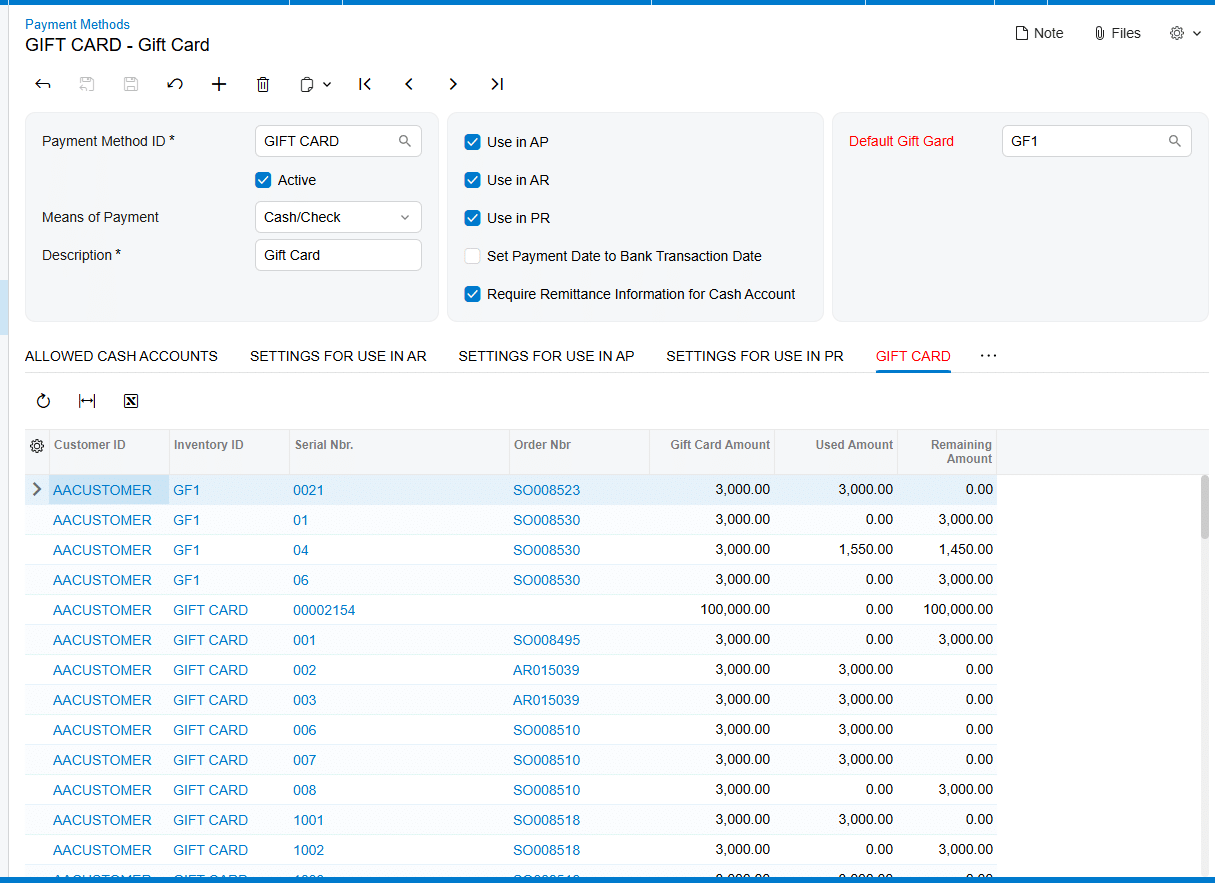
1 Create the Gift Card Payment Method on the Payment Methods screen (CA204000), connect the appropriate cash account, and set a Default Gift Card if one should appear automatically during payment creation.
2 For a non-stock model, prepare the Acumatica Non-Stock Item that uses the Gift Card Payment Method.
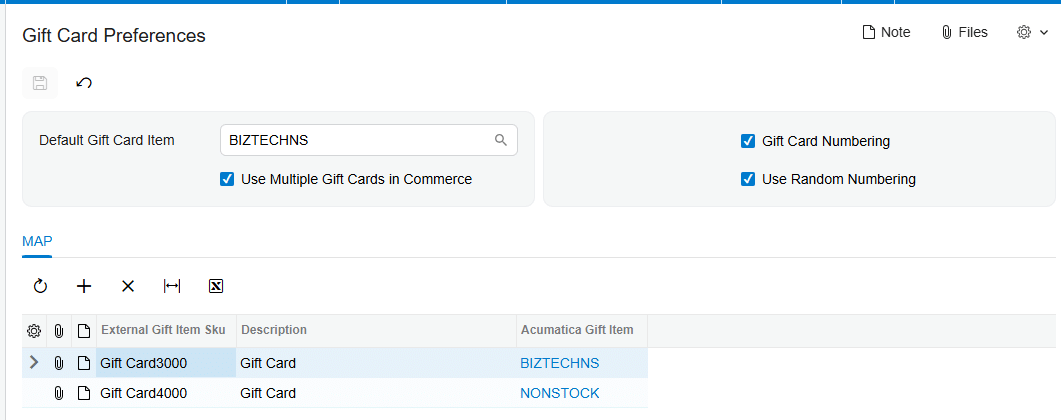
3 On Gift Card Preferences (BZ102000), select a Default Gift Card Item for external order import when one default item should represent external gift cards.
4 If external orders can contain multiple gift card SKUs, select Use Multiple Gift Cards in Commerce and map each documented External Gift Card SKU to the corresponding Acumatica Gift Card Item.
5 Choose Gift Card Numbering with Numbering Segments, including the required Auto-Incremental Value, or select Use Random Numbering for automatically generated random numbers.
6 For a stock model, create the item on Stock Items (IN202500), assign a gift-card-specific serial class, associate the Payment Method, and configure expiration tracking when required.
7 Receive stock gift card quantities and generate their serial numbers before trying to allocate them on a sales order.
8 Validate the resulting gift card item, number, and stock status on the documented setup, order, payment, and gift card inquiry screens.
Configure the Gift Card Payment Method Foundation
Both item models depend on the payment method setup. The documentation directs administrators to the Payment Methods screen (CA204000) to create a new Payment Method. Because payment methods are linked to cash accounts, it strongly recommends creating a new general ledger account for the newly created gift card item and adding the Gift Card Payment cash account on the Allowed Cash Accounts tab.
The Default Gift Card field on Payment Methods controls which gift card appears by default in the Gift Card field of the Create Payment popup. This is a payment-entry default, not the same setting as Default Gift Card Item on Gift Card Preferences. The latter determines which non-stock item represents an external gift card during order import when multiple external gift card mapping is not enabled.
Keep those two defaults separate during review. One points to the gift card used as a payment selection; the other points to the non-stock inventory item used when an external order is imported. The source documents both fields but does not describe a validation message that warns if administrators confuse them.
Configure a Non-Stock Gift Card Item and Its Numbering
The non-stock setup is the direct choice when the business wants Acumatica to treat the gift card as a Non-Stock Item and generate or accept a gift card number during order entry. The documentation says that the corresponding Acumatica Non-Stock Item for which the Gift Card Payment Method is selected can be used as a Gift Card Item and can also be mapped to external gift cards for external order import.
Open Gift Card Preferences (BZ102000) screen to control automatic numbering. When Gift Card Numbering is selected, the Numbering Segments tab becomes available. Define the numbering structure there and configure the Auto-Incremental Value, which the source identifies as essential for automatic gift card number generation.
Use Random Numbering is the alternative. When it is selected, the Numbering Segments tab is hidden. The system then generates random numbers when a gift card item and quantity are entered on a sales order. The generated values appear in the Gift Card Numbers popup. The manual says this mode prevents users from relying on a predefined numbering sequence.
For an order created in Acumatica, the gift card number can be entered manually or produced according to Gift Card Preferences. The Gift Card Numbers popup is tied to the selected item line. When quantity is greater than one, the numbers are shown in the popup. The source also states that the shipping rule for the corresponding non-stock gift card becomes Ship Complete on the sales order line.
Map External Gift Card SKUs in Gift Card Preferences
Gift Card Preferences (BZ102000) is the documented mapping point between external gift card items and Acumatica gift card items. The Default Gift Card Item field accepts the non-stock item that should represent an external gift card during order import. If Use Multiple Gift Cards in Commerce is not selected, external order import uses that default non-stock item.
Select Use Multiple Gift Cards in Commerce when the external system sends more than one gift card SKU and those SKUs must resolve to different Acumatica gift card items. The documentation states that this option allows an External Gift Card SKU to be mapped to the corresponding Acumatica Gift Card Item, and that the mapping is used when processing orders involving multiple gift cards.
A practical review should therefore compare the external SKU and the Acumatica item selected in each documented mapping. The manual does not name the individual grid columns beyond External Gift Card SKU and Acumatica Gift Card Item, and it does not describe a separate alias, cross-reference, or alternate-ID table. Use only the fields shown in Gift Card Preferences rather than assuming that another Acumatica cross-reference screen participates in this product workflow.
The documentation also does not state what happens when an incoming external gift card SKU has no matching row while Use Multiple Gift Cards in Commerce is selected. It provides no rejection message, fallback rule, error inquiry, or automatic record-creation behavior for an unmapped SKU. Test that case in a non-production environment and document the observed result before relying on it in live imports.
Configure a Serialized Stock Gift Card Item
Create a stock gift card on the Stock Items screen (IN202500). Associate the chosen item with the Payment Method used for gift card payments. The source states that the Payment Method field is enabled only for serialized items, so create and assign a Serial Class specifically for the gift card item before expecting that field to be available.
If the gift card requires an expiration date, select Track Expiration Date for its serial class. The documentation says the expiration date is established during the gift card receipt process. It does not describe setting or replacing the expiration date as part of the sales order mapping step.
Receive the item before sale. On the Receipts screen, add the Gift Card Item, enter the quantity, and generate the serial numbers with their respective expiration dates in the Line Details popup when expiration tracking is selected. The manual does not provide a screen ID for the Receipts screen or the Lot/Serial Classes screen, so none should be inferred from standard product knowledge.
On the Sales Orders screen (SO301000), allocation is required for stock gift card items. Select the serial number from the Lot/Serial Nbr field on the Line Details tab. The available gift card-related serial numbers and their expiration dates are displayed there. This is the documented stock-item selection rule; it is different from generating a new non-stock number through Gift Card Preferences.
Apply Stock Receipt and Sales Order Validation
The source documents several configuration conditions that can be checked without inventing application behavior.
1 Confirm that the Payment Method is associated with the gift card item. For a stock item, confirm that the item is serialized because the Payment Method field is enabled only for serialized items.
2 If Gift Card Numbering is used for non-stock cards, confirm that Numbering Segments are visible and that Auto-Incremental Value is configured.
3 If Use Random Numbering is selected, expect Numbering Segments to be hidden and check the Gift Card Numbers popup after entering the sales order quantity.
4 If multiple external gift card products are expected, confirm that Use Multiple Gift Cards in Commerce is selected and review each External Gift Card SKU to Acumatica Gift Card Item mapping.
5 If the stock card tracks expiration, enter the expiration date while generating serial numbers during receipt.
6 Before selling a stock gift card, confirm that a received serial number is available for allocation in Lot/Serial Nbr on the sales order Line Details tab.
7 After sale, confirm that the Gift Card tab on Payment Methods contains Customer ID, Inventory ID, Gift Card Serial Number, Order Number, Gift Card Amount, Used Amount, and Remaining Amount.
The manual does not provide the exact text of any validation error raised when these conditions are missing. It documents the required setup and expected field availability, but it does not identify a formal validation-rule list, severity level, or error code.
Handle Mapping Topics the Documentation Does Not Define
The source provides one explicit item-mapping mechanism: External Gift Card SKU to Acumatica Gift Card Item on Gift Card Preferences (BZ102000), enabled through Use Multiple Gift Cards in Commerce. It also provides one defaulting mechanism: Default Gift Card Item for external order import when multiple gift card mapping is not selected.
It does not document Acumatica item cross-references, vendor or customer part numbers, aliases, wildcard mappings, case sensitivity, duplicate external SKUs, or precedence between a mapping row and another inventory identifier. It also does not describe how unmapped records are queued, rejected, logged, or corrected. Administrators should not design those behaviors from assumptions about another connector or standard Acumatica feature.
Item classes are also absent from the Gift Card Processing manual. No item class is required by name, no class-level default is described, and no inheritance rule is given for the Payment Method, Serial Class, or gift card flags. If an implementation uses item classes for internal governance, validate that local design separately; it is not part of the documented product mapping.
Finally, the manual does not state that a serialized stock gift card can be selected as Default Gift Card Item for external imports. Its definition identifies that field as a Non-stock Item. Follow that documented restriction unless Biz-Tech Services supplies product-specific guidance for a different configuration.
Where to Check Your Work
Use these documented screens and fields to confirm the configuration from setup through the resulting gift card record.
1. Payment Methods (CA204000): confirm the Gift Card Payment Method, Allowed Cash Accounts, the payment-level Default Gift Card selection, and the Gift Card tab after sale.
2. Gift Card Preferences (BZ102000): confirm Default Gift Card Item, Use Multiple Gift Cards in Commerce, each External Gift Card SKU mapping, Gift Card Numbering, Use Random Numbering, and Numbering Segments when visible.
3. Stock Items (IN202500): confirm that the stock gift card is serialized and that the Payment Method is associated with the item.
4. The item serial class: confirm Track Expiration Date when expiration control is required. The source does not provide the Lot/Serial Classes screen ID.
5. The Receipts screen and Line Details popup: confirm the received quantity, generated serial numbers, and expiration dates when tracked. The source does not provide the Receipts screen ID.
6. Sales Orders (SO301000): for non-stock cards, check Gift Card Numbers on the selected line and in the popup; for stock cards, check Lot/Serial Nbr on Line Details and confirm allocation.
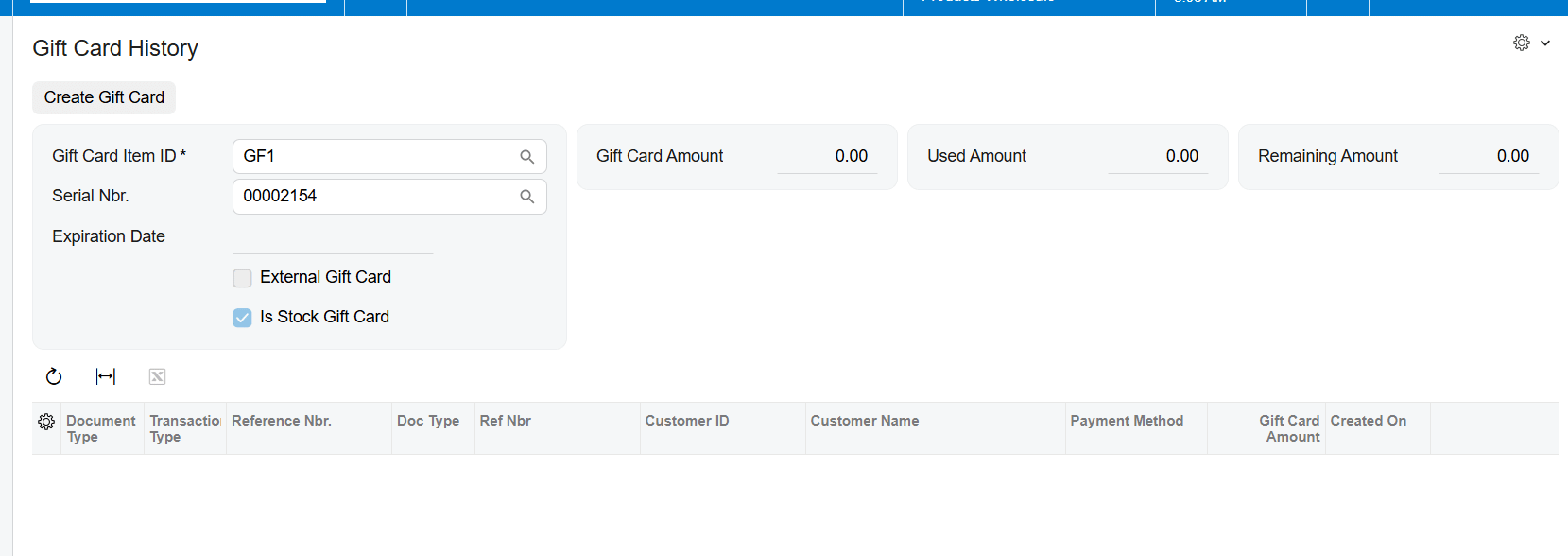
7. Gift Card History (BZ407099): confirm External Gift Card and Is Stock Gift Card indicators and review the card record reached through its serial number.
8. Gift Card Summary: review the corresponding gift card information. The source names this screen but does not provide its screen ID.
Serialized and Non-Stock Gift Card Configuration Frequently Asked Questions
What is the main difference between serialized and non-stock gift cards in Acumatica?
A non-stock gift card can receive a manually entered number or a number generated from Gift Card Preferences. A stock gift card must be serialized, received into stock, and allocated by its available Lot/Serial Nbr on the sales order.
Where do I map an external gift card SKU to an Acumatica item?
Use Gift Card Preferences (BZ102000). Select Use Multiple Gift Cards in Commerce, then map the External Gift Card SKU to the corresponding Acumatica Gift Card Item.
What happens when Use Multiple Gift Cards in Commerce is not selected?
External order import uses the Non-Stock Item selected in Default Gift Card Item. The documented default applies instead of individual external SKU mappings.
Why is the Payment Method field unavailable for my stock gift card item?
The documentation states that the field is enabled only for serialized items. Create and assign a Serial Class specifically for the gift card item, then review the stock item setup again.
Why did the Numbering Segments tab disappear?
The tab is hidden when Use Random Numbering is selected. Clear that option and use Gift Card Numbering when the implementation requires a predefined numbering structure.
Where is the expiration date entered for a serialized gift card?
Select Track Expiration Date for the serial class, then enter the expiration date when serial numbers are generated during the gift card receipt process. The source does not describe adding it during sales order mapping.
Does the product use item cross-references or aliases for gift card mapping?
The documentation does not say that it does. It documents External Gift Card SKU to Acumatica Gift Card Item mapping on Gift Card Preferences and does not define a separate cross-reference or alias process.
How does Acumatica handle an unmapped external gift card SKU?
The manual does not define the result, error message, fallback, or correction queue for an unmapped SKU when multiple mapping is enabled. Test the condition outside production and obtain product-specific guidance before establishing an operating procedure.
Work With Biz-Tech Services Gift Card Processing
A reliable gift card item configuration keeps three decisions distinct: whether the item is non-stock or serialized stock, how its number is created, and how an external SKU resolves to an Acumatica item. Gift Card Preferences handles documented defaulting and external SKU mapping, while serialized stock cards add receipt, expiration, and allocation controls.
If you need help validating serialized and non-stock gift card setup, external SKU mappings, or numbering behavior in your Acumatica environment, visit https://biz-techservices.com to speak with Biz-Tech Services about Gift Card Processing.
Chech also Youtube video for detailed explanation: https://www.youtube.com/watch?v=FyVcs9bR5NY

Acumatica 2026 R2 Upgrade Guide: Changes, Risks, and a 30-Day Readiness Plan
Prepared for Biz-Tech Services | Last verified 12 October 2026
Acumatica 2026 R2 is now generally available, but the decision to upgrade should be based on operational readiness rather than release-day enthusiasm. The publicly listed launch build was 26.200.0334.37177 when this guide was verified. That number is a point-in-time reference, not a permanent production target. Recheck the download page, release notes, known issues, edition coverage, and licensed services before every sandbox refresh and again before the production window. [1] [3]
For executives, the central question is not whether the release contains useful features. It is whether the organization can adopt the platform changes without interrupting cash, shipping, production, project billing, reporting, customer service, or regulatory controls. Modern UI is the default. Infrastructure requirements have moved forward. Mobile definitions, commerce extensions, payment plug-ins, reports, integrations, and ISV products may need targeted work. A disciplined upgrade therefore combines technical validation with business-process ownership, evidence-based testing, training, reconciliation, and a timed rollback decision.
This Acumatica 2026 R2 upgrade guide translates the release into actions for CEOs, CFOs, COOs, operations leaders, application owners, developers, and QA teams. It covers the highest-impact changes, implications for finance and industry workflows, customization and integration risk, a 30-day readiness plan, minimum test coverage, cutover controls, and the measures leaders should review during stabilization. Feature availability varies by edition, deployment model, geography, configuration, license, and third-party agreement, so confirm entitlement before building a business case around any single capability.
Table of Contents
- Executive summary of the highest impact changes
- The business case for upgrading to Acumatica 2026 R2
- Release facts and assumptions to verify
- What Acumatica 2026 R2 means for executive sponsors
- Finance and accounting impact
- Distribution and commerce impact
- Manufacturing impact
- Construction and project operations impact
- IT data and platform impact
- Modern UI readiness and Classic UI risk
- Infrastructure and deployment prerequisites
- Customization and ISV risk inventory
- Integration API commerce and payment risk
- AI analytics and data governance
- The 30 day Acumatica upgrade plan
- Testing strategy and acceptance evidence
- Training adoption and change management
- Cutover rollback and stabilization
- Executive scorecard and post upgrade value
- Ten changes to review before moving to 2026 R2
- Supporting 2026 R2 article roadmap
- Frequently Asked Questions
- Book a Biz Tech readiness assessment
- Sources used to prepare this article
Executive summary of the highest impact changes
Acumatica positions 2026 R2 around embedded AI, governed analytics, a modern platform, easier portal and payment experiences, and deeper industry workflows. Those themes are useful for discovery, but they do not define the upgrade plan. The plan should begin with the changes that can stop work or invalidate controls: Modern UI coverage, supported infrastructure, customization compatibility, ISV certification, integration behavior, data reconciliation, and restore readiness. Optional capabilities should enter scope only after an owner, entitlement, expected outcome, and test capacity are confirmed. [2]
Modern UI is the default in 2026 R2 and ordinary interface switching is removed. Classic-only assets remain temporarily accessible with warnings, and administrators have a limited legacy option for troubleshooting. Acumatica says Classic-only functionality is scheduled to become unavailable with 2027 R1. That makes 2026 R2 a transition release: organizations can finish migration work while there is still a fallback, but they should not design operating procedures that depend on that fallback. [5]
Customer-managed environments also face a clear platform gate. Current requirements list Microsoft SQL Server 2022 or 2025, Windows Server 2019 or 2022, IIS 10, and an Integrated application pool. SQL Server 2019 is not supported for 2026 R2. On the application side, older mobile MSDL definitions may need new Modern UI view and DAC names, obsolete commerce APIs have been removed, and payment integrations can require rebuilt assemblies because processing interfaces have changed. [6] [9] [10] [11]
- Treat the target build as a governed decision and verify it again immediately before cutover.
- Separate the core technical upgrade from optional AI, portal, analytics, and workflow rollouts unless a business deadline requires one combined release.
- Require evidence for every go-live claim: test result, reconciliation, vendor confirmation, rehearsal duration, or named risk acceptance.
- Give business owners authority to stop go-live when an essential workflow or financial control fails, even if the software installation itself succeeds.
The business case for upgrading to Acumatica 2026 R2
An upgrade creates value when it removes operational friction, improves decisions, protects supportability, or prepares the organization for growth. Build the case around measurable constraints in the current environment. Examples include slow inquiry performance, dependence on Classic UI, manual promise-date calculations, limited shop-floor access, fragmented vendor communication, delayed reporting, high integration support effort, or the need for governed AI access. A feature without a current business problem is a candidate for later optimization, not a reason to expand the critical path.
Executives should distinguish three investments. The first is mandatory readiness: supported infrastructure, compatibility work, security, testing, and cutover controls. The second is adoption: redesigned roles, job aids, training, and process ownership. The third is optimization: new automation, dashboards, portals, AI scenarios, or industry features. Combining all three into one budget can hide the true cost of keeping the platform supportable and make it difficult to measure returns. A clearer business case shows the baseline upgrade cost separately from optional initiatives and assigns benefits to the owners who can actually produce them.
Define success in business terms before the sandbox is built. A distributor may target fewer promise-date exceptions and faster pick confirmation. A manufacturer may focus on schedule adherence, labor capture, and planning time. A construction firm may prioritize vendor-document turnaround and project forecast accuracy. Finance may require an unchanged close duration and zero unexplained reconciliation differences. IT may target fewer unsupported components, shorter deployment time, and faster defect diagnosis. These measures keep the project centered on operational outcomes instead of a generic claim that the company is now on the latest version.
Release facts and assumptions to verify
Freeze a release-facts sheet before formal testing and refresh it before production approval. Record the source version, target build, publication date, deployment model, database and operating-system versions, installed modules, tenants, branches, localizations, ISV products, customization packages, mobile projects, endpoints, and licensed services. Link each fact to an official page or written vendor response. The sheet prevents teams from testing one build, buying services for another, and approving a third because a newer package appeared during the project.
The October 1, 2026 general-availability announcement and community launch post establish the release timing and public launch build, while the release overview describes the product themes. They do not replace the release notes, known-issues list, or solution-specific documentation. Treat marketing summaries as a navigation aid. When a claim affects production scope, licensing, data access, supported infrastructure, or an integration contract, confirm it in the official technical source that governs that decision. [1] [2] [3]
Pay special attention to words such as available, embedded, included, supported, preview, and generally available. A capability may exist in the release but still need enablement, a specific edition, an additional subscription, a supported region, a compatible connector, or a role assignment. Capture those dependencies in the scope register. If entitlement cannot be confirmed before testing begins, classify the feature as conditional and keep it out of the launch benefit forecast.
What Acumatica 2026 R2 means for executive sponsors
The executive sponsor owns the conditions for a safe decision, not every technical detail. The most valuable contribution is to define what cannot be compromised: financial integrity, customer commitments, production continuity, payroll, payment processing, project billing, data protection, and the ability to restore service. The sponsor should also resolve priority conflicts. When a new feature competes with remediation of a critical customization, supportability and operating continuity should win unless the business consciously accepts the risk.
A useful steering review is short and evidence based. Ask whether infrastructure is supported, whether every critical package and ISV product is certified for the target build, whether all tier-one workflows have passed, whether reconciliations are within approved tolerances, whether the cutover has been rehearsed, whether the restore has been proven, and whether users have completed role-based practice. Red, amber, and green labels are useful only when the evidence and decision owner sit behind them.
Avoid turning go-live into a referendum on sunk cost. The closer the cutover date becomes, the harder it is for teams to report uncomfortable results. Set stop criteria at the start and state that a delayed go-live can be a successful control decision. This protects the organization from forcing an upgrade through after a material reconciliation difference, an unsupported component, an unresolved authentication problem, or a critical process failure has already been identified.
- Approve the target outcome, risk appetite, budget boundary, and business owners.
- Review blockers weekly and require a date, owner, evidence, and fallback for each one.
- Protect testing time from last-minute scope additions that do not affect supportability.
- Require a final written go or no-go decision from both IT and the affected business leaders.
Finance and accounting impact
Finance should own the control baseline because many upgrade defects first appear as small differences in balances, aging, taxes, allocations, or document status. Capture trial balances by company, branch, ledger, and period; AP and AR aging; cash balances; fixed assets; deferred revenue; tax reports; inventory valuation; unreleased batches; and selected financial statements. Record the report parameters and as-of time so the same evidence can be produced before and after the upgrade. A total without filters is not a reliable control.
Test complete transaction chains, not isolated screens. For procure-to-pay, include vendor entry, purchase receipt, invoice, approval, payment, void, and bank reconciliation. For order-to-cash, include credit review, shipment, invoice, payment, adjustment, refund, and aging. Exercise multiple branches, currencies, tax zones, periods, approval paths, and payment methods that reflect production. Review generated entries and downstream reports, because a document can save successfully while posting logic, classification, or reporting behavior is wrong.
New AI-assisted analysis, dashboards, matching behavior, approvals, payroll changes, or 1099 changes should be tested as separate capabilities with their own permissions and acceptance criteria. Finance must know which data is exposed, which suggestion is advisory, who approves the result, and how exceptions are documented. Do not let a successful core upgrade become implicit approval for an automation that has not been tested against control requirements. [2]
Finance acceptance evidence
The finance sign-off pack should contain pre- and post-upgrade control totals, screenshots or exports of critical reports, a sample of posted transactions, payment and bank-interface results, open-item aging, and a list of accepted differences. The controller or delegate should sign the evidence, not simply confirm that users logged in. Keep the pack with the cutover record so later questions can be answered without reconstructing the project from email.
Distribution and commerce impact
Distribution testing should follow inventory from demand through fulfillment and return. Cover sales-order entry, availability, allocation, promise dates, purchasing, receiving, replenishment, wave or batch processes, picking, packing, shipment, invoicing, returns, transfers, cycle counts, and valuation. Use real item classes, warehouses, units of measure, kits, lot or serial controls, backorders, and partial shipments. A demonstration with one stocked item cannot prove that warehouse operations will survive the cutover.
Available-to-Promise and other 2026 R2 distribution improvements can affect customer commitments, so compare system dates with current policy and planner expectations. Validate supply and demand sources, calendars, lead times, allocation rules, transfer assumptions, and exceptions. Decide who may override a proposed date and how the reason will be captured. If customer service, purchasing, and warehouse teams use different definitions of available stock, the upgrade will expose the conflict rather than resolve it. [2]
Commerce connectors need transaction-level reconciliation. Test catalog changes, inventory and price synchronization, orders, tax, discounts, payments, cancellations, partial fulfillment, refunds, returns, and retry behavior. Acumatica removed obsolete commerce APIs in 2026 R2, so custom connector extensions must be reviewed against the documented replacements. Monitor queues and duplicates during the first production sync; an integration that appears healthy at the endpoint can still omit or replay business documents. [10]
Shipping and warehouse devices deserve a physical rehearsal. Validate scanners, labels, printers, scales, carrier services, packaging logic, and user permissions on the actual network where possible. Measure response time during representative load. When a process depends on a local device or external service, document the manual fallback and how transactions will later be reconciled. This is especially important when the cutover occurs before a high-volume shipping day.
Manufacturing impact
Manufacturers should test planning, scheduling, execution, material movement, labor, completion, quality, and costing as one connected operating model. Include realistic calendars, constraints, work centers, alternate resources, bills of material, routings, engineering changes, subcontract steps, scrap, backflush rules, lot or serial tracking, and production close. Planning results should be compared with known demand and capacity situations so the team can explain why recommendations changed.
Optimized APS and expanded Shop Floor Kiosk capabilities may offer meaningful gains, but they also introduce adoption and configuration work. Treat a planning-engine change as an operational initiative, not a checkbox within the platform upgrade. Establish a baseline for schedule generation time, late-order count, constraint utilization, and planner overrides. Run the old and proposed planning approach against the same scenario, document differences, and involve the planners who will defend the schedule on the floor. [2]
For kiosk use, validate device placement, shared-device security, badge or credential behavior, shift changes, clock-in and clock-out, labor moves, material issue, completion, downtime, rework, offline contingencies, and supervisor correction. Confirm that transactions post to the expected employee, operation, production order, branch, and financial period. A fast kiosk experience is valuable only when the resulting labor and cost data can be trusted.
Manufacturing reconciliation should include open production orders, component allocations, work in process, completed quantity, labor, overhead, material variances, and inventory value. Review MRP or DRP messages and critical schedules immediately after cutover. If planning runs are long, include their full duration in the cutover and stabilization schedule rather than assuming they will finish after users arrive.
Construction and project operations impact
Construction and project teams should organize testing around the contract and project lifecycle: estimate or budget, commitment, change, subcontract, time and expense, progress, billing, retainage, revenue recognition, forecasting, compliance documents, vendor access, and closeout. Include parent-child project structures, multiple branches, taxes, cost codes, equipment, and security restrictions that mirror the production design. Project profitability reports must tie to financial control totals after representative transactions are posted.
Vendor Portal and document-center improvements can reduce email and manual follow-up, but external access changes the risk model. Test invitation, identity, role, project visibility, upload and download, document status, expiration, rejection, resubmission, and termination of access. Use test accounts that represent different vendor relationships. Confirm that one vendor cannot see another vendor's documents or projects, and that internal users can identify who changed a record and when. [2]
Project billing deserves focused regression testing because small differences can affect revenue, cash, and customer confidence. Validate time and material, progress billing, retainage, taxes, change orders, reversals, adjustments, and invoice presentation. Compare billed-to-date, cost-to-date, committed cost, forecast, and margin before and after the upgrade. If a report was customized, validate the calculation and layout separately from the underlying transaction.
IT data and platform impact
IT should treat the upgrade as a controlled change to an application ecosystem, not a single website. The inventory must include application instances, databases, operating systems, SQL versions, IIS settings, certificates, identity providers, email, file locations, scheduled processing, webhooks, endpoints, monitoring, backup tools, replication, reporting, data warehouses, devices, and network dependencies. Map each component to an owner and a recovery action. Unknown ownership is itself a production risk.
Build the sandbox from a production-like backup using approved data-handling controls. Redirect or disable outbound email, payment, commerce, tax, shipping, webhooks, and file transfers before users enter the environment. Use separate credentials where possible and make the sandbox visually distinct. A good test environment is representative enough to expose scale and configuration defects but isolated enough that testing cannot create real financial or customer transactions.
Measure performance by business task. Record login time, screen load, inquiry execution, report generation, batch release, import, API throughput, planning, and scheduled-job duration using repeatable data and concurrency. Compare median and slow cases, not a single best run. If performance changes, capture the query, filters, row count, role, browser, time, and server metrics so the problem can be reproduced. Modern UI adoption, optimized Generic Inquiries, and grouped-table behavior can change where performance bottlenecks appear. [2]
Modern UI readiness and Classic UI risk
Create a role-by-role Modern UI inventory. Start with menus and workspaces, then trace the tasks people actually perform. Include data entry, lookups, selectors, filters, attachments, approvals, mass actions, imports, exports, report parameters, printing, dashboards, pivot tables, inquiries, favorites, mobile steps, keyboard use, and accessibility needs. A screen-opening test is insufficient because the highest-risk defects often occur in secondary actions or uncommon states.
Identify Classic-only forms, custom screens, layout-editor changes, JavaScript or CSS assumptions, dashboards, and documentation that still depends on the old interface. Classify each item as migrate, replace, retire, or temporarily accept. Give every accepted item an owner and deadline before 2027 R1. The legacy setting may help diagnose an issue during transition, but it should not be the normal operating procedure or the basis for postponing redesign. [5]
Training should use the final Modern UI configuration, security roles, navigation, and terminology. Ask users to complete realistic work without an instructor directing every click. Capture where they hesitate, choose the wrong action, or cannot find a record. These observations reveal navigation and job-aid gaps that technical test scripts will miss. Where a process changes, update the standard operating procedure and control narrative, not just the screenshot.
Infrastructure and deployment prerequisites
For customer-managed deployments, verify the platform against the current installation guide before scheduling the cutover. The requirements reviewed for this article include SQL Server 2022 or 2025, Windows Server 2019 or 2022, IIS 10, and an Integrated application pool. SQL Server 2019 and Classic application-pool mode are not supported for 2026 R2. Confirm browser, database compatibility, storage, memory, certificates, service accounts, and any separate reporting or integration hosts as part of the same review. [6]
Do not combine an operating-system, database, infrastructure, and Acumatica upgrade in one production window unless the integrated change has been rehearsed end to end. Separating layers can reduce diagnosis time, but sequencing depends on the supported source and target combinations. Document the chosen order, intermediate support state, downtime, backup points, and rollback boundary. If a managed hosting provider controls a layer, obtain written confirmation of its schedule and responsibilities.
Prove that backups can be restored within the recovery objective. A successful backup job is not the same as a recoverable environment. Test database restore, application configuration, encryption or certificate dependencies, file attachments, and connection changes in a safe environment. Record the duration and the person authorized to begin rollback. This evidence should be current enough to reflect the target architecture and the planned cutover sequence.
Customization and ISV risk inventory
Create one authoritative register for customization projects, compiled libraries, graph extensions, DAC extensions, custom screens, reports, inquiries, workflows, mobile definitions, site files, import and export scenarios, business events, notifications, and external packages. Record business purpose, technical owner, source control location, dependency order, target-build status, validation result, test evidence, rollback method, and retirement candidate. A customization with no owner and no source is a blocker until its importance is understood.
Run Acumatica compatibility validation against the exact target build in a development environment. Review graph and method overrides, base graphs, DAC fields, event handlers, return types, assembly references, and obsolete APIs. Passing validation reduces risk but does not prove the business outcome. Publish projects in their documented order and exercise the process that depends on each package. Preserve logs and the final package set used in the approved sandbox. [8]
For every ISV product, request a written statement that identifies the supported Acumatica release or build, compatible product version, required upgrade steps, license or configuration changes, known limitations, and support contact for the cutover. Do not rely on a generic statement that the vendor supports 2026 R2. The installed combination matters, particularly when multiple products interact with the same screen, event, endpoint, or database object.
- Blocker: prevents an essential process, control, security boundary, publication, or recovery path.
- Required before go-live: material defect with an agreed fix and retest date.
- Accepted risk: understood impact, named owner, documented workaround, and executive approval.
- Follow-on improvement: useful change that does not affect safe operation of the upgraded baseline.
Integration API commerce and payment risk
Inventory every inbound and outbound path: REST and SOAP clients, OData feeds, commerce connectors, EDI, tax, shipping, WMS, CRM, banks, payment gateways, payroll, expense, reporting, data warehouses, files, imports, exports, webhooks, scheduled jobs, and robotic automation. Record direction, endpoint, authentication, data owner, schedule, volume, retry behavior, idempotency method, monitoring, reconciliation, and business fallback. Pay special attention to integrations that run infrequently because they may not appear during a short test cycle.
Test more than the successful create path. Include update, delete or cancel, partial completion, reversal, return, refund, duplicate, timeout, invalid data, expired credentials, unavailable downstream service, replay, and out-of-order delivery. Confirm HTTP behavior, status polling, response handling, and endpoint versions. Reconcile source and target totals at the business-document level. Logs should connect a technical message to the order, invoice, payment, shipment, or employee that operations understands.
Mobile customizations created for earlier versions may use WSDL names that no longer match Modern UI views and DAC fields. Acumatica provides an MSDL adaptation path, but generated changes still require code review and task-based testing. For commerce, obsolete APIs have been removed and custom extensions should use documented replacements. For payments, synchronous adapters remain in some scenarios, yet assemblies compiled against changed return types may still need rebuilding and complete authorization, capture, void, refund, settlement, and failure testing. [9] [10] [11]
Define transaction recovery before production. During cutover, decide which interfaces are paused, which messages remain queued, which upstream systems may continue, and how duplicates will be prevented when processing resumes. Set an owner for each queue and a maximum acceptable backlog. The recovery procedure should explain how to identify the last confirmed transaction, replay safely, reconcile gaps, and communicate to business teams when normal processing has resumed.
AI analytics and data governance
Acumatica AI Assistant is generally available for 2026 R1 and later, but use depends on subscription enablement, security roles, approved Generic Inquiries, and AI Unit consumption. MCP access in the documented release is read-only against approved inquiries. Those controls are not setup trivia; they define what data the assistant can retrieve and what the organization can monitor. Confirm current commercial and technical terms before positioning AI as an included benefit of the upgrade. [12]
Begin with a narrow, reviewable use case. Examples include explaining a governed inquiry, summarizing approved operational data, or helping a manager investigate an exception. Document the decision the user will make, the permitted data sources, excluded fields, expected accuracy, human review, escalation, retention, and usage budget. Test correct answers, incomplete data, ambiguous questions, unauthorized requests, and adversarial prompts. An impressive demonstration is not a production control.
Generic Inquiries deserve the same governance as reports and APIs. Review row-level access, branch restrictions, personal or financial data, joins, filters, calculated fields, refresh behavior, and performance. Assign an owner who approves changes and periodically confirms that the inquiry still represents the intended business definition. Monitor AI Units and usage patterns so cost and adoption remain visible. If users export data to another tool, make that boundary explicit in policy and training.
In many environments the safer sequence is to stabilize 2026 R2 first, then enable AI and advanced analytics through a separate release. This preserves a clean baseline and makes performance, security, and adoption issues easier to diagnose. A combined launch may be reasonable when there is a firm business deadline, but it requires dedicated testing capacity and a rollback option that can disable the new capability without reversing the core upgrade.
The 30 day Acumatica upgrade plan
This plan assumes that a representative sandbox can be prepared quickly and that major infrastructure changes have already been identified. A heavily customized, multi-tenant, or highly integrated environment may need more than 30 days. Keep the gates and extend the calendar instead of compressing validation. The purpose of the sequence is to create progressively stronger evidence while there is still time to remediate or reschedule.
| Timing | Focus | Required work | Exit evidence |
|---|---|---|---|
| Days 30 to 26 | Inventory and scope | Confirm target build, infrastructure, modules, tenants, Classic assets, customizations, ISVs, interfaces, reports, owners, entitlements, and business measures. | Signed scope, release-facts sheet, risk register, and sandbox plan |
| Days 25 to 21 | Sandbox upgrade | Refresh safe production-like data, isolate external services, apply the target build, adapt packages, publish in order, redirect endpoints, and capture logs. | Repeatable upgrade steps and complete initial defect list |
| Days 20 to 14 | End-to-end testing | Run tier-one business processes with representative roles, volumes, devices, interfaces, reports, and reconciliation controls. | Passed scripts, control totals, performance results, and named defect owners |
| Days 13 to 8 | Remediation and adoption | Fix and retest defects, confirm ISV versions, finish Modern UI job aids, train users, and test manual fallbacks. | Critical defects closed and users complete guided practice |
| Days 7 to 4 | Cutover rehearsal | Time backup, lockout, upgrade, package publication, interface restart, smoke tests, reconciliation, communication, and rollback. | Approved runbook with actual durations and dependencies |
| Days 3 to 1 | Go or no-go | Recheck build and known issues, freeze changes, prove backups, review blockers, confirm staffing, and obtain business and IT approval. | Written decision and controlled production package set |
| Day 0 and week 1 | Cutover and stabilize | Execute the runbook, reconcile early, monitor queues and jobs, triage daily, record changes, and defer optional activation. | Stable operations, transparent issue queue, and handoff to support |
Days 30 to 21 scope and sandbox
Name one owner for each business process and one technical owner for each platform component. Rank processes by operational consequence and frequency. Create the production baseline, sanitize the test copy as required, redirect external connections, and document the first upgrade attempt in enough detail that another person can repeat it. The first sandbox run is for discovery; the second should prove that remediation and sequencing are controlled.
Days 20 to 8 testing and remediation
Run tier-one scenarios first so serious defects surface while developers and vendors still have time to respond. Hold brief defect reviews with severity, business impact, reproducibility, owner, target date, build, and retest evidence. Train super users in the same environment after the core configuration stabilizes. Their questions often identify missing roles, navigation, reports, and exception paths before broad training begins.
Days 7 to 0 rehearsal and decision
Rehearse the cutover with the same sequence, accounts, package set, scripts, and evidence owners planned for production. Record actual durations and the last safe rollback time. In the final days, freeze changes, review new release information, confirm vendor coverage, and verify backups. The go or no-go meeting should decide against published criteria, not optimism about fixing issues during the window.
Testing strategy and acceptance evidence
Organize testing by end-to-end process and risk tier. Tier one includes processes that stop cash, shipping, production, project billing, payroll, financial close, security, or legal compliance. Tier two includes important work with a temporary manual fallback. Tier three covers low-frequency or convenience functions. This ranking helps the team spend its limited time on consequences rather than counting test cases. Every script needs an owner, prerequisites, steps, expected result, evidence location, status, and retest reference.
Use production-like roles and data conditions. Test more than administrators, because elevated access can hide security defects. Include branches, companies, currencies, tax zones, warehouses, projects, item types, devices, browsers, and record states that matter. Run negative cases and exception paths. Confirm that unauthorized users are blocked, approvals route correctly, duplicates are prevented, invalid data produces an understandable response, and recovery works after a partial failure.
Build a reusable reconciliation pack: trial balances, AP and AR aging, cash, inventory quantity and value, open sales and purchase orders, open production and project documents, pending integration records, scheduled jobs, and critical report totals. Record filters, as-of time, tolerance, reviewer, and reason for any difference. Run the same pack before and after sandbox upgrades, immediately before production cutover, and after production opens.
| Test stream | Minimum scenarios |
|---|---|
| Finance | AP, AR, GL, taxes, cash, payments, financial statements, allocations, and selected close steps |
| Distribution | Order, promise, allocation, picking, shipment, invoice, return, inventory, barcode, printing, and carrier services |
| Manufacturing | Planning, scheduling, release, material, labor, completion, costing, quality, and Shop Floor Kiosk |
| Construction | Commitments, changes, billing, retainage, vendor access, compliance, security, forecasting, and project reports |
| Integrations | Success, exception, timeout, retry, duplicate prevention, credentials, schedules, and cross-system reconciliation |
| Platform | Sign-in, roles, branches, attachments, approvals, email, mobile, jobs, events, reports, backup, restore, and performance |
Training adoption and change management
Training should be role based, task based, and timed close enough to go-live that users remember the work. Begin with what changes in the user's day: where to navigate, how to find records, which step changed, which approval or control remains, and where to get help. Avoid presenting the release as a tour of every new feature. Most users need confidence in a small set of recurring tasks and the ability to recognize exceptions.
Use short job aids with final screenshots, navigation paths, decision points, and recovery steps. For critical roles, require hands-on practice in the approved sandbox and record completion. Super users should test the help process by raising realistic questions before go-live. Update operating procedures, onboarding material, control narratives, and support scripts where the process or interface changes. Old documentation that directs users to Classic UI is a migration risk.
Plan support coverage by business rhythm. Finance may need extra help during payment runs or close; distribution during carrier pickup; manufacturing during shift changes and planning runs; construction during billing; and IT during scheduled integration windows. Publish one intake route, severity definitions, expected response, and status-update cadence. A visible support model reduces informal workarounds and helps the team detect patterns early.
Cutover rollback and stabilization
The production runbook should list every step, owner, prerequisite, start time, expected duration, evidence, decision point, and fallback. Include user lockout, interface pause, backup, infrastructure change, application and database upgrade, package publication, endpoint update, cache or index work, service restart, smoke tests, reconciliation, interface release, communication, and monitoring. Use the standard Configuration Wizard upgrade path described by Acumatica; separate website-only or database-only approaches do not provide the same customization compatibility validation. [7]
Define rollback authority, triggers, and the latest safe decision time before the window. Triggers commonly include an upgrade failure, inability to publish a critical package, essential authentication failure, a material unexplained reconciliation difference, loss of a required integration, or inability to meet the recovery-time objective. Rollback is not simply restoring a database; it must account for transactions created in connected systems, queued messages, files, credentials, and user communication.
During the first 24 hours, monitor login failures, scheduled jobs, business events, integration queues, payments, banking, email, printing, reports, planning, dashboards, and response time. Reconcile high-value controls before volume grows. Hold short triage meetings with business and technical owners, record every production change, and publish known workarounds. Do not allow urgent fixes to bypass source control, testing, or documentation unless the incident process explicitly authorizes the exception.
During the first week, review issues by pattern rather than treating every ticket as isolated. Separate training questions, security gaps, configuration defects, code defects, data issues, performance problems, and third-party failures. Confirm that daily and weekly schedules have run, backlogs are cleared, and manual fallbacks are reconciled. Close the project only after ownership transfers to support and the next optimization backlog has been prioritized.
Executive scorecard and post upgrade value
A useful scorecard connects readiness, stability, adoption, and value. Report a small set of measures with a baseline, target, owner, and review date. Avoid a single completion percentage because it can hide one unresolved blocker among dozens of low-risk tasks. During readiness, the scorecard supports the go-live decision. After cutover, it shows whether the organization has returned to normal and whether optional 2026 R2 capabilities are producing the intended improvement.
| Dimension | Measures | Primary owner |
|---|---|---|
| Readiness | Tier-one pass rate, open blockers, ISV confirmations, infrastructure support, rehearsal duration | Upgrade lead and process owners |
| Integrity | Financial differences, inventory differences, document-count differences, duplicate or missing integration records | Controller and data owners |
| Stability | Severity-one incidents, failed jobs, queue backlog, login failures, response time, support volume | IT operations |
| Adoption | Training completion, Modern UI task success, workaround use, help requests by role | Business change lead |
| Value | Close time, promise accuracy, pick time, schedule adherence, billing cycle, inquiry performance, manual touches | Executive benefit owners |
Set a stability threshold before declaring success. For example, critical integrations have completed two normal cycles, financial and inventory reconciliations are approved, no severity-one incident remains open, backlogs are within normal range, and business owners confirm that essential tasks can be completed without unapproved workarounds. Then schedule 30-, 60-, and 90-day reviews for adoption and value. Benefits that are not owned and measured usually remain release-note promises.
Ten changes to review before moving to 2026 R2
These ten points are written as an executive recap and can also be adapted into the LinkedIn carousel titled 10 changes to review before moving to 2026 R2. Keep the social version concise and link it back to this guide so readers can reach the operational detail, source links, and readiness plan.
- Modern UI is now the default, so test complete role-based tasks and retire dependence on Classic UI before 2027 R1.
- The target build can change, so verify release notes, known issues, edition coverage, and rollout timing before every approval gate.
- Customer-managed infrastructure must meet current 2026 R2 requirements, including supported SQL Server, Windows Server, IIS, and application-pool settings.
- Every customization package needs compatibility validation plus functional testing against the exact target build.
- Every essential ISV solution needs written version compatibility, upgrade instructions, known limitations, and cutover support details.
- Mobile MSDL definitions may need adaptation to Modern UI view and DAC names, followed by review on the real device workflow.
- Commerce API removals and payment interface changes require targeted code review, rebuilds where applicable, and exception-path testing.
- AI and analytics require entitlement, approved data sources, security roles, governance, human review, and consumption monitoring.
- Go-live depends on process evidence, reconciliations, a rehearsed cutover, and a proven restore, not on a successful installer message.
- The first week needs daily monitoring, transparent triage, controlled fixes, and delayed activation of optional features until the baseline is stable.
Supporting 2026 R2 article roadmap
Use this article as the central Acumatica 2026 R2 hub. Each focused article below should answer one narrower implementation question, link back to this guide, and be linked from the relevant section here when published. Do not add placeholder URLs to the live page; update each title with its canonical link after publication.
- Acumatica 2026 R2 Modern UI Migration Checklist Before Classic UI Fallback Ends
- Acumatica AI Assistant in 2026 R2 Use Cases AI Units GI Security and Governance
- Acumatica Classic UI and Chromium XSLT Patch and Test Before November 17 2026
- Acumatica AI Agents and Agent Actions A Governed Automation Playbook
- Acumatica Modern UI Performance Troubleshooting After an Upgrade
- Faster Generic Inquiries in Acumatica 2026 R2 Grouped Tables Query Design and Dashboard Performance
- Available to Promise in Acumatica 2026 R2 Setup Sales Order Behavior and Pitfalls
- Handling Acumatica REST Long Running Operations 202 Location Polling 204 and 409
- Using AI to Validate Acumatica Customizations Before an Upgrade Safely
- Converting Acumatica Custom Screens to Modern UI Extension vs New Screen Decision Guide
- Acumatica Construction Vendor Portal in 2026 R2 Document Center Security and Rollout
- Optimized APS vs Classic APS in Acumatica When Manufacturers Should Migrate
- Acumatica Shop Floor Kiosk Rollout Checklist Devices Labor Capture Permissions and Adoption
- Acumatica Exchange Sync Microsoft Graph Upgrade Checklist for the October 2026 Requirement
- BILL vs AvidXchange in Acumatica 2026 R2 AP Workflow Fit Controls and Integration Questions
- How Acumatica Calculates Demand Forecasts for Inventory Planning
- Acumatica REST API vs OData Choosing the Right Integration Pattern in 2026
Frequently Asked Questions
Is Acumatica 2026 R2 available now
Yes. Acumatica announced general availability on October 1, 2026. The publicly listed launch build was 26.200.0334.37177 when this guide was verified. Confirm the current build, release notes, and known issues immediately before sandbox and production work.
What are the most important Acumatica 2026 R2 changes
For upgrade planning, the highest-impact changes are Modern UI becoming the default, the approaching end of Classic-only functionality, updated infrastructure requirements, mobile MSDL adaptation, removed commerce APIs, payment-interface changes, and governance requirements for AI and analytics. Industry features should be evaluated against specific business outcomes.
Does Classic UI still work in Acumatica 2026 R2
Partly. Modern UI is the default and ordinary switching is removed. Classic-only functions may still open with warnings in 2026 R2, and administrators have a temporary legacy option. Acumatica states that Classic-only functionality will be unavailable starting in 2027 R1.
Is an Acumatica 2026 R2 upgrade mandatory immediately
There is no universal immediate date for every customer. Timing depends on deployment model, edition, upgrade program, contract, support lifecycle, customizations, ISVs, and business calendar. Confirm the supported schedule with your Acumatica partner and hosting provider.
Will every customization need to be rewritten
No. Some packages may validate with limited changes, while others require Modern UI work, API replacements, rebuilt assemblies, or redesigned logic. Compatibility validation is only the first step; the dependent business process still needs functional and regression testing.
How long does an Acumatica upgrade take
There is no reliable universal duration. Infrastructure, database size, source version, customizations, integrations, ISV readiness, data volume, testing, training, remediation, and the business calendar determine the schedule. Use a timed sandbox upgrade and cutover rehearsal to forecast the production window.
What is the minimum acceptable test environment
Use a current, production-like sandbox with representative configuration, packages, roles, data volumes, devices, and safe versions of every important endpoint. Isolate outbound services so testing cannot send real payments, orders, emails, shipments, or files.
Should AI be enabled during the same project
Only when entitlement, data access, governance, owners, budget, and test capacity are ready. Many organizations should stabilize the core upgrade first and launch AI through a separate controlled release. A combined launch needs its own disable path so the base upgrade can remain in service if the optional capability is withdrawn.
What should block go live
Unsupported infrastructure, a critical package that cannot publish, missing ISV support, failed financial or inventory reconciliation, an essential workflow or integration failure, a serious security defect, an untested restore, or lack of business approval should stop the cutover.
What belongs on an Acumatica upgrade checklist
Include release and build verification, infrastructure, backups and restore, Modern UI coverage, customizations, ISVs, integrations, roles, reports, devices, reconciliations, performance, training, cutover steps, rollback triggers, support coverage, and post-go-live monitoring. Every item should have an owner and evidence.
Book a Biz Tech readiness assessment
The safest next step is a scoped readiness assessment before the production date becomes fixed. Biz-Tech Services can inventory Modern UI gaps, infrastructure, customizations, ISV products, integrations, reports, security, and critical workflows; then convert the findings into a risk-ranked remediation, testing, and cutover plan. The goal is a defendable go-live decision and a stable platform for the improvements that follow.
Ready to establish the facts and the critical path? Book a Biz-Tech 2026 R2 readiness assessment.
Sources used to prepare this article
1. Acumatica 2026 R2 general availability press release
2. Acumatica 2026 R2 release overview
3. Acumatica Community launch announcement and build
4. Acumatica 2026 R2 virtual launch overview
5. Beacon Classic UI transition guidance for 2026 R2
6. Beacon system requirements for Acumatica ERP
7. Beacon general upgrade process
8. Beacon customization compatibility validation guidance
9. Beacon MSDL adaptation guidance for Modern UI
10. Beacon removal of obsolete commerce APIs
11. Beacon asynchronous credit card processing changes
12. Acumatica AI Assistant FAQ
How to Map Consignment Items to Customer Locations in Acumatica
Mapping consignment items to customer locations in Acumatica means associating a customer with a consignment warehouse and placing the correct inventory items on that customer's Consignment Order. The Biz-Tech Services Consignment Processing product then uses the selected customer, warehouse, order lines, and quantities to track stock held at the customer location.
This mapping is operational rather than a separate item-master cross-reference process in the supplied product documentation. The documented flow identifies the customer location through its Consignment Warehouse, identifies products through inventory items on the Consignment Order, and validates the result through quantities and order status. This guide focuses on that relationship and does not repeat the full configuration, shipment-to-invoice, sales order, or location-tracking workflows covered in earlier consignment articles.
Consignment Item Mapping Definition and Prerequisites
Consignment Processing is designed to manage the location, quantity, and valuation of inventory held by customers. It shows sold and unsold quantities and supports invoicing sold items or returning unsold items from a Consignment Order. For item mapping, the important relationship is customer to Consignment Warehouse to inventory item line. The documentation does not define a separate mapping screen where an external stock keeping unit, or SKU, is translated to an Acumatica Inventory ID.
Before building this relationship, the customization package must be published through the Customization Projects form (SM204505). The Sales Order Preferences form (SO101000) must contain the Consignment Order Type, Consignment Invoice Order Type, Consignment Return Order Type, and Consignment Warehouse settings. The warehouse used for consignment must have the Use for Consignment checkbox selected on the Warehouses form (IN204000).

The Consignment Order Type is based on the Transfer Order template, the Consignment Invoice Order Type is based on the Invoice Order template, and the Consignment Return Order Type is based on the Transfer Order template. These order types establish how the documented transactions are created. They do not create item aliases or customer-specific SKU translations.
Consignment Item Mapping Step by Step
Use the following sequence to establish and verify the documented relationship in Acumatica.
1 Confirm that the destination warehouse is marked Use for Consignment on Warehouses (IN204000).
2 Associate the customer with the appropriate Consignment Warehouse. The customer-specific warehouse overrides the default Consignment Warehouse from Sales Order Preferences.
3 Open Sales Orders (SO301000) and select CN as the Order Type.
4 Select the corresponding Customer. This selection associates the Consignment Order with that customer and determines the customer-specific Consignment Warehouse when one is assigned.
5 Add each inventory item that will be shipped on consignment. The item and quantity on each order line are the documented product-level identifiers for the relationship.
6 Review the warehouse roles before processing. The consignment warehouse can be selected only as the destination warehouse, and a standard non-consignment warehouse can be selected only on the lines.
7 Complete Shipment Confirmation and run Update IN from the Actions menu. The system issues the item quantities from the main warehouse and receives them into the selected consignment warehouse.
8 Verify the customer, warehouse, inventory items, quantities, and resulting Consignment or Partial Consignment status before users sell, return, or count the stock.
How the Customer Location Controls the Mapping
The selected customer is the first control in the mapping. The documentation states that the specific Consignment Warehouse associated with the customer is used for the sales order. This customer-level choice overrides any default warehouse entered under Consignment Settings on Sales Order Preferences.
Inage_4_Customers_ShippingTab_ConsignmentWarehouse
That override matters when multiple customers hold consigned stock. A single default warehouse may help populate a new order, but the customer-specific Consignment Warehouse is the documented way to direct the order to the relevant customer location. Before adding item lines, confirm that the customer record points to the intended consignment warehouse.
The documentation does not name a customer form ID, a customer-location tab, or a field other than Consignment Warehouse for this association. It also does not describe separate behavior for multiple locations under the same customer. If the implementation needs one warehouse per customer location, confirm that design in the configured Acumatica environment before loading orders.
How Inventory Items and Quantities Represent the Product Mapping
The item-level side of the mapping is created when the user adds Item(s) to the Consignment Order. After shipment and Update IN, the same items and quantities become part of the stock at the selected consignment warehouse. The documentation later uses the Item Selection pop-up to identify the items and quantities that will be sold or returned.
For a sale, Consignment Sell Items opens Item Selection. The user selects the items and quantities, then clicks Add & Close. The system creates a Consignment Invoice Order with the specified warehouse, items, and quantities. After the invoice is prepared and released, Cons. Sold Qty. on the original Consignment Order is updated.
For a return, Consignment Return Items opens Item Selection. The user selects the items and return quantities and clicks Add & Close. The system creates a Consignment Return Order. Running Update IN for the return creates a Purchase Receipt according to the documented return process.
These actions preserve the connection among the customer, consignment warehouse, item line, and quantity. They do not document a second product identifier, external SKU, or customer-specific item number.
Cross References Aliases and Item Classes
The supplied Consignment Processing documentation does not describe cross-references, alternate IDs, aliases, customer part numbers, external SKUs, barcodes, or item-class mapping. It does not identify a screen, field, import, or rule that translates one product code into another. Therefore, an article based on this source cannot claim that the product automatically resolves an alias to an Acumatica Inventory ID.
The documentation also does not state that item classes control whether an item can be placed on a Consignment Order. It names inventory items and inventory IDs, but it does not define class-based inclusion, exclusion, defaults, or validation. Treat item-class behavior as an implementation question unless it is confirmed in the configured system or in separate approved documentation.
A practical review should use the Inventory ID already present in Acumatica and make sure the intended item appears on the Consignment Order for the correct customer and warehouse. If a business requires aliases or customer-specific SKUs, that requirement needs separate design and validation outside the behavior documented for Consignment Processing.
Warehouse Rules That Validate the Location Relationship
Warehouse designation is the only explicit mapping validation described in the documentation. A warehouse becomes eligible as a consignment warehouse when Use for Consignment is selected on Warehouses (IN204000). The selected consignment warehouse is allowed only as the destination warehouse. A standard non-consignment warehouse is allowed only on the lines.
If those roles are reversed, the documentation says that an error message with a corresponding notification appears. It does not provide the message text, error code, or a list of conditions that trigger it. Troubleshooting should therefore begin by comparing the destination warehouse and line warehouse against the documented designation rule rather than searching for an undocumented message string.
This rule validates the warehouse relationship, not the identity of an item. The source does not describe validation for inactive inventory items, duplicate aliases, missing cross-references, restricted item classes, or customer-specific product eligibility.
Unmapped Records and Documented Source Limits
The documentation does not define an unmapped-record queue, exception inquiry, mapping status, retry action, or rejection report. It also does not explain what happens when an external SKU cannot be matched, because no external item feed or alias mapping flow is documented for this product.
Within the documented workflow, a missing relationship is more likely to appear as an incorrect or absent customer warehouse selection, an item missing from the order, a quantity that does not agree with the physical stock, or a warehouse-role error. Those are review points, not named product error categories.
Do not interpret a blank alias or missing cross-reference as a Consignment Processing failure unless the implementation includes a separate customization or integration that uses those fields. Keep the documented consignment relationship separate from any external product-master mapping performed by another system.
Physical Inventory as an Item Location Reconciliation Check
Physical inventory provides a documented way to reconcile inventory held at customer locations. On Physical Inventory Types (IN208900), a PI Type can be created with Consignment Inventory Count selected. When that checkbox is enabled, Customer and Location fields are displayed and specified for the PI Type. Consignment orders must already exist for the relevant customer and warehouse.
On Prepare Physical Count (IN504000), select the consignment PI Type ID. The form displays the related Inventory IDs and Book Qty. The documentation defines Book Qty as the sum of Open Qty from the Item Selection pop-up of related Consignment Orders for the specified customer and warehouse.
Generate PI to open Physical Inventory Review (IN305000), enter the actual value in Physical Qty. for each line, and use Finish Counting. Complete PI then generates a Consignment Invoice order based on the recorded physical quantities. After the invoice is released, verify that Open Qty in Item Selection on the original Consignment Order reflects the new balance.
Where to Check Your Work
Use these checks to confirm that items are tied to the intended customer location.
1 On Warehouses (IN204000), confirm that the destination warehouse has Use for Consignment selected.
2 On the customer record, confirm that the intended Consignment Warehouse is associated with the selected customer.
3 On Sales Orders (SO301000), confirm CN as the Order Type and verify the Customer before reviewing the item lines.
4 Confirm that each item and quantity on the order matches the stock being sent to that customer location.
5 Confirm that the consignment warehouse is the destination and that the standard non-consignment warehouse appears on the lines.
6 After Update IN, confirm the Consignment or Partial Consignment status and review the item quantities on the Consignment Order.
7 Use the Consignment Orders Generic Inquiry for order-level information and Consignment Item Details for open item-level information.
8 For a physical count, verify Inventory ID, Book Qty, Physical Qty., and the revised Open Qty after Complete PI and invoice release.
9 Remember that Consignment Item Details no longer displays item-level information for a Closed order. Order-level information remains available in Consignment Orders.
Consignment Item Mapping Frequently Asked Questions
Does Consignment Processing include a separate item mapping screen?
The supplied documentation does not identify a separate mapping screen. It documents the customer's Consignment Warehouse and the inventory items entered on the Consignment Order as the working relationship.
Can I map a customer SKU or alias to an Acumatica Inventory ID?
The documentation does not describe aliases, customer part numbers, alternate IDs, or SKU cross-references. Do not assume that Consignment Processing performs that translation without separate approved documentation or testing.
Do item classes control which products can be consigned?
No item-class rule is documented. The source names items and Inventory IDs but does not state that an item class includes, excludes, or defaults products for consignment.
Why did the default consignment warehouse change after I selected the customer?
A customer-specific Consignment Warehouse overrides the default warehouse from Sales Order Preferences. Verify the warehouse associated with the selected customer.
Why does Acumatica reject the warehouse selection?
Confirm that Use for Consignment is selected for the destination warehouse on Warehouses (IN204000). The consignment warehouse can be used only as the destination, while a standard non-consignment warehouse can be used only on the lines. The source does not provide the exact error text.
Where can I see item level consignment records?
Use the Consignment Item Details Generic Inquiry for item-level information on orders that are not Closed. Closed orders disappear from that inquiry, while order-level records remain in Consignment Orders.
How can I find quantity differences at a customer location?
Use a PI Type with Consignment Inventory Count selected, prepare the count on IN504000, enter Physical Qty. on IN305000, and complete the count. Compare Book Qty, Physical Qty., and the revised Open Qty on the original order.
What happens to the item relationship when the consignment order closes?
When all ordered items have been shipped and all shipped items have been sold or returned, the order changes to Closed. Consignment Sell Items and Consignment Return Items are disabled, and Consignment Item Details no longer shows the item-level information for that order.
Work With Biz Tech Services Consignment Processing
A reliable consignment item relationship starts with the correct customer, the correct customer-specific Consignment Warehouse, and accurate Inventory IDs and quantities on the Consignment Order. The documented checks in Sales Orders, the consignment inquiries, and physical inventory help confirm that stock remains tied to the intended customer location.
If your team needs help configuring or validating Consignment Processing in Acumatica, visit https://biz-techservices.com to learn more about Biz-Tech Services and schedule a personalized consultation.
Check the YouTube video for visual explanation: https://www.youtube.com/watch?v=afFwt8-gZCM

Acumatica Agentic ERP 2026: AI Automation Guide
Acumatica Agentic ERP 2026 Guide to AI Automation and Data
Understanding
Agentic ERP in Acumatica
Acumatica Agentic ERP in 2026 gives growing businesses a
practical way to combine ERP data, AI automation, conversational analysis, and
intelligent workflows inside governed business processes. Acumatica 2026 R2,
generally available on October 1, 2026, adds capabilities that can interpret
business context, work with approved data, apply defined instructions, and take
a constrained action. In this guide, agentic ERP describes a direction rather
than a separate Acumatica product name. The released capabilities come from AI Assistant, AI Automation, AI Anomaly
Detection, AI Studio, and Model Context Protocol. Combined with
Generic Inquiries, endpoints, Business Events, import scenarios, and workflows,
these tools move AI beyond a detached chatbot and into governed ERP work.
Acumatica
Ascent and AI Readiness
We are pleased to have earned the 2026 Inaugural ASCENT
Badge, reflecting our commitment to staying current with Acumatica’s AI
direction and applying that knowledge to real-world ERP solutions. Acumatica Ascent 2026
included an AI readiness session covering Acumatica’s built-in AI tools, AI
Studio with external large language models, and the broader role of integrated
AI agents. That partner education is valuable because the important question is
whether AI can use the right operational context, stay within approved
boundaries, and produce an outcome that users can review and trust.
The Governed
Data Foundation
The data foundation begins with Acumatica’s existing
business structure. An agent does not need unrestricted database access to be
useful. On the Agents form in 2026 R2, Acumatica can provide tools that
retrieve the current record, update editable fields or detail lines, and
retrieve supporting information from published Generic Inquiries. The endpoint
selected for the target form determines which fields the current-record tools
can see and change. A Generic Inquiry can add the supporting context needed for
a decision, such as expected prices, open invoices, inventory availability,
project status, or exception data.
AI Assistant
for Conversational ERP
AI Assistant provides the conversational layer for questions
and analysis. Administrators decide which published Generic Inquiries are
exposed, then describe the inquiry, fields, and parameters in business language
so the assistant can connect a user’s wording to the correct data source. Users
can ask operational questions in everyday language, follow links to the
underlying records, and receive results as text, tables, charts, or pivot-style
views. The assistant can use the open form or record as context for
product-help questions, retain follow-up context in a chat, and turn useful
results into widgets that users can add to dashboards. Acumatica’s 2026 R2 documentation
positions AI Assistant as the place to explore and understand authorized data;
record updates belong to the separate AI Automation capability.
AI Automation
and Controlled Execution
AI Automation adds controlled execution. Acumatica agents
can retrieve the current record with the get_current tool, use one or more
published Generic Inquiries for supporting data, apply the instructions defined
for the agent, and write permitted results through the patch_current tool. The
result might be a summary, a classification, a fixed status value, a note, or
an update to an editable field or detail line. Acumatica documents examples
such as recognizing expense receipts, tagging files, summarizing service cases,
and comparing sales-order prices with expected values. A user can start an
activated agent from the target form, but the same agent action can also be
called by a configured process.
Agentic
Workflows and Business Events
That process control is what makes the workflow agentic. A
record change, schedule, user action, import, or other configured event can
start the sequence. The process invokes the agent, the agent writes its result,
and a later Business Event or workflow step can evaluate that result before
running another agent, sending a notification, creating a task, or invoking
another configured action. Beacon describes this sequence as an
agentic workflow. The boundaries are explicit: an agent works with
the current record on its target form, can update only fields and detail lines
exposed through the endpoint and editable on that form, and cannot create a new
record on the target form or invoke arbitrary form actions. The surrounding
workflow supplies those steps.
Anomaly
Detection and Exception Management
AI Anomaly Detection strengthens this pattern by identifying
unusual values before an agent or employee decides what to do. Acumatica can
analyze configured Generic Inquiry data, learn expected patterns for dimensions
such as vendors, items, or customers, and rank exceptions by severity. One
documented scenario combines anomaly results with an AI Automation agent that
compares sales-order unit prices with expected values and writes a summary back
to the order. The practical benefit is management by exception: employees spend
less time searching every transaction and more time investigating the records
that merit attention.
Native Data
Warehouse and Analytics
Acumatica 2026 R2 also expands the platform underneath
reporting and AI. The Native Data Warehouse
provides a dedicated, performance-optimized copy of ERP data for reporting and
analytics, reducing competition with order entry, invoicing, approvals, and
other transactional work. Acumatica describes this as a foundation that will
continue to expand. InsightXL connects live Acumatica data to Excel, while
dashboards, financial statements, AI Assistant, and external AI tools provide
other ways to work with governed information. These capabilities support a
consistent data strategy even though each surface serves a different task.
Model Context
Protocol and External AI
Model Context Protocol extends selected Acumatica data to
compatible external AI clients and custom applications. An administrator
configures an MCP server and exposes published Generic Inquiries as callable
tools. The tool definition, input parameters, output fields, filters, sorting,
field selection, and pagination come from the inquiry. External clients
authenticate through OAuth 2.0, each request runs on behalf of the signed-in
Acumatica user, and access rights are checked when tools are discovered and again
when they are called. MCP tool calls are logged in Acumatica.
In the current 2026 R2 design, MCP tools retrieve data from published Generic
Inquiries; they do not provide a general-purpose path for an external model to
write freely into ERP records.
Data
Governance Security and Monitoring
Governance depends on deliberate data design. Acumatica
recommends that each Generic Inquiry return exactly the information the model
needs and no more. Required columns should be active, descriptive captions
should explain unfamiliar fields, conditions and parameters should narrow the
records, and Select Top limits should control volume. Totals, averages, date
differences, and other calculations should be performed in the inquiry when
possible instead of asking a language model to calculate across a large result
set. For AI Automation, masking applied to values from the current-record tool
does not automatically mask sensitive columns returned by a Generic Inquiry
tool. Sensitive columns therefore need to be removed, filtered, or otherwise
protected in the inquiry itself.
Testing and monitoring complete the control model. Teams can
test an agent against an example record before activation and review the tools
called, call order, messages, timing, token consumption, results, and errors in
the processing log. Production executions appear in AI Automation History.
Reusable Agent System Instructions can centralize security, safety, and
governance guidance. These controls do not guarantee a correct result, so
implementation should define a human review point wherever an agent affects
pricing, credit, payments, regulatory information, customer commitments, or
other material business decisions.
Practical
Implementation Roadmap
A sound rollout starts with one narrow workflow whose input,
output, owner, and review criteria are already understood. A finance team might
begin with an exception summary for unusual vendor invoices. A distributor
might use an agent to explain sales-order price deviations. A service
organization might summarize a long case history before a representative
responds. The team can then measure accuracy, review time, exception volume,
user adoption, token use, and the frequency of manual corrections before adding
more records, more tools, or more autonomous steps. This staged approach keeps
the business process visible while the organization learns where AI judgment is
reliable and where deterministic rules remain the better choice.
By combining deep Acumatica experience with practical AI
capabilities, we help businesses improve automation, gain better insights,
streamline operations, and create greater value from their ERP environment.
Biz-Tech Services can help identify suitable use cases, design focused Generic
Inquiries, configure endpoints and agent instructions, align access rights,
establish review controls, and test the complete workflow before production
use. The goal is a useful agentic capability grounded in the company’s own
processes and governed Acumatica data.
The phrase agentic ERP is useful when it describes a
connected operating model rather than a marketing label. A general-purpose
assistant may produce a plausible answer from a prompt, but an ERP agent must
understand which company, branch, warehouse, customer, vendor, project, or
transaction is in scope. It must also know what the user is allowed to see and
what the process permits it to change. Acumatica’s approach keeps those
questions close to the configuration that already governs daily work. Forms,
endpoints, Generic Inquiries, access rights, workflows, and Business Events
become the practical guardrails around the model. The result is not
unrestricted autonomy. It is a bounded service that can reason over selected
business context and return a result to a process that people already
recognize.
Generic Inquiries are especially important because they turn
operational data into a reusable contract. The inquiry designer defines the
tables, joins, filters, parameters, calculated fields, sorting, and output
columns. That definition can be reviewed by a functional expert who understands
the business question. When the same inquiry is used for a dashboard, an AI
Assistant question, an MCP tool, or an AI Automation agent, the organization
has a clearer opportunity to compare the result with the report users already
trust. It also becomes easier to improve the data source without rewriting
every prompt. A focused inquiry with clear field captions is usually more
valuable than a broad extract that forces the model to infer relationships from
columns that were never intended for conversation.
The quality of an AI answer therefore begins before a
language model is selected. A team should first state the question in business
terms, identify the record or population that answers it, and decide how much
context is enough. For example, an inquiry that supports an invoice exception
review may need the vendor, document number, date, amount, currency, approval
status, due date, and exception reason. It may not need every address field,
internal key, or historical note. When the input is constrained, the model has
fewer opportunities to confuse unrelated values, and the user has a more direct
path from the response to the source record. This is a data design decision as
much as an AI decision.
AI Assistant administration reflects the same principle. An
inquiry should be published, exposed deliberately, and described in language
that reflects how employees ask questions. Descriptions can explain what the
inquiry returns, which filters matter, what a parameter means, and when a user
should choose another source. Field captions should be understandable without
requiring the user to know database terminology. Access rights remain the
foundation: exposing an inquiry to the assistant does not replace the
permissions that control the underlying Acumatica data. The assistant can help
users find and interpret authorized information, but it should not become a
shortcut around role design or row-level business rules.
AI Automation requires an additional distinction between
understanding and execution. The language model can interpret instructions and
select an action, but Acumatica still determines which form is targeted, which
endpoint is used, and which fields are editable. The agent’s system
instructions can define the task, expected output, escalation behavior, and
restrictions. The form supplies the current record, while Generic Inquiries
supply carefully selected context. If a result must be written, the target field
should be chosen because it is a meaningful part of the business process, not
because it happens to be technically available. This keeps the outcome visible
to employees and compatible with existing approvals, inquiries, and downstream
reporting.
The workflow around an agent deserves as much attention as
the agent itself. A Business Event can watch for a defined condition, a
schedule can run a review at a controlled interval, or a user can start an
action from a form. The agent may classify or summarize the current record,
then a deterministic workflow can route the result. For example, a fixed result
value can trigger a notification or create a review task, while a different
value can leave the record untouched. This separation makes the process easier
to explain and test. It also avoids asking a model to perform a series of
unrelated side effects when ordinary Acumatica configuration can perform them
predictably.
This is why the documented limits on agents are useful
design constraints. An agent cannot create a new record on the target form or
invoke arbitrary actions simply because a prompt requests it. It works within
the current record and the editable fields or detail lines exposed by the
configured endpoint. If a business process needs a new record, a release, an
approval, or another formal action, the implementation can place that step in a
workflow, import scenario, or Business Event with its own permissions and audit
trail. The model contributes interpretation where it is helpful; the ERP
process remains responsible for controlled state changes.
Anomaly Detection adds another practical signal. Many teams
do not need an AI system to decide every transaction; they need help finding
the small percentage that deserves attention. A configured Generic Inquiry can
provide the dimensions and values used to learn expected patterns. The
resulting anomalies can be ranked, displayed, and passed to an automation agent
for explanation or comparison. This can support reviews of prices, unusual
quantities, unexpected expense values, or other operational measures. The
important outcome is not a mysterious score. It is a traceable exception that
points an employee toward the record, the relevant values, and the next
decision.
Data sensitivity must be considered at every handoff.
Current-record masking and inquiry design solve different problems. A value
hidden in the current record may still be returned if the same information is
included as a column in a Generic Inquiry tool. For that reason, sensitive data
should be excluded from the inquiry, limited by conditions, or made available
only through a role and process that require it. The same review applies to
external MCP tools. A published inquiry becomes part of a tool definition that
another client can discover and call, so its name, description, parameters,
output columns, and access rights should be treated as an intentional public
interface within the organization’s trusted AI environment.
MCP is most useful when it connects an external assistant to
a small set of well-designed, read-oriented business questions. A tool that
returns open receivables by customer, orders awaiting approval, or inventory
below a planning threshold can be clear and testable. A tool that exposes
dozens of loosely related columns across many joins is harder to secure and
harder for a model to use correctly. Acumatica’s OAuth 2.0 flow and per-user
authorization help establish identity, while tool logging helps administrators
understand what was requested and returned. Teams should still control the
number of tools, use stable names and descriptions, and review whether each
tool has a real business owner.
The Native Data Warehouse can support a complementary
pattern for analytics at scale. Transactional screens are optimized for people
entering and approving work, while a performance-optimized copy can support
broader reporting and historical analysis. That separation helps protect the
responsiveness of daily ERP operations when a dashboard or analytical question
scans a larger population. It also creates a common place to align definitions
for measures and dimensions used in financial statements, InsightXL,
dashboards, and future AI experiences. The warehouse is not a replacement for a
transactional inquiry when an agent must work with the current record, but it
can be a strong foundation for trend analysis, planning, and management
insight.
A responsible implementation also distinguishes managed
capabilities from configurable ones. Acumatica provides built-in AI experiences
such as AI Assistant and AI Anomaly Detection, while AI Studio and AI
Automation support configuration that may involve an external large language
model provider. The available model, data path, retention terms, and
administrative controls should be reviewed with the organization’s security and
compliance stakeholders. The safest claim is not that every model will behave
identically. The safer approach is to configure the process so that the model
receives only the context it needs, produces an observable result, and cannot
bypass the controls that would apply to a human user.
Testing should include ordinary records, edge cases,
incomplete values, contradictory values, and records that the user cannot
access. An example record helps a team check whether the agent calls the right
tools and writes the expected field. The processing log can reveal unnecessary
calls, excessive context, unexpected token use, or a sequence that does not
match the intended process. AI Automation History provides a place to review
production executions. These records are valuable for improving instructions
and inquiries, but they are also part of operational accountability. A team
should agree in advance who reviews failures, how corrections are made, and
when an agent is paused.
The first production use case should be narrow enough to
measure. A finance team could begin with a daily list of unusual invoice values
and a short explanation for each exception. A distribution team could compare
order prices against an approved expectation and route only deviations. A
service team could create a concise case summary for a representative while
preserving the full history in Acumatica. A project team could review budget or
commitment anomalies before a manager’s meeting. Each example starts with a
data source, a clear output, and a human who can confirm whether the result is
useful. That makes it possible to improve the process without pretending that
every ERP decision can be automated at once.
Measures should reflect business value as well as model
behavior. Useful indicators include the time required to review an exception,
the percentage of results accepted without correction, the number of records
routed for human attention, the rate of false positives, the number of tool
calls, and the cost or token use associated with a run. Adoption matters too:
if users do not trust the explanation or cannot reach the source record, a
technically accurate answer may still fail in practice. Feedback should flow
back into the Generic Inquiry, the agent instructions, the workflow, or the
role design rather than being handled only as a prompt change.
Human oversight is not a weakness in an agentic ERP design.
It is a way to place judgment where it has the greatest business value.
Deterministic rules remain appropriate for calculations, approvals, required
fields, and repeatable routing. An AI agent is useful when language, context,
and comparison make the work difficult to express as a fixed rule. The
strongest solutions combine both: the model interprets a case, the ERP
validates permitted values, and a person reviews decisions that carry material financial,
customer, or regulatory consequences. This balance creates room for automation
while keeping responsibility visible.
For Biz-Tech Services, the practical opportunity is to help
customers move from an interesting demonstration to a durable ERP capability.
That means mapping a business question to the right Acumatica data, designing a
focused inquiry, configuring the agent and endpoint, checking roles and
sensitive fields, testing ordinary and exceptional records, and documenting the
review path. It also means explaining what the agent cannot do and where a
workflow or human approval remains necessary. The Ascent experience reinforces
the importance of current Acumatica knowledge, but the outcome customers need
is concrete: less manual searching, faster exception handling, clearer insight,
and more consistent execution across the process.
A useful discovery workshop asks a few direct questions.
Which decision takes too long today? Which records are reviewed repeatedly?
What evidence does a reviewer need before acting? Which values are
confidential? What should happen when the data is incomplete? The answers
define the first inquiry and the first agent more reliably than a generic
request to add AI. They also expose whether the current process is ready. If
users disagree about the definition of an exception, the organization may need
to clarify the business rule before introducing a model. If the needed fields
are not available through a stable form or inquiry, data preparation is part of
the project rather than a problem to hide in a prompt.
Prompts and instructions should be written as operational
guidance. They can tell an agent what to compare, how to describe a result,
which values are acceptable, and when to ask for human review. They should not
rely on hidden assumptions about abbreviations, local jargon, or a user’s
memory of an earlier conversation. A good instruction also explains what to do
when no matching record is found, when more than one record qualifies, or when
the supporting inquiry returns conflicting values. These details make testing
repeatable and reduce the risk that a fluent answer will conceal an unresolved
data question.
The target endpoint deserves a functional review because it
defines the boundary between a useful suggestion and a permitted update. Teams
should confirm which fields are editable, whether detail lines are exposed, how
values are validated, and how the updated record appears to a person opening
the form. A field that looks suitable for a note may not be suitable for a
workflow condition. A calculated value may be visible but not writable. An
agent should write to fields that have a clear meaning in the process and
should preserve the auditability that employees expect from ordinary Acumatica
changes.
External model connectivity should be evaluated with the
same care as any other integration. The implementation team should document
which data leaves the ERP boundary, which provider processes it, how
authentication is managed, and how failures are handled. Where a managed
Acumatica capability is sufficient, it may reduce configuration and operational
overhead. Where an external provider is needed, the project should define the
permitted data, retention expectations, regional requirements, and monitoring responsibilities
before activation. The best architecture is the one that meets the business
need with the smallest necessary exposure.
An agentic workflow can improve employee experience without
removing employee visibility. A user may see the original record, the relevant
inquiry results, the agent’s explanation, and the field or status that changed.
A notification can link directly to the item needing review. A dashboard can
show the volume and age of exceptions rather than only the number of successful
model calls. This makes the capability part of daily work instead of a separate
AI destination. When employees can understand the source and correct an output,
feedback becomes a practical source of continuous improvement.
The same design can support different roles while preserving
their responsibilities. A clerk may receive a concise exception explanation, a
supervisor may see the supporting values and approve a route, and an
administrator may review the processing log or adjust a Generic Inquiry.
Role-specific access should be designed intentionally rather than assuming that
a single broad agent is appropriate for everyone. Published data sources,
target forms, and workflow actions can be aligned with the responsibilities already
represented in Acumatica roles. This helps the organization scale use without
turning a helpful assistant into an uncontrolled shared credential.
Agentic ERP is therefore best understood as a disciplined
extension of Acumatica configuration. The data source is explicit, the model
task is bounded, the action is limited, and the result is placed back into a
process that can be reviewed. As the organization learns, it can add another
inquiry, another agent action, or another workflow branch while keeping each
change understandable. That incremental path is more durable than attempting to
automate an entire department in one step. It lets business owners, security
teams, and technical specialists evaluate the same evidence and decide where
the next investment will create value.
Documentation should travel with the configuration. For each
inquiry and agent, record the business purpose, owner, source fields,
parameters, permissions, expected result, review point, and fallback procedure.
Note whether the result is advisory or whether it writes to a field that drives
another process. A short runbook can explain how to pause an agent, inspect a
failed execution, correct a source inquiry, and communicate a change to users.
This information protects the investment when the original implementer is not
available and gives auditors or security reviewers a clear account of why the
capability exists.
Change management matters because agentic features alter how
people divide work with the ERP. Training should show the data source behind an
answer, the difference between a recommendation and a saved update, and the way
a user can challenge or correct a result. Teams should agree on language for
uncertainty and exceptions instead of encouraging employees to accept a
confident response automatically. A small pilot group can provide examples of
confusing field captions, missing parameters, or unnecessary notifications.
Those observations often improve the process faster than adding a more
elaborate prompt.
The long-term value comes from repetition and learning. Once
a narrow use case is stable, its inquiry may support a dashboard, an AI
Assistant question, an MCP tool, and an automation step without creating
separate definitions for every interface. Its measures can be compared over
time, and its exceptions can reveal where the underlying business process needs
attention. That compounding effect is the promise of a data-capable agentic
ERP: practical AI work remains connected to the same governed records, roles,
and operational decisions that run the business.
Use Cases
Across Business Operations
For finance leaders, agentic ERP can shorten the distance
between an exception and a defensible response. An assistant can retrieve an
authorized population of invoices, payments, journal entries, or customer
balances through a focused inquiry and explain what makes a record unusual. An
automation agent can write a concise conclusion or review status to the current
record, while established approval rules determine what happens next. This
approach can help teams prepare for period-end reviews, prioritize collections,
investigate price or cost deviations, and summarize supporting context. The
accounting control still belongs to Acumatica and the responsible employee; the
agent reduces research time and makes the evidence easier to consume.
Distribution companies can apply the same pattern to orders,
inventory, purchasing, and fulfillment. A Generic Inquiry can present the exact
combination of item, warehouse, availability, promised date, price, customer,
and shipment information needed for a decision. An agent can explain why an
order appears at risk, identify a mismatch between an entered price and an
expected value, or summarize the records associated with an allocation problem.
A workflow can then notify the correct role or place the order into a review
state. Because the inquiry and endpoint define the available data, the
implementation can be specific to the distributor’s policies instead of relying
on a broad model assumption about inventory management.
Manufacturers can focus agents on the moments where variance
information becomes actionable. Production inquiries can organize completed
operations, labor results, material usage, expected values, and actual costs.
Anomaly Detection can identify unusual observations within the configured
population, while an automation agent can translate the relevant values into a
concise explanation for a production manager. The goal is not to let a model
redesign a bill of material or schedule on its own. The goal is to surface a
credible exception earlier, connect it to the supporting production data, and
help the responsible person decide whether the variance reflects a one-time
event or a process issue.
Construction and project-centric businesses can use governed
inquiries to bring together budget, commitment, cost, billing, and change
information for review. A project manager might need to understand why a cost
category is moving away from plan, which commitments remain open, or whether
unapproved changes are affecting the current forecast. An agent can summarize
the relevant records when they are represented in an inquiry designed for that
purpose. Formal budget changes, approvals, billing decisions, and contractual
commitments should continue through the configured project controls. The agent
helps the manager reach those controls with better context and less manual
navigation.
Service organizations can use AI Automation to condense long
case histories, identify the latest customer request, classify the next type of
attention needed, or prepare a representative before contact. The source should
include only the case details that matter, and the output should be written to
a field or note that employees can review. If the result is intended to trigger
escalation, a fixed category is often more dependable than a long free-form
paragraph because a Business Event or workflow can evaluate it consistently.
The full activity history remains available for verification, so the summary
accelerates work without becoming the only record of the customer interaction.
Designing
Reliable AI Tools
The role of natural language should also be defined
carefully. AI Assistant is valuable when users know the business question but
do not know the exact inquiry, field caption, or filter sequence. It can make
authorized ERP information easier to explore and can preserve conversational
context for follow-up questions. However, the assistant should not be treated
as a substitute for well-designed reports, statutory statements, or
reconciliations. When an answer must be repeated exactly, a controlled inquiry,
report, or calculation remains the source of record. Natural language is
strongest as an access and explanation layer over governed data.
Good inquiry design improves performance as well as
accuracy. Returning thousands of unnecessary records increases processing time,
token consumption, and the chance that the model will focus on irrelevant
details. Parameters can require a date range, customer, vendor, project,
branch, warehouse, or status. Conditions can exclude records that are already
closed or otherwise outside the decision. Select Top can cap the result, and
calculated fields can provide totals or differences before the data reaches the
model. These are familiar Acumatica reporting techniques, but they become even
more important when an inquiry is used as an AI tool.
Field descriptions and tool descriptions should use the
vocabulary of the business. A column called RemainingAmount is easier to
interpret when the inquiry description explains whether it represents an open
document balance, an unbilled project amount, or a remaining commitment.
Parameters should say whether they are required and what date or status they
constrain. If two inquiries answer similar questions, their descriptions should
make the difference clear. This metadata helps a model choose the correct tool,
but it also helps administrators and functional consultants review the design
without reading every join and formula.
Reusable system instructions can provide a shared baseline
for multiple agents. They can define expectations for confidentiality, handling
missing data, refusing unsupported actions, writing concise results, and
escalating uncertainty. Agent-specific instructions can then concentrate on the
business task. Centralizing common guidance reduces inconsistent wording and
makes policy changes easier to apply. It does not remove the need to test each
agent, because a shared instruction can interact differently with different
tools and data. The processing log remains the place to confirm how the
instructions were applied in a real execution.
Token usage should be treated as an operational measure
rather than an abstract technical statistic. A high token count may indicate
that an inquiry returns too many columns, that the agent repeatedly calls the
same tool, or that instructions include material unrelated to the decision.
Reviewing token details alongside execution time and result quality can reveal
whether the process should be simplified. Cost control is therefore connected
to data design: a smaller, clearer context usually supports a faster and more
predictable agent. Teams should establish an acceptable range during testing
and investigate material changes after an inquiry or instruction update.
Deployment
Upgrade and Operations
Upgrade planning is important for organizations that used
earlier LLM prompt capabilities. The verified 2026 R2 release information
states that agents use tool calling to read and update record data and that
existing legacy prompts are not automatically converted. A team upgrading from
2025 R2 or 2026 R1 should review and test previously activated prompts before
users rely on them in 2026 R2. The target form, endpoint, tools, instructions,
and expected update should all be confirmed. This is a functional validation
exercise as well as a technical one because a process that completes without an
error may still produce no useful change if its earlier assumptions no longer
match the tool-based design.
Mobile use requires its own configuration review. When an
agent action is added to a form, Acumatica can expose the corresponding action
through the More menu. If the action must be available in the mobile
application, it needs to be exposed through the customization project. The
mobile experience should be tested with realistic record states and role
permissions, especially when employees initiate reviews from a warehouse, job
site, or service location. A concise result field and a clear confirmation path
are particularly valuable on a smaller screen.
Agent outputs should be designed for downstream use. A
narrative summary is helpful for a person, but a fixed value such as Review
Required, Within Policy, or Insufficient Data is easier for a workflow
condition to evaluate. Many implementations benefit from both: a short
controlled result in one field and an explanation in a note or description
field. The controlled value supports routing, while the explanation helps the
reviewer understand the reason. The permitted values should be documented,
tested against edge cases, and validated by Acumatica wherever possible.
Failure handling should be visible and proportionate to the
process. A model call can fail, a tool can return no records, an endpoint can
reject an update, or the available data can be ambiguous. The agent
instructions should specify a safe response, and the surrounding process should
avoid treating a missing result as approval. Administrators need a practical
method to review the processing log and AI Automation History, correct the
configuration, and rerun or manually complete the work. High-impact workflows
may also need a notification when an agent cannot complete its task within an
expected time.
Security review should cover identities, permissions, data
sources, and destinations. Internal Acumatica agents operate through configured
forms, endpoints, inquiries, and user access. External MCP clients authenticate
through OAuth 2.0 and operate on behalf of the signed-in user. The inquiry
still controls which data is offered as a tool, and Acumatica checks access as
tools are discovered and invoked. Security teams should review the external
client, the authorization scope, the published inquiry, logging, and the model
provider’s data practices as one end-to-end design rather than approving each
component in isolation.
Enterprise
Architecture and Long Term Governance
MCP can support valuable read-oriented scenarios outside the
Acumatica user interface. A compatible assistant may retrieve a customer’s open
documents, summarize orders awaiting attention, or answer a question from an
authorized inquiry without requiring a custom API for each conversation. This
does not mean that every inquiry should become an MCP tool. The strongest tool
sets are small, clearly named, stable, and owned. Pagination, filters, field
selection, and result limits should be tested with realistic questions. Tool
logs can then show which capabilities are actually used and where descriptions
need improvement.
The data warehouse, InsightXL, dashboards, Generic
Inquiries, AI Assistant, AI Automation, and MCP are complementary surfaces
rather than interchangeable features. The warehouse supports analytical
workloads and a growing foundation for historical reporting. InsightXL supports
live analysis in a familiar Excel environment. Dashboards present monitored
indicators. Generic Inquiries shape reusable operational datasets. AI Assistant
provides conversational exploration, AI Automation connects reasoning to a bounded
current-record action, and MCP gives approved external clients a
standards-based way to retrieve selected inquiry data. A coherent architecture
assigns each requirement to the surface that best fits its latency, volume,
control, and user-experience needs.
A mature governance cycle reviews agents after launch.
Business owners should examine accepted and corrected results, administrators
should review failures and usage, and the implementation team should monitor
changes to endpoints, inquiries, roles, workflows, and provider settings. A new
field or changed caption can affect the context seen by a model. A revised
inquiry condition can change the population used for anomaly detection or an
MCP tool. Versioning the configuration and recording test cases makes these
changes easier to assess. Governance is therefore an ongoing product-management
practice, not a one-time security checklist.
The strongest business case is usually built from avoided
effort and improved response time. A team can estimate how many records are
reviewed, how long a manual investigation takes, how often an exception is
found, and what delay costs the organization. After implementation, the same
measures can show whether the agent reduces search time, improves consistency,
or simply moves work to a different queue. This evidence helps leaders decide
whether to refine the use case, expand it, or keep the process primarily
deterministic. It also keeps the conversation focused on operational value
instead of the novelty of AI.
Acumatica’s agentic direction is significant because it
builds on the platform’s existing strengths: configurable business logic,
role-based access, open integration, and adaptable reporting. AI can add
interpretation and natural-language interaction, but the underlying ERP still
supplies the transactions, permissions, workflows, and audit context.
Organizations that invest in clean master data, meaningful statuses, focused
inquiries, and disciplined process ownership are better positioned to benefit.
The technology does not eliminate the fundamentals of ERP implementation; it
increases the return on getting those fundamentals right.
Frequently
Asked Questions
What is agentic ERP in Acumatica?
Agentic ERP describes a governed
way for AI to interpret selected business context, use approved tools, and
contribute a constrained result to an ERP process. In Acumatica 2026 R2, the
practical building blocks include AI Assistant, AI Automation agents, Generic
Inquiries, endpoints, workflows, Business Events, Anomaly Detection, AI Studio,
and MCP. It is a capability pattern rather than a separate product that
operates outside Acumatica controls.
Is Acumatica Agentic ERP fully
autonomous?
No. Acumatica agents operate
within configured boundaries. They work with a target form, the current record,
endpoint fields, and approved Generic Inquiry tools. They cannot create a new
record on the target form or invoke arbitrary actions merely because a model
requests them. Workflows, Business Events, import scenarios, permissions, and
human review provide the surrounding control.
What is the difference between AI
Assistant and AI Automation?
AI Assistant is designed for
conversational questions, analysis, product help, and exploration of authorized
information. AI Automation is designed to run a defined agent against a current
record and, when permitted, write a result through the configured endpoint. AI
Assistant helps a user understand data; AI Automation connects a bounded AI
task to an operational process.
Why are Generic Inquiries important
for Acumatica AI?
Generic Inquiries define the
records, columns, calculations, filters, parameters, sorting, and limits
available to the AI experience. They can serve as approved data tools for AI
Assistant, AI Automation, Anomaly Detection, and MCP. A focused inquiry improves
relevance, performance, security review, and repeatability because it gives the
model a deliberate business dataset instead of broad database access.
Can an Acumatica agent update
records?
An AI Automation agent can
update permitted fields or detail lines of the current record through the
patch_current tool when those elements are exposed by the selected endpoint and
editable on the target form. The implementation should choose meaningful output
fields, validate allowed values, test the update, and use a workflow or human
review for material decisions.
Can an Acumatica agent create
records or release documents?
Not directly through the
current-record agent tools described for 2026 R2. If a process requires record
creation, release, approval, notification, or another formal action, that step
should be implemented through the appropriate Acumatica workflow, Business
Event, import scenario, or other configured action with its own controls.
How does Acumatica protect sensitive
data used by agents?
Protection begins with user
access rights, endpoint design, published inquiry design, and the
model-provider configuration. Masked fields configured for current-record tools
do not automatically protect the same values if they are returned by a Generic
Inquiry. Sensitive inquiry columns should therefore be removed, filtered, or
restricted deliberately.
What does MCP add to Acumatica?
Model Context Protocol lets
compatible external AI clients discover and call selected published Generic
Inquiries as tools. Clients authenticate through OAuth 2.0, operate on behalf
of the signed-in user, and remain subject to Acumatica access checks. In the
current design, this is primarily a governed retrieval pattern, not
unrestricted external write access to ERP records.
How should a company choose its
first agentic ERP use case?
Choose a narrow, repeated
workflow with a clear data source, owner, expected result, and review point.
Good candidates involve time-consuming research or explanation, such as invoice
exceptions, price deviations, service-case summaries, file tagging, or operational
anomaly review. Avoid beginning with a decision that has unclear rules, missing
data, or irreversible consequences.
How should an Acumatica AI agent be
tested?
Test ordinary records, edge
cases, missing values, conflicting values, access restrictions, and failure
conditions. Review the processing log for tool calls, call order, inputs,
outputs, errors, timing, and token usage. Confirm the saved result in the target
form and verify every downstream workflow condition. Production executions
should continue to be monitored through AI Automation History.
What should be measured after
deployment?
Measure result accuracy,
correction rate, review time, exception volume, false positives, user adoption,
tool calls, execution time, token use, and business outcomes such as faster
response or reduced backlog. These measures show whether the process creates
value and whether the next improvement belongs in the inquiry, instructions,
workflow, permissions, or training.
How can Biz-Tech Services help?
Biz-Tech Services can help
identify viable use cases, design focused Generic Inquiries, configure agents
and endpoints, align access rights, connect agent results to workflows,
establish review controls, test the complete process, and prepare users for production.
The objective is a practical Acumatica capability that improves work while
remaining grounded in governed company data.
Sources
Acumatica 2026 R2 Release With Embedded
AI
Acumatica Artificial Intelligence
Acumatica Ascent 2026 Partner Readiness
Working With AI Assistant General
Information
Use of Agent Actions in Agentic
Workflows
Configuring MCP Servers General
Information
Acumatica
ERP 2026 R2 Release Notes, AI Studio and Agentic Workflow sections
Acumatica expertise. AI-driven solutions. Real business
value.
How to Map Kit Components to Finished Kit Items in Acumatica
Mapping kit components to finished kit items in Acumatica starts with a kit specification, its current revision, and the component rows assigned to that revision. The Biz-Tech Services Kit Processing product for Acumatica lets a user expose those component rows during sales order processing, while the kit item remains the item being sold or assembled.
For a mapping project, the important distinction is between what the Kit Processing documentation names and what it does not name. It documents Inventory ID, Kit Inventory ID, stock and non-stock components, option categories, option codes, substitute items, kit revisions, and a placeholder item. It does not document a separate SKU-alias table, cross-reference maintenance process, item-class mapping rule, or automated unmatched-record queue. Those requirements should be defined outside this product documentation before an import or integration is approved.
What Kit Component Mapping Means in Acumatica
A finished kit is identified by the Kit Inventory ID on the Kit Specifications screen. The kit must already be marked as a kit on Stock Items IN202500 or Non-Stock Items IN202000. The Kit Assembly feature must be enabled on Enable Disable Features CS100000 for the Kit Specifications form to be available. Within a kit specification, the selected revision supplies the component definition used by the product.
This is a component-to-kit relationship, not a general product-master translation service. A stock component and a non-stock component can be added to a kit specification. A nested kit can also be used as a component or option, with the main kit treated as the Parent Kit and the included kit treated as the Child Kit. That documented structure is the reliable basis for deciding which component belongs to which finished kit.
Kit Component Mapping in Acumatica at a Glance
Use this sequence to establish and validate the documented mapping before a kit is used on a sales order, purchase order, or kit assembly.
1 Confirm that the intended finished item is a stock or non-stock item marked as a kit.
2 Open Kit Specifications and select the Kit Inventory ID and the correct revision.
3 Make the intended revision current and active before expecting the kit to explode on a sales order.
4 Add stock and non-stock component items to the kit specification, or define option components where the kit has options.
5 If a component can be replaced, enable component substitution and assign the allowed substitute item or items.
6 If the kit uses a placeholder after explosion, confirm that the placeholder is a non-stock item and that its unit of measure matches the kit item.
7 Test the kit in Component Details before explosion, then use Load Components or enter a quantity to verify the resulting lines.
8 Treat any external SKU alias, cross-reference, item-class rule, or unmatched-record handling as a separate control because the documentation does not describe it.
Start With the Finished Kit Item and Revision in Acumatica
The Kit Inventory ID anchors the mapping. The documentation says that this ID is the inventory ID assigned to the kit on Stock Items IN202500 or Non-Stock Items IN202000. The Non-Stock indicator is read only on the Kit Specifications form, and Revision ID uniquely identifies the kit specification revision.
A revision must be current for the kit item to explode on the sales order. Changing the Current Revision setting can uncheck the prior current revision after the user saves the change. This makes revision selection a validation step, not merely a description field. A component relationship can be correctly entered on an older revision yet still not be the relationship used by an order.
The source documents Active separately from Current Revision. Keep both states in the review process: use the relevant active specification and confirm that the revision intended for order processing is current. The documentation does not define an item-class rule that selects a kit or revision, so do not assume an item class will perform that mapping.
Map Stock and Non Stock Components to the Kit in Acumatica
The kit specification holds the documented component mapping. Stock and non-stock items can be associated with a kit, and option codes can also contain stock items, non-stock items, and kit items. In the Kit Pricing Summary, the component display loads stock components first and then non-stock components, which is useful when checking the composition of a selected kit.
When a kit is added to a sales order, Component Details provides the operational view of its mapped components. Before explosion, a user can add or delete components, exchange a component for a substitute item, and change options. The source also states that when component addition is not enabled, users cannot add new components but can delete existing ones before explosion. After explosion, Component Details is limited to changing Quantity and Warehouse; further component additions or deletions are handled from the Document Details tab with the available controls.
This behavior helps distinguish the finished-kit mapping from the order-level result. The kit definition supplies the initial components; the sales order can show or adjust permitted component details before and after explosion. The documentation does not describe a line-level field that maps an external SKU to an Acumatica component. If an outside record must identify a component, that field mapping needs its own design and test evidence.
Use Acumatica Options and Substitutions as Controlled Mapping Variations
Options are the documented way to vary a kit configuration. With Kit has options enabled, Option Category and Option Codes tabs appear. An option code is assigned to an option category, given an option price, and associated with stock, non-stock, or kit items. A Required option code must be selected in the Options popup before the kit order can proceed.
Default Code provides a documented fallback for cases in which a user cannot select options, including API, import scenarios, processing screens, Opportunities, and Sales Quotes. It is a default option selection, not a documented alias or SKU cross-reference mechanism. Option Rules can exclude a target option code when a specified source category and source code are selected. Review these rules as part of mapping validation because they can make a component option unavailable to the user.
Component substitution is another controlled variation. Enable Allow Component Substitution, mark the component on the Stock Components tab, and assign replacement items on the Substitution tab. The Biz-Tech Services Kit Processing product for Acumatica therefore documents substitutions as explicit item choices linked to a component. It does not state that substitutions are selected through item classes, aliases, or an automatic cross-reference lookup.
Handle Acumatica Placeholder and Explosion Settings Before Testing Lines
When Explode Kit is selected, the product enables Kit Placeholder Item, Explode Option, and Price Calculation. The placeholder is a non-stock item that replaces the kit item on the sales order after explosion while the component items are added to the order. Its purpose is to prevent double counting of item costs while functioning like the kit item in the order.
The placeholder unit of measure must match the kit item unit of measure. A mismatch produces a warning error message. Explosion may be Prompt, Automatically, or Do Not Explode. A customer or vendor setting named Block Kit Items Explosion, as well as the Biz-Tech Kit Processing Settings section on Order Types, can prevent explosion regardless of the selected explode option.
For a non-stock kit with a stock option item, the documentation requires Automatically as the explode option so the stock option is allocated during shipment. For a nested non-stock kit used as a component or option, both the Parent Kit and Child Kit must use Automatically. These are configuration validation rules that affect whether the mapped items reach the expected order lines.
Validate Acumatica Mapping Through Sales Orders Assemblies and Imports
A practical test begins by entering the kit item on a sales order and reviewing Component Details. Use Load Components to explode the kit, or assign a quantity to the new kit item. After explosion, the placeholder and components appear on the order with their prices, quantities, and costs. The documented Total Cost of Components uses the component unit cost when the sales order is created multiplied by quantity, remains unchanged, and is displayed on the placeholder row and carried to the invoice.
For kit assembly, select the kit Inventory ID, revision, warehouse, and quantity on the Kit Assembly screen. The generated document includes required stock components with quantities and costs based on the selected revision. A kit assembly can also be generated from a sales order without exploding the kit; sales-order-generated assemblies use the current Kit Specifications revision. Mark for assembly is disabled for non-stock kit items.
The documentation also supports Import by Scenario for kit items and says to perform proper data mapping between an external data source and corresponding Acumatica fields. Its listed scenarios enable Is a Kit for stock or non-stock items, configure the kit header, add stock components, add non-stock components, add option categories and option codes with associated components, and add substitute items. This supports structured import of the documented kit relationships. It does not specify how to resolve duplicate SKU aliases, cross references, item classes, or unmatched external records.
Where to Check Your Acumatica Mapping Work
1 Enable Disable Features CS100000 to confirm that Kit Assembly is enabled when Kit Specifications or Kit Assembly work is required.
2 Stock Items or Non-Stock Items to confirm the finished item is marked as a kit.
3 Kit Specifications to verify Kit Inventory ID, Revision ID, Current Revision, Active, and Explode Kit settings.
4 Stock Components and non-stock component entries to confirm the intended kit composition.
5 Option Category and Option Codes tabs to check required selections, default codes, prices, and option components.
6 Option Rules to verify that a chosen source option is not excluding an expected target option.
7 Substitution tab to confirm each allowed replacement item for an eligible component.
8 Sales Orders Component Details to inspect components, options, substitutions, and the result of Load Components.
9 The placeholder row after explosion to check the unit of measure, cost total, and component lines.
10 Kit Assembly to verify inventory ID, selected revision, warehouse, quantity, and any linked sales order.
11 Import by Scenario to confirm the selected kit import scenario and the source-to-field mapping used by the import.
Kit Component Mapping in Acumatica Frequently Asked Questions
Can an Acumatica kit map both stock and non-stock components?
Yes. The documentation describes stock and non-stock components in the kit specification and in the kit import scenarios. It also states that option codes can include stock items, non-stock items, and kit items.
What makes a kit revision available for sales order explosion?
The current revision must be enabled for the kit to explode on a sales order. The source also describes the Active setting for the kit specification, so a review should confirm the intended active specification and current revision.
Can Acumatica use a SKU alias or cross-reference to find a kit component?
The Kit Processing documentation does not describe a SKU alias or cross-reference feature for component lookup. It documents kit inventory IDs, components, options, substitutions, and import scenarios, but not an alias-resolution rule.
How are unmapped external item records handled?
The source instructs users to perform proper mapping between the external source and Acumatica fields before import. It does not define an unmatched-record queue, error disposition, or fallback behavior. Establish those controls separately and test them before production import.
Do item classes decide which component is mapped to a kit?
No item-class mapping behavior is described in the supplied Kit Processing documentation. Do not rely on item classes to choose a kit component unless another approved source documents that design.
Why does the kit not explode after the component mapping is complete?
Check the current revision, Explode Kit setting, selected explode option, and the customer or order-type controls that can block kit explosion. Also check the specific non-stock kit rules when stock option items or nested kits are involved.
Why does the kit show a placeholder line after explosion?
The placeholder is a non-stock item that replaces the kit item while the mapped component items are added to the order. The documentation says this prevents double counting of item costs.
Can a substitute item be selected for any component?
Only components configured for substitution are documented as eligible. Enable Allow Component Substitution, mark the component, and add the substitute item or items on the Substitution tab.
Work With the Biz-Tech Services Kit Processing Product for Acumatica
The Biz-Tech Services Kit Processing product for Acumatica gives teams a documented path from a finished kit Inventory ID and revision to component rows, options, substitutions, order explosion, assemblies, and import scenarios. Keep the kit specification and its current revision as the source of truth for component composition. For SKU aliases, item classes, cross references, or unmatched-record policies, create a separate documented mapping design because these behaviors are not defined by the supplied product documentation.
If your team needs help planning a reliable Kit Processing setup in Acumatica, visit https://biz-techservices.com to learn more about Biz-Tech Services or schedule a personalized demonstration.
Check the video for more details: https://www.youtube.com/watch?v=sP89DBTxCJU
How to Sync ServiceTitan Inventory Movements with Acumatica
ServiceTitan inventory movements can be imported into Acumatica when the ServiceTitan Store is configured for inventory transactions and the related item and warehouse mappings are in place. The supplied ServiceTitan documentation identifies receipts, transfers, adjustments, and returns as supported transaction categories, but it does not define the source quantity calculation or a stock allocation process.
For an inventory workflow, the ServiceTitan Store is the control point for item handling, warehouse and branch mapping, transaction processing, purchase orders, receipts, and bills. The Biz-Tech Services ServiceTitan Acumatica Connector should therefore be configured around the mappings and import choices documented on that store record before transaction imports begin.
What ServiceTitan Inventory Sync Covers in Acumatica
The documentation describes an Inventory area on the ServiceTitan Store that can import items, generate items, load ServiceTitan materials, equipment, and services, and map warehouses. It also describes an Inventory Transactions tab with setup options for receipts, transfers, adjustments, and returns. This describes the available integration controls, rather than a complete inventory accounting design.
When Import Item is selected, Generate Item from ServiceTitan becomes available. The source says this option can generate stock and non-stock items from the selected Stock Item Class, Non-Stock Item Class, and Unit of Measure values. It also says manual mapping of ServiceTitan items to Acumatica items is possible. The Biz-Tech Services Acumatica ServiceTitan Connector can support either documented approach, subject to the store configuration.
ServiceTitan Inventory Sync at a Glance
Use this sequence as a concise checklist for the documented inventory workflow.
1 Configure the ServiceTitan Store because its settings control inventory and transaction handling
2 Select Import Item if items should be imported, then review the item generation option and its stock class, non-stock class, and UOM settings
3 Load Materials, Equipment, and Services to display ServiceTitan items on the Inventory tab in Acumatica
4 Confirm whether each ServiceTitan item is manually mapped to an Acumatica item or created through the documented generation option
5 Load ServiceTitan Warehouse and Truck IDs, then map them to Acumatica warehouses
6 Configure receipts, transfers, adjustments, and returns on the Inventory Transactions tab, including release-after-import choices
7 Import and review the resulting documents in Acumatica using the records and status behavior documented for the transaction type
Quantity Basis and Stock Visibility
The source confirms that materials and equipment create stock items, while services create non-stock items. It also identifies Unit of Measure as an input to item generation. These are the documented foundations for how imported items are classified and measured in Acumatica.
However, the documentation does not state how ServiceTitan calculates movement quantities, whether quantities are signed for each transaction type, how available quantity is displayed, or how quantity changes are reconciled to a physical count. The Biz-Tech Services ServiceTitan Acumatica Integration should be evaluated against those requirements during implementation rather than assuming an undocumented quantity basis.
Map ServiceTitan Warehouses and Trucks to Acumatica Warehouses
The Warehouses section maps Acumatica warehouses with ServiceTitan Warehouse and Truck IDs. Selecting Load Warehouses retrieves and displays ServiceTitan Warehouse and Truck ID values, which can then be manually mapped with Acumatica Warehouse values. This mapping is the documented location for connecting a ServiceTitan warehouse or truck identifier with an Acumatica warehouse.
Business units are handled separately: ServiceTitan Business Unit IDs are mapped to Acumatica branches after Load Business Units retrieves their values. Keep the warehouse map and branch map distinct, because the source presents them as separate mappings. The Biz-Tech Services Acumatica ServiceTitan Integration relies on these documented mapping records for warehouse and branch correspondence.
Configure Inventory Transaction Imports
The Inventory Transactions tab lists receipts, transfers, adjustments, and returns. The source says there are setup options for each transaction type. It also lists checkboxes for releasing a receipt, transfer, adjustment, or return after import.
When the applicable release checkbox is selected, the source says the document can be imported into Acumatica and released. The source does not describe the default status for every inventory transaction type when release is not selected, nor does it provide a transaction-by-transaction field map. The Biz-Tech Services Acumatica ServiceTitan Integrator should be configured only with the release behavior actually documented for the chosen transaction.
Item Creation and Manual Item Mapping
Load Materials, Equipment, Services retrieves and displays the corresponding ServiceTitan items on the Inventory tab in Acumatica. The source explicitly distinguishes their resulting item types: Materials and Equipment create stock items, and Service creates non-stock items.
An organization can instead manually map ServiceTitan items with Acumatica items. The source does not prescribe which method is best or explain duplicate-item handling, substitutions, lot or serial tracking, replenishment, or allocation rules. Choose the documented generation or manual-mapping option based on the item master design in Acumatica, and test it before live imports.
Purchase Receipts and Related Inventory Review
For purchase activity, ServiceTitan Purchase Orders are imported as Acumatica Purchase Orders. If a ServiceTitan Purchase Receipt or Bill already exists when the purchase order is imported, it is imported as part of the same process. A receipt or bill that does not yet exist is not imported at that time and can later be imported separately using the appropriate processing screen.
A PO receipt cannot be imported until its related purchase order has already been imported. When the purchase order exists, the receipt import locates it and attaches the receipt document in the PO History tab of the Purchase Orders screen. If Release is selected in store setup, the receipt imports with a Released status; otherwise, the source says it imports with a Balanced status. The Biz-Tech Services Acumatica ServiceTitan Integrator supports this documented order-of-operations dependency.
Allocation and Reconciliation Limits in the Documentation
The supplied source does not describe inventory allocation, reservation, availability calculations, pick or fulfillment logic, warehouse replenishment, cycle counts, or a formal inventory reconciliation report. It also does not identify stock inquiry screens, screen IDs, or fields for comparing ServiceTitan movement quantities to Acumatica quantities.
A practical review should therefore focus on what the source does document: the store configuration, item class and UOM inputs, item mappings, warehouse and truck mappings, transaction selection, release settings, and the PO History attachment behavior for imported receipts. Use implementation testing to establish any allocation or reconciliation procedure that the business needs.
Where to Check Your Work
1 ServiceTitan Stores screen for the store record and its Inventory area
2 Connection Settings tab for testing credentials used to connect to the ServiceTitan store through the API
3 Inventory tab for loaded Materials, Equipment, and Services
4 Import Item and Generate Item from ServiceTitan options for the selected item-import approach
5 Stock Item Class, Non-Stock Item Class, and Unit of Measure values used for generated items
6 Warehouses mapping area for ServiceTitan Warehouse and Truck IDs mapped to Acumatica warehouses
7 Business Units mapping area for ServiceTitan Business Unit IDs mapped to Acumatica branches
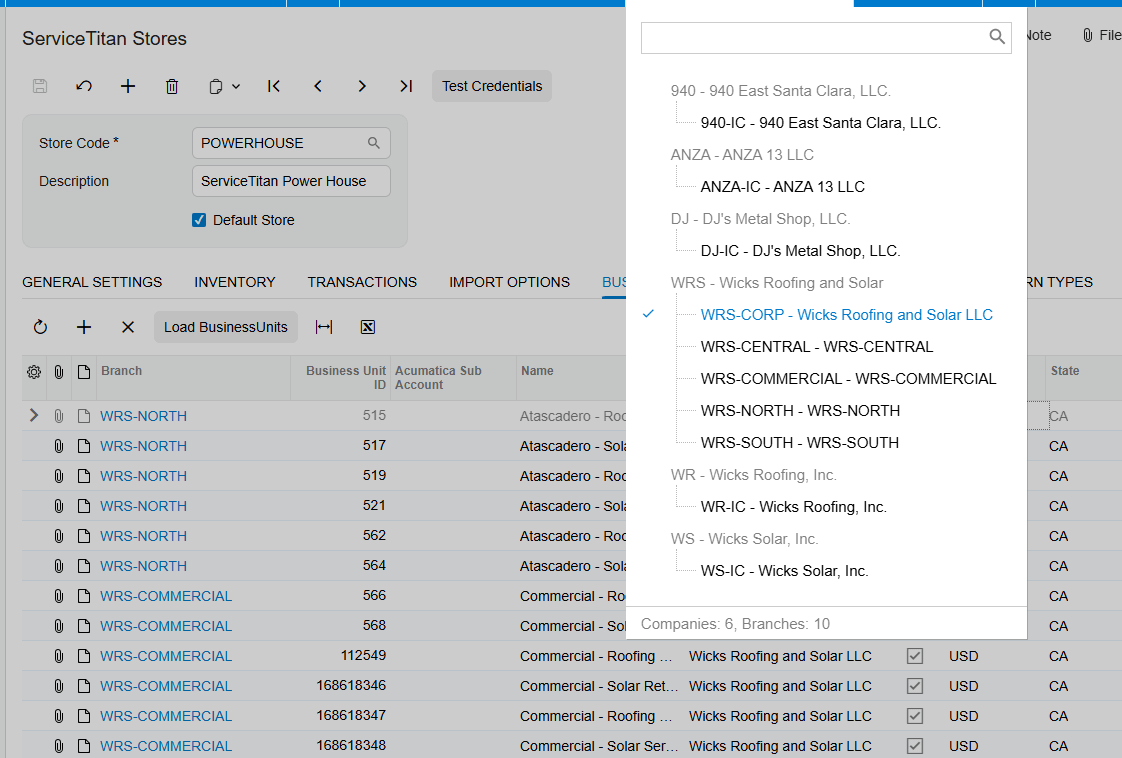
8 Inventory Transactions tab for receipts, transfers, adjustments, returns, and release-after-import choices
9 Import ServiceTitan Purchase Orders screen for the required related purchase order
10 Import ServiceTitan Receipts screen and the PO History tab of the Purchase Orders screen for an imported receipt
ServiceTitan Inventory Sync Frequently Asked Questions
Which ServiceTitan items become stock items in Acumatica?
The source states that Materials and Equipment create stock items, while Service creates non-stock items.
Can ServiceTitan items be manually mapped to Acumatica items?
Yes. The source says ServiceTitan items can be manually mapped with Acumatica items instead of being created through the generation option.
How are ServiceTitan warehouses mapped in Acumatica?
Load Warehouses retrieves ServiceTitan Warehouse and Truck ID values. Those values can be manually mapped with Acumatica Warehouse values.
Can receipts, transfers, adjustments, and returns be released after import?
The source lists a release-after-import checkbox for each of those transaction types. When selected, it allows the document to be imported and released in Acumatica.
Why cannot a ServiceTitan PO receipt be imported?
The related ServiceTitan purchase order must already be imported. The source gives the error text POOrder document for Receipt 433272225 has not been created yet for an attempted receipt import without that purchase order.
Does the connector define how inventory quantities are calculated?
No. The source identifies item classes and UOM as item-generation settings, but it does not define the movement quantity calculation or stock-availability calculation.
Does the source describe inventory allocation or reconciliation?
No. Allocation and a formal reconciliation process are not described in the supplied documentation.
Work With the Biz-Tech Services ServiceTitan Connector
The documented ServiceTitan inventory workflow centers on store setup, item generation or manual item mapping, warehouse and truck mapping, transaction configuration, and the purchase-order dependency for receipts. It does not document every inventory-control detail, especially allocation, quantity calculation, and reconciliation. For help configuring the Biz-Tech Services ServiceTitan Acumatica Connector around your Acumatica item and warehouse design, visit https://biz-techservices.com to discuss the integration with Biz-Tech Services.
How Salesforce Orders Affect Inventory Allocation in Acumatica
Salesforce orders affect inventory allocation in Acumatica only through the sales order they create during import. The Salesforce integration documentation identifies the default warehouse, order type, item matching, and order status inquiry, but it does not document Acumatica allocation rules, available quantity calculations, lot or serial handling, or warehouse transfer behavior.
That distinction matters when a sales team expects a Salesforce order to reserve stock. The import can place the order in an Acumatica document type and default warehouse, while the inventory consequences depend on the Acumatica sales order configuration outside the supplied Salesforce documentation. This article explains the documented handoff and the checks a team should make before treating imported demand as allocated inventory.
What the Salesforce Order Import Documents
The Biz-Tech Services Salesforce Acumatica Connector provides Salesforce Store settings for order import. In Order Settings, the documented Default Import Options include Order Type and Warehouse ID. The Order Type indicates the document type where the order is imported and placed in Acumatica. Warehouse ID defines the default warehouse for the order.
The documentation also says that Get Orders retrieves Salesforce orders related to the setup date in Order Settings. Import brings selected displayed orders into Acumatica, while Import All imports all displayed orders. The Salesforce Orders Inquiry then shows the initial Salesforce order details together with the Acumatica SO number and SO status.
Salesforce Inventory Handling at a Glance
Use the following sequence to understand what the integration documents and where Acumatica inventory processing begins.
1 Configure the Salesforce Store with an Order Type and default Warehouse ID
2 Set whether customers and items can be created during order import
3 Retrieve Salesforce orders with Get Orders based on the last imported order date
4 Import a selected order or all displayed orders into the configured Acumatica document type
5 Match an order item by Salesforce Product SKU to an Acumatica Inventory CD, or create the item if Import Item is enabled
6 Review the resulting SO number and SO status in Salesforce Orders Inquiry
7 Apply your Acumatica sales order and inventory policies to determine whether the imported demand is allocated, available, shipped, or otherwise processed
The Biz-Tech Services Acumatica Salesforce Connector supports the integration setup and import path above. The supplied manual does not say that Salesforce itself calculates, commits, or reserves Acumatica quantities.
Quantity Basis Starts With the Imported Sales Order
The source documentation explains how an item is found during an order import: the integration searches the Acumatica Inventory CD using the Salesforce Product SKU. If a matching inventory item is found, it retrieves that item. If no item is found and Import Item is not enabled, the documented error is “The item {0} does not exist in the system”.
This identifies the item matching basis, but not a quantity availability basis. The manual does not state which quantity fields are evaluated before import, whether Salesforce on-hand figures are sent to Acumatica, or whether a Salesforce quantity is checked against available inventory. A team should therefore avoid representing an imported order as inventory-confirmed until its Acumatica order and inventory settings have been reviewed.
If Import Item is selected, new items can be created in Acumatica based on configured settings. If it is not selected, the program prohibits import and creation of items unless the corresponding items already exist in Acumatica. Add Items in Inventory Sync enables synchronization with Salesforce items, but the source does not define inventory quantity synchronization or stock availability synchronization.
How the Default Warehouse Shapes the Imported Order
The Biz-Tech Services Salesforce Acumatica Integration documents Warehouse ID as the field used to define the default warehouse for an order. That is the clearest warehouse control described in the manual. It means the store setup supplies a warehouse value for imported orders, rather than the manual describing a warehouse selected from each Salesforce order.
The source does not describe multiple-warehouse selection, warehouse mapping tables, location-level assignment, branch-to-warehouse logic, or reallocation after import. It also provides no screen ID for the Salesforce Store, Import Salesforce Orders, or Salesforce Orders Inquiry screens. If a business has more than one fulfillment warehouse, it should validate the imported sales order in Acumatica and confirm that the configured default Warehouse ID is appropriate for the actual fulfillment process.
Allocation Is an Acumatica Policy Decision Not a Salesforce Import Setting
The Biz-Tech Services Acumatica Salesforce Integration does not document a setting called allocation, an allocation status, or a rule that reserves stock when an order is imported. It documents the order type and default warehouse that shape where the order is placed. Whether the resulting Acumatica sales order allocates inventory depends on Acumatica configuration and operational steps that are outside this Salesforce integration guide.
For that reason, use the imported SO number and SO status as the integration evidence, not as proof of allocated stock. The manual says these values are visible in Salesforce Orders Inquiry. It does not define which SO statuses indicate allocation, shipment, backorder, fulfillment, or release. Teams should establish their own Acumatica status and allocation checks with the inventory administrator.
Stock Visibility and Item Synchronization Limits
The Biz-Tech Services Salesforce Acumatica Integrator supports item-related operations through the Item Settings and Item Details areas. Load Acumatica Items retrieves Acumatica items and displays them in a table. Sync to Salesforce creates or updates Acumatica items in Salesforce. Sync All from Salesforce retrieves and creates Salesforce items in Acumatica.
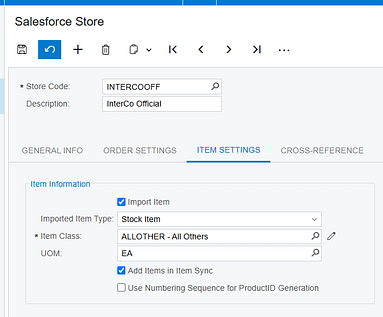
Item Details includes the synced item Salesforce ID, product code, product name, price, and weight. Those fields support product record visibility. The documentation does not list on-hand quantity, available quantity, allocated quantity, safety stock, warehouse quantity, or a stock synchronization schedule. It therefore cannot support a claim that Salesforce inventory visibility is real-time, warehouse-specific, or based on allocated inventory.
Price books have separate behavior. The Price Book Details tab can load Salesforce price books based on Last Imported Price Book Date, and Export Salesforce Price Books sends only items that have been updated or changed. Price book activity should not be confused with stock synchronization because the source describes list prices and products, not inventory balances.
Reconciliation Checks After an Import
The Biz-Tech Services Acumatica Salesforce Integrator gives operations staff a documented path for reconciling the integration result. Start in Import Salesforce Orders, where Get Orders, Import, and Import All control the import process. Then select the Order ID hyperlink to open Salesforce Orders Inquiry and compare the Salesforce order details with the Acumatica SO number and SO status shown there.
1 Confirm the Salesforce Store Order Type and default Warehouse ID before retrieving orders
2 Confirm that the imported order received the intended Acumatica SO number and SO status
3 Review whether the Salesforce Product SKU matched an Acumatica Inventory CD or required item creation
4 Review customer behavior: Import Customer creates a new customer with email, contact information, and the selected customer class, while an unselected setting uses the default customer
5 Review shipping and billing addresses because the manual documents override checkboxes, but its opposite-case wording is contradictory
6 Use your Acumatica inventory process to verify availability and allocation because the Salesforce manual does not provide those checks
Order Updates Do Not Establish Inventory Reconciliation
Sync Orders To Salesforce can process updated imported order data from Acumatica back to Salesforce. At the line level, the guide says it can update line description, discount code, discounted amount, and added or deleted lines. At the document level, it can update addresses, country, order date, description, total, freight, discount, and tax amounts.
The Biz-Tech Services Salesforce Acumatica Integrator can therefore support order-detail updates back to Salesforce. However, the guide does not say that inventory allocations, warehouse changes, quantity availability, shipments, or fulfillment statuses are sent back. It also says only modified orders with On Hold or Open status are displayed on this screen. Use that documented filter when investigating a missing order, but do not infer a broader inventory synchronization rule.
How Salesforce Orders Affect Inventory Allocation in Acumatica Frequently Asked Questions
Does importing a Salesforce order allocate inventory in Acumatica?
The supplied Salesforce integration documentation does not state that import allocates inventory. It documents the order type, default Warehouse ID, item matching, and the resulting SO number and SO status. Confirm allocation through your Acumatica sales order and inventory configuration.
Which warehouse is used for an imported Salesforce order?
The Salesforce Store Order Settings documentation says Warehouse ID defines the default warehouse for the order. The manual does not describe warehouse mapping by Salesforce order, multiple warehouses, or location-level handling.
How does the integration identify the item on a Salesforce order?
It searches the Acumatica Inventory CD using the Salesforce Product SKU. If it cannot find the item and item import is not enabled, the source documents the error The item {0} does not exist in the system.
Can Salesforce show Acumatica available quantity or allocated quantity?
The source does not document an available quantity, on-hand quantity, allocated quantity, or inventory balance synchronization feature. It documents item IDs, product code, product name, price, and weight.
Where can I verify that an order was imported?
Use the Order ID hyperlink on Import Salesforce Orders to open Salesforce Orders Inquiry. The guide says that inquiry shows initial Salesforce order details along with the Acumatica SO number and SO status.
Why did an item fail to import from Salesforce?
When Import Item is not selected, the item must already exist in Acumatica. The documented matching uses Salesforce Product SKU against the Inventory CD, and the guide gives the missing-item error text.
Can a changed Acumatica order be sent back to Salesforce?
Yes, the guide documents Sync Orders To Salesforce for selected imported order changes. It limits the displayed modified orders to On Hold or Open status and does not document inventory allocation or shipment updates.
Work With the Biz-Tech Services Salesforce Acumatica Connector
A reliable process separates what the Salesforce import is documented to do from what Acumatica inventory policy must decide. Configure the default warehouse and order type carefully, validate the imported SO number and SO status, and use Acumatica controls to confirm availability and allocation before promising fulfillment.
For help aligning Salesforce order imports with your Acumatica warehouse and inventory process, work with the Biz-Tech Services Salesforce Acumatica Connector team. Visit https://biz-techservices.com to learn more about Biz-Tech Services integrations.

